

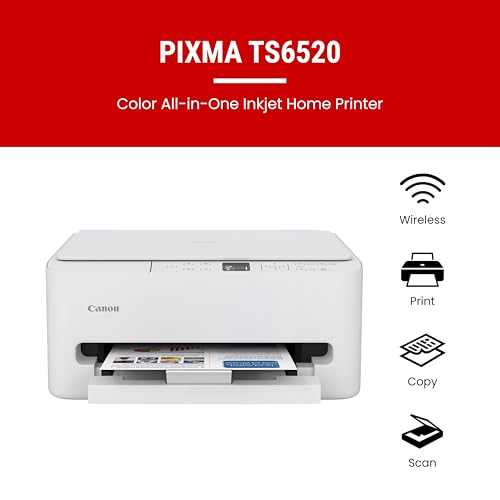


- Functionality: Print, scan, copy
- Resolution: 1200 x 1200 dpi
- Color Print Speed: 9 ppm
- Monochrome Print Speed: 14 ppm
- Two-Sided Printing: Yes
- Max Paper Size: 8.5" x 14"




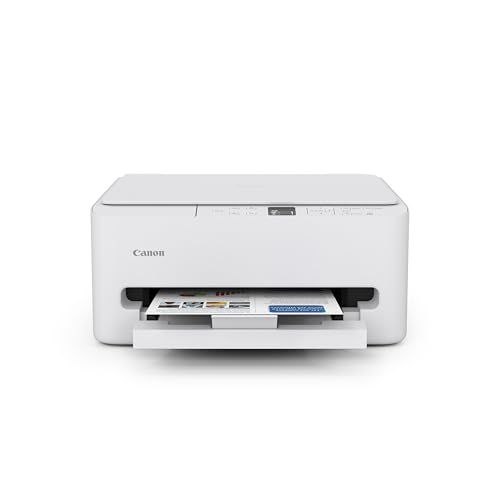
Canon PIXMA TS6520 Printer
Overview and Everyday Experience

The Canon PIXMA TS6520 Printer is designed for households and small home offices that want an attractive, compact all-in-one for printing, scanning, and copying. It aims to balance photo-friendly output with everyday document convenience, making it a common fit for students, remote workers, and families who print a mix of school assignments, shipping labels, recipes, and occasional photos. In day-to-day use, its appeal is largely about simplicity: it’s easy to tuck onto a desk or shelf, it doesn’t feel intimidating to operate, and it handles typical home workloads without demanding much attention.
For general document printing, the TS6520 produces crisp text and solid-looking graphics for flyers, worksheets, and color handouts. If your printing includes color charts, class projects, or light marketing materials, it tends to deliver pleasing color that looks “finished” on the page. Photo prints are where many PIXMA models try to shine, and the TS6520 can produce attractive photos on compatible photo paper with good saturation and smooth gradients, especially for casual albums, crafts, and gifts. As with most consumer inkjets, output quality and drying behavior depend a lot on paper choice, print settings, and how demanding you are about color accuracy.
Scanning and copying are practical for home needs like archiving receipts, digitizing signed forms, or copying ID cards. The experience is straightforward rather than enterprise-grade: it’s there when you need it, and it covers the common tasks without requiring a steep learning curve. Like many printers in this category, the best experience comes from setting it up once, keeping it in a stable spot with decent Wi‑Fi signal, and using the manufacturer’s app or drivers so the printer and your devices stay in sync.
Purchase Factors to Consider and What Matters Most
Before buying the Canon PIXMA TS6520, most people should think less about the sticker price of the printer and more about the long-term ownership experience. The most important factor for many buyers is ongoing ink cost, because ink is typically the largest expense over time. If you print frequently or print many full-color pages, your cost per page can add up quickly, and a printer that seems inexpensive up front can become costly. Consider how much you print each month, whether you mostly print black text or full-color pages, and whether you often print photos. If your household prints a lot, you may want to compare cartridge pricing and page yields carefully and decide whether a cartridge-based inkjet aligns with your budget.
The next key factor is print reliability and ease of use. Home printers are often judged by how often they “just work.” The TS6520’s value is strongest when it’s used regularly and kept connected without constant troubleshooting. If you have a busy household with multiple devices, pay attention to how well the printer fits your environment: stable Wi‑Fi coverage, compatible operating systems, and whether you prefer printing from phones and tablets as much as from a laptop. Wireless printing convenience can be a deciding factor, but it also depends on your network stability. For some buyers, USB printing is still important as a fallback, while others are comfortable relying entirely on wireless connections.
Paper handling is another purchase factor that can matter more than expected. Think about what you print most: standard letter documents, envelopes, cardstock for crafts, or glossy photo paper. A printer can be excellent for plain paper but fussy with thicker media, or it may do photos beautifully but feel slow and expensive for bulk documents. If you routinely print double-sided pages for school or work, automatic duplex printing can be a major quality-of-life feature. If you only occasionally need two-sided printing, manual duplex may be acceptable, but it’s less convenient and more error-prone when you’re in a hurry.
Speed is worth considering, but it’s usually less important than print quality and cost for a home inkjet like this. Many consumer models are fast enough for occasional tasks but can feel slow if you’re printing long documents or multiple photo prints back-to-back. If you regularly print large packets, you might value speed and a higher-duty design more than photo output. Conversely, if your typical job is a five-page homework assignment or a few shipping labels, speed becomes secondary.
Finally, consider your tolerance for maintenance. Inkjets can require occasional nozzle cleaning, and they tend to be happiest when used at least periodically so ink doesn’t dry in the print head. If you print very rarely, you might experience more cleaning cycles over time. If you print every week, you’re more likely to enjoy consistent results. For buyers who know they print infrequently and mainly in black, a monochrome laser printer can sometimes be a better match, but it won’t handle photos the way the TS6520 can.
In short, the most important considerations are total ink cost for your printing habits, connection and usability in your home setup, and whether the paper handling and duplex features match what you actually print. Everything else tends to be secondary.
Common Questions
Does the Canon PIXMA TS6520 work well for photos, or is it mainly for documents? It’s a good all-around home printer that can produce very nice photo prints on the right photo paper while still handling everyday documents cleanly. If your top priority is gallery-grade photo color accuracy, you may want a dedicated photo printer, but for family photos, crafts, and casual displays, it can deliver pleasing results.
Is this printer a good choice for heavy school or home-office printing? It can handle typical home and student workloads, but if you print large volumes every week, ink cost and speed may become frustrating. For high-volume text printing, many people end up happier with a laser printer for documents and keep an inkjet like this for color and photos.
Will it print from a phone or tablet easily? In most modern home setups, yes, assuming your Wi‑Fi network is stable and you use the recommended app or built-in mobile printing options. The smoothness of the experience depends as much on your network and device settings as the printer itself, so it’s worth confirming you have good signal where the printer will sit.
What should I do if I don’t print often? If you print only occasionally, run a small test page from time to time to keep ink flowing and reduce the chance of clogged nozzles. If you know you might go months without printing, consider whether a different printer type better matches your habits, because cartridge-based inkjets are typically happiest with regular use.
Overall, the Canon PIXMA TS6520 Printer is a strong fit for homes that want a compact, attractive all-in-one capable of sharp documents and satisfying photo prints without stepping into professional territory. It’s at its best when your monthly printing is moderate, your Wi‑Fi is reliable, and you’re comfortable factoring ink costs into the real price of ownership.