

- Task Management: Create, assign, and track tasks directly on collaborative boards to keep projects organized.
- Scheduling: Plan timelines and coordinate team schedules with shared, visual calendars.
- Project Templates: Jump-start projects with customizable templates for common workflows and frameworks.
- Focus Time: Block out distraction-free periods to concentrate on deep work within Miro.
- Progress Tracking: Monitor task status and project milestones with visual indicators and dashboards.
Best Apps for Scheduling Your Day
.jpeg)
Best Productivity Apps for a Distraction-Free Workspace

Creative Ways to Use Project Management Tools


Helping millions of users make smarter purchases online.



Miro Review
Overview and First Impressions
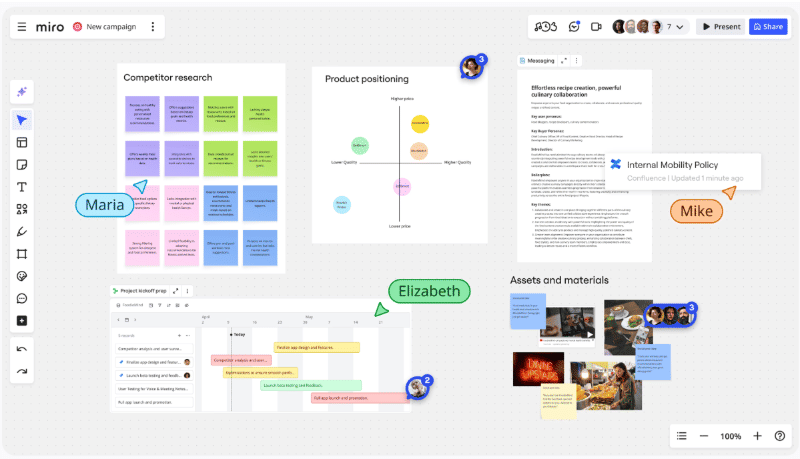
Miro is a cloud-based visual collaboration platform built around an infinite online whiteboard. Teams use it to brainstorm, map processes, plan projects, run workshops, and document complex ideas in a shared space, whether they are in the same room or spread across time zones. At its best, Miro feels like a digital wall covered with sticky notes, diagrams, and screenshots, but with all the advantages of search, templates, and integrations with your other tools.
The core experience centers on the canvas. You can zoom from a high-level project map down to the details of a single user story or wireframe. Multiple people can edit simultaneously, with cursors and avatars showing who is doing what in real time. This makes Miro especially strong for workshops, retrospectives, and ideation sessions, where energy and momentum are hard to maintain in a traditional slide deck.
Miro’s template library is a major strength. There are ready-made boards for user journey mapping, kanban, OKRs, retrospectives, empathy mapping, product discovery, and hundreds of other use cases, including many created by the community. This dramatically shortens setup time. Instead of building a framework from scratch, you drop in a template, tweak it, and spend most of your time collaborating rather than arranging shapes.
Integrations are another highlight. Miro connects with tools such as Jira, Confluence, Azure DevOps, Asana, Slack, Microsoft Teams, Zoom, Google Drive, and others. In practice, that means you can link tickets to sticky notes, embed boards into wikis, or run a workshop directly inside Teams or Zoom. For organizations that already live in these ecosystems, Miro tends to slide in naturally rather than feeling like a standalone island.
Performance and usability are generally strong. The interface is modern and responsive, with a shallow learning curve for basic actions such as adding sticky notes, drawing arrows, or using frames to organize content. More advanced facilitation features like voting, timers, Talktrack (recorded walkthroughs), and presentation modes are available on paid plans and are geared toward people who run workshops or lead cross-functional sessions.
There are downsides. Large, heavily loaded boards can feel cluttered, and if your team is not disciplined about structure, the canvas can turn chaotic over time. Some advanced features are locked behind higher tiers, and Miro’s power can be overkill for teams that only need simple brainstorming now and then. However, for teams that rely on visual collaboration and remote or hybrid work, Miro is one of the most polished and feature-rich tools in its category.
Key Factors to Consider Before You Buy
Before upgrading from the free plan or rolling Miro out across a team, there are several practical factors worth weighing. The first is scope and frequency of use. The free plan allows up to three editable boards with core collaboration features, which might be enough for individuals, small projects, or occasional workshops. If you expect to run many simultaneous projects or want dedicated boards for each team and initiative, you will very quickly hit that limit and need at least the Starter plan with unlimited boards.
Team size and roles are equally important. Starter and Business tiers are priced per member and add features like private boards, advanced templates, better sharing controls, and expanded collaboration capabilities with guests.:contentReference[oaicite:6]{index=6} If you have a small, stable team that collaborates regularly, per-seat licensing makes sense. In contrast, if you plan to involve many occasional collaborators, you will want to pay close attention to how guests and visitors are handled on each plan, because this can significantly affect costs and governance.
Security, compliance, and administration should be a top priority for larger organizations. Enterprise plans layer in SAML-based single sign-on, SCIM user provisioning, advanced sharing policies, audit logs, domain control, and more granular admin controls designed for company-wide rollouts. If you handle sensitive data, need strict access controls, or operate in regulated industries, these capabilities may move Miro from “nice-to-have” to “non-negotiable.”
Integration depth is another key factor. It is not enough to know that Miro integrates with Jira or Teams; you need to assess how your team actually works. If your product managers live in Jira, designers in Figma, and the wider business in Confluence and Slack, Miro becomes a connective tissue where everyone can visualize work while still linking back to their source systems. On the other hand, if most of your collaboration happens in documents and spreadsheets, Miro’s value might be less central.
Ease of onboarding and facilitation skills can also make or break adoption. Miro is intuitive for simple tasks, but fully leveraging it for structured workshops, design sprints, or discovery initiatives requires someone to design clear boards, set rules, and guide participants. If your organization lacks facilitators or product owners who are comfortable with this sort of work, Miro’s more advanced features might sit idle.
Finally, there is the straightforward question of budget and return on investment. Paid plans start with relatively affordable per-member pricing for Starter and increase for Business and Enterprise tiers, where you gain features like unlimited guests with edit access, stronger diagramming libraries, and advanced security. The most important question is not whether Miro is “cheap” or “expensive” in absolute terms, but whether it replaces other tools, improves meeting quality, reduces context switching, and accelerates decision-making enough to justify the cost.
If you had to rank the most important considerations, three stand out. Clarity of use cases comes first: if you do a lot of visual, collaborative work, Miro will probably earn its keep. Security and governance come second for any organization beyond a small startup, because the difference between Business and Enterprise tiers can be significant. Pricing and licensing flexibility rank third, especially for companies with many occasional collaborators, where guest and visitor rules can greatly influence total spend.
Common Questions
Q: Is the free version of Miro enough for serious work?
A: The free plan can absolutely support serious work for individuals or very small teams, especially if you cycle through a few key boards and archive old ones. You still get real-time collaboration, core integrations, and access to many templates. However, the three-board limit and lack of advanced facilitation and security features become restrictive as soon as you start running multiple projects in parallel or involving more stakeholders. For ongoing team-wide use, a paid plan is usually necessary.
Q: Who is Miro best suited for?
A: Miro shines for product and engineering teams, UX and design groups, agile coaches, consultants, educators, and anyone who regularly runs collaborative sessions or needs to map complex systems visually. Distributed and hybrid teams benefit the most, since the platform gives them a shared visual space that replaces the physical whiteboard they no longer share in an office.
Q: How does Miro compare to simpler whiteboard tools?
A: Compared with basic whiteboards that offer drawing and sticky notes, Miro provides a much richer ecosystem: extensive templates, integrations, diagramming libraries, AI-assisted features, facilitation tools, and enterprise-grade admin options. The trade-off is that it can feel heavier than minimalist tools if your needs are basic. If you only need occasional sketching, something simpler might be enough, but if you want a central hub for visual collaboration, Miro is in a different league.
Q: Will non-technical stakeholders find Miro confusing?
A: Most non-technical users adapt quickly to Miro’s basics. Sticky notes, shapes, text, and simple arrows are easy to learn, and templates provide structure. The potential challenge is not the UI itself, but board complexity. When boards are well designed, with clear frames and instructions, non-technical stakeholders usually do fine. When boards grow organically without structure, anyone can feel overwhelmed. Investing a little time in board design and facilitation pays off significantly in adoption.
Conclusion
Miro is a powerful, mature visual collaboration platform that excels when teams use it as a shared workspace for ongoing projects, not just a one-off brainstorming tool. Its combination of an infinite canvas, rich templates, and deep integrations makes it a compelling choice for modern, distributed organizations. As long as you are mindful about governance, costs, and board structure, Miro can become a central hub for turning scattered ideas into shared, actionable plans.