

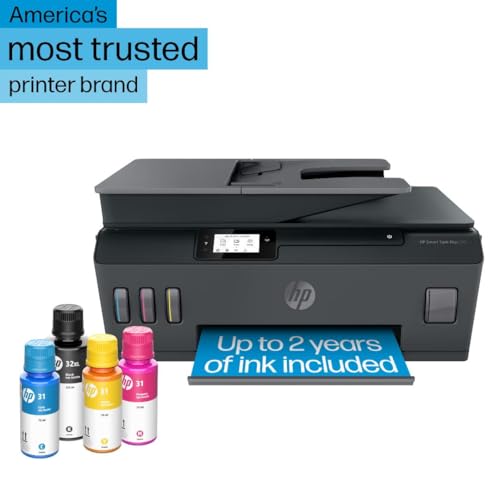


- Functionality: Print, scan, copy
- Resolution: 4800 x 1200 dpi
- Color Print Speed: 5 ppm
- Monochrome Print Speed: 11 ppm
- Two-Sided Printing: No





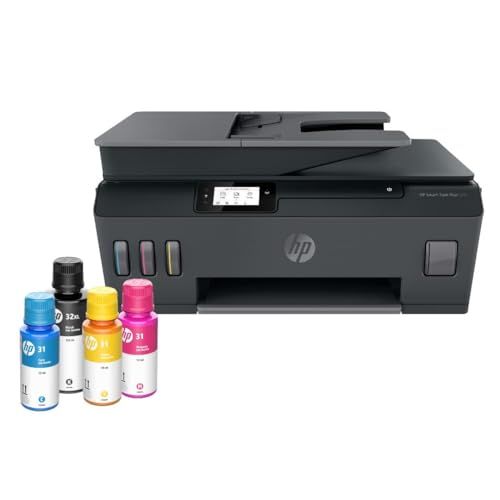
HP Smart Tank Plus 570 Printer
Overview and everyday performance

The HP Smart Tank Plus 570 is designed for people who print often and want to stop thinking about cartridges. Instead of swapping small ink cartridges every few weeks, you refill large, built-in tanks with bottled ink. In day-to-day use, that changes the feel of ownership: printing becomes less of a “meter running” experience and more of a dependable utility, especially if you regularly produce homework packets, forms, shipping labels, study materials, or color-heavy documents.
For typical home and home-office tasks, the Smart Tank Plus 570 is at its best with high-volume color documents. Text prints are clean and legible, and color graphics look bright and consistent for reports, presentations, school projects, and flyers. Where this model is more “practical” than “premium” is in photo printing. It can produce nice-looking color images on the right paper, but if your main goal is gallery-style photos with fine tonal gradients, a photo-focused printer may deliver smoother results. For most families and small offices, though, its output is more than sufficient, and the overall value is driven by ink economy rather than specialty photo features.
Setup is generally straightforward: fill the tanks, run the alignment routine, connect to Wi‑Fi, and you’re ready. The main thing to understand up front is that tank printers reward patience during initial setup and occasional maintenance cycles. Those steps are not difficult, but they’re part of the ownership experience, and they help keep prints consistent over time.
What to consider before buying (and what matters most)
The biggest factor to consider is your printing volume and the cost you want per page. If you print only a few pages a month, the upfront price of a tank printer can be harder to justify versus a cheaper cartridge model. If you print weekly or daily, or you have multiple people in a household printing consistently, the Smart Tank Plus 570’s refillable system becomes the central advantage. The most important decision is whether you want to pay less over time for ink in exchange for a higher initial purchase price. For high-volume users, that trade is usually worth it.
The next factor is what you print most. If you primarily print black-and-white text, you may still benefit from the low running costs, but you should also consider whether you need fast, duplex-heavy workflows. Many users expect automatic two-sided printing as a baseline office feature; if you print a lot of multi-page documents and want automatic duplexing, verify whether the exact configuration you’re buying supports it the way you expect. If it does not, manual duplexing can be a small nuisance that becomes a big one over months of use. For color documents and mixed printing, the 570 is a strong fit, because the low-cost color pages are a key part of the value proposition.
Connectivity and app experience also matter more than people expect. Wireless printing is essential for many homes now, and a printer that’s temperamental on Wi‑Fi can drain the joy out of the savings. The Smart Tank Plus 570 supports modern wireless workflows and typically plays nicely with phones, tablets, and laptops. Still, before you buy, think about where the printer will sit and how stable your Wi‑Fi is in that spot. Printers can be sensitive to weak signals. If your router is far away or you have dead zones, consider whether you can place the printer closer to the router or add a mesh node. The most important part here is reliability: a printer that prints cheaply but fails to connect consistently isn’t a bargain.
Paper handling and the physical footprint deserve a quick reality check. Tank printers often have a slightly different shape than cartridge models due to the integrated reservoirs. Measure your space, especially if you plan to place it on a narrow shelf. Also consider how often you switch paper types. If you regularly alternate between plain paper, cardstock, and photo paper, you’ll want paper feeding that feels predictable. The Smart Tank Plus 570 is generally comfortable for common paper types, but very thick or specialty media can be more finicky on any inkjet, so it helps to align expectations if crafting and heavy cardstock are a major use case.
Maintenance and long-term habits are another purchase consideration. Ink tanks reduce cartridge waste, but inkjet heads can still require cleaning cycles if the printer sits unused for long periods. If you print very infrequently, you may run into occasional nozzle checks or cleaning routines that use a little ink. If you print at least a few pages every week or two, the experience is typically smoother. The most important “maintenance” factor is simply consistency: occasional use keeps ink flowing and reduces the chance of clog-related frustrations.
Finally, consider total ecosystem fit. If you already use HP’s mobile printing features and like them, the experience tends to be cohesive. If you prefer a printer that works with minimal software involvement, make sure you’re comfortable with the setup flow and ongoing driver/app updates on your devices. None of this is unique to HP, but it is worth factoring in if you want a low-touch appliance rather than a gadget you troubleshoot.
Common Questions
Is the HP Smart Tank Plus 570 a good choice for students and families? Yes, especially if multiple people print frequently. The refillable tanks are well-suited to homework, worksheets, color projects, and general household printing where page counts add up quickly.
Will it save money compared to cartridge printers? For moderate to heavy printing, it typically does. The main savings come from the cost per page of bottled ink versus cartridges. If you print only occasionally, the savings may take longer to outweigh the higher upfront cost.
Is it good for photos? It can produce attractive photos on appropriate photo paper, but it’s primarily optimized for cost-effective document and color graphics printing. If photo quality is your top priority, a dedicated photo printer may be a better match.
How hard is it to refill the ink tanks? Refilling is usually straightforward and much less frequent than replacing cartridges. The key is to use the correct ink bottles and take your time to avoid spills, especially the first time.
What should I check before buying to avoid disappointment? Confirm the features you care about most, particularly how duplex printing works on the exact model variant you’re purchasing, and make sure you have a stable Wi‑Fi signal where you plan to place the printer.
As a practical, budget-smart printer for people who print often, the HP Smart Tank Plus 570 stands out for its low running costs, strong everyday color output, and the convenience of ink tanks over cartridges. It’s at its best in homes and small offices with consistent print volume, where long-term savings and fewer supply interruptions matter more than premium photo output or specialized office finishing features.