


- Speed: Up to 6.5 Gbps
- Coverage Area: Up to 2400 sq ft
- Bands: Dual (2.4GHz & 5GHz)
- Type: WiFi 7
- Ports: 2x 2.5G Ports + 3x Gigabit Ports





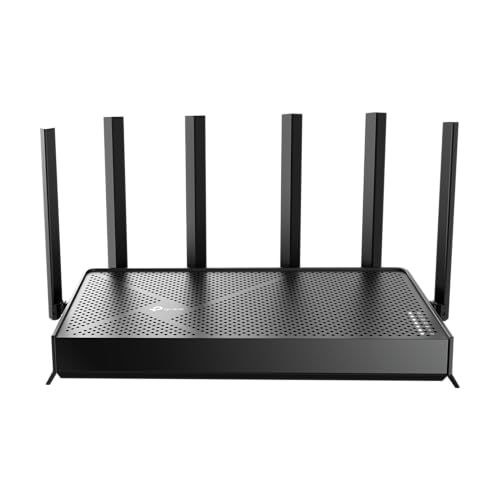
TP-Link Archer BE6500 Dual-Band Wi-Fi 7 Router
Review and Real-World Performance

The TP-Link Archer BE6500 is positioned as an approachable step into Wi‑Fi 7, aiming to deliver higher throughput, lower latency, and better efficiency than Wi‑Fi 6/6E gear without the premium pricing of flagship mesh kits. As a dual-band router, it focuses on 2.4 GHz and 5 GHz rather than adding a dedicated 6 GHz band. That design choice makes the Archer BE6500 especially relevant for households that want a meaningful upgrade in responsiveness and peak speeds on modern devices but don’t necessarily need the extra spectrum that 6 GHz provides.
In everyday use, the most noticeable improvements you can expect from Wi‑Fi 7 on this router come from better handling of congestion and bursts of traffic, not only raw speed tests. Features associated with Wi‑Fi 7, such as improved scheduling and more efficient use of airtime, tend to translate into smoother video calls, faster page loads on crowded networks, and less buffering when multiple devices compete for bandwidth. If you already have several Wi‑Fi 6 clients and you’re adding newer phones or laptops that support Wi‑Fi 7, the Archer BE6500 can help those newer devices stretch their legs while still serving older clients competently.
Because it’s dual-band, most performance tuning and practical results will center on the 5 GHz band. For many homes, 5 GHz provides the best balance of speed and range, but its effectiveness depends heavily on distance, wall materials, and interference from neighbors. The Archer BE6500 can feel very fast in the same room or one room away, particularly for large downloads, cloud backups, and game updates. As you move farther away, you should expect speeds to taper, as they do on any router, but you may still see improved stability under load compared with older routers.
Setup and management are typically a strong suit for TP-Link, and the Archer line is generally designed for consumers who want quick onboarding with the option to tweak more advanced settings later. If you prefer an app-driven experience for naming networks, setting passwords, adding guest Wi‑Fi, and keeping an eye on connected devices, this router should feel familiar. The more important question is not whether the router can be configured, but whether it stays configured: a good router should remain stable over weeks and months, handle occasional power outages gracefully, and recover from ISP hiccups without needing constant reboots. For many buyers, that “quiet reliability” is the difference between a satisfying upgrade and a frustrating one.
One practical note: Wi‑Fi 7 benefits are most apparent with Wi‑Fi 7 clients. If the majority of your devices are Wi‑Fi 5 or Wi‑Fi 6, you’ll still gain from a newer chipset, better radios, and improved software, but you shouldn’t expect every device to suddenly hit headline speeds. Consider the Archer BE6500 as an investment in the next few years of devices, while still delivering a meaningful uplift today if your current router is several generations old.
What to Consider Before Buying (and What Matters Most)
The first factor to consider is whether dual-band is the right fit. If you live in a dense apartment building where 5 GHz is crowded, or you have devices that would benefit from the cleaner 6 GHz spectrum, a tri-band router with 6 GHz support might be worth the extra cost. On the other hand, if your home environment is typical suburban or moderately congested, dual-band can be a smart value choice, and you can still achieve excellent real-world performance.
The most important consideration for most people is coverage relative to their home layout. Router placement, square footage, number of floors, and wall materials can matter more than any spec sheet. If your home has dead zones today, a single router upgrade may or may not fix them. The Archer BE6500 can be a strong central router, but if you need consistent connectivity in far bedrooms, basements, or detached offices, it’s worth thinking about whether you will pair it with an extender or migrate to a mesh system. Even the best router can’t bend physics, and the most expensive mistake is buying a high-performance unit that only performs in half your home.
The second most important factor is your internet plan and wired backhaul needs. If you subscribe to gigabit internet or faster, you’ll want to ensure your router’s WAN port and LAN ports align with your service and your wired devices. Many households now have a mix of bandwidth-hungry endpoints like gaming PCs, workstations, NAS boxes, and smart TVs that benefit from Ethernet even if Wi‑Fi is excellent. If you rely on wired connections for low latency gaming or for stable work-from-home video production, port selection and throughput matter as much as wireless speed.
Third, consider your device mix and upgrade horizon. If you already own Wi‑Fi 7-capable laptops or phones, the Archer BE6500 makes more immediate sense. If you do not, the router can still be a solid purchase if your current router is aging, but you should weigh the value of paying for next-gen capability you won’t use for another year or two. That said, routers tend to stick around longer than phones, and buying ahead of your client devices isn’t unreasonable if the price is right.
Security and software support should also be on your checklist. Automatic firmware updates, strong default security settings, guest networks, and options for parental controls can be crucial depending on your household. If you have kids, roommates, or frequent guests, the ability to isolate guest devices and manage basic access policies is often more valuable than chasing peak throughput. Likewise, if you run smart home devices, network segmentation can help reduce risk. In any router purchase, the long-term value comes from the vendor’s update cadence and how easy it is to keep the router secure without constant manual work.
Finally, think about latency and consistency, not just download speed. For gaming, video calls, and remote work, stable performance under load is the real goal. If your network often bogs down when someone starts a large download or a cloud backup, features that improve scheduling and traffic handling can be more important than theoretical maximum rates. In a busy household, the “feel” of the connection is what you’ll notice every day.
Common Questions
Does the Archer BE6500 require Wi‑Fi 7 devices to be worth buying? It helps, but it’s not required. You’ll see the biggest gains on Wi‑Fi 7 clients, yet older devices can still benefit from a newer router’s improved radios, processing power, and software stability. If your current router is several years old, the upgrade can still feel significant even before you replace your devices.
Is dual-band a drawback compared with tri-band routers? It depends on your environment. Tri-band models with a 6 GHz band can reduce congestion and improve peak performance for compatible devices, particularly in dense neighborhoods. Dual-band can be an excellent value when 6 GHz isn’t essential, when your clients are mostly 5 GHz, or when your layout and placement already allow strong 5 GHz coverage.
Will this router improve gaming and video calls? It can, especially if your current router struggles when multiple people are online. Better efficiency and traffic handling can reduce spikes and improve responsiveness. For the best gaming experience, Ethernet remains ideal, but a strong 5 GHz connection can be very good when wired isn’t practical.
Do I need a mesh system instead? If you have persistent dead zones or multiple floors with difficult construction materials, mesh can be the better solution. If your home is a moderate size and you can place the router centrally, a single high-quality router like the Archer BE6500 can be simpler, cheaper, and very effective. Many buyers start with a single router and only expand if coverage proves insufficient.
As a practical Wi‑Fi 7 upgrade in a dual-band design, the TP-Link Archer BE6500 makes the most sense for users who want better responsiveness, strong 5 GHz performance, and a router that can grow into newer client devices. The most important purchase considerations are coverage for your layout and whether dual-band fits your congestion level, followed closely by matching the wired port capabilities to your internet plan and home network. If those align, the Archer BE6500 can be a satisfying step forward that improves daily connectivity rather than just delivering a bigger number on a speed test.