


Best TP-Link Wi-Fi Routers Updated May 2026

Join the millions that have trusted BuyersGuide.org to help them make smarter buying decisions. Let our independent expert reviews and data-driven shopping recommendations help you find the one that's right for you.

Best TP-Link Wi-Fi Routers
2026 Buyer's GuideUpdated May 2026
Sort by:
1

10.0

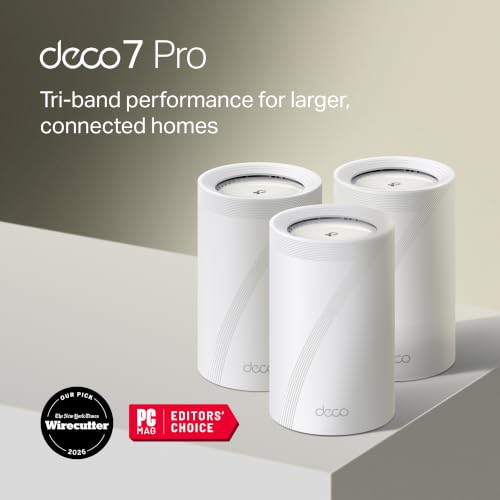
TP-Link Deco 7 Pro BE63 Tri-Band WiFi 7 BE10000 Whole Home Mesh System - 6-Stream 10 Gbps, 4x2.5G Ports Wired Backhaul, 4X Smar...
Speed: Up to 10Gbps
Coverage Area: Up 7600 sq ft
Bands: Tri (2.4GHz, 5GHz, & 6GHz)
Type: WiFi 7 mesh
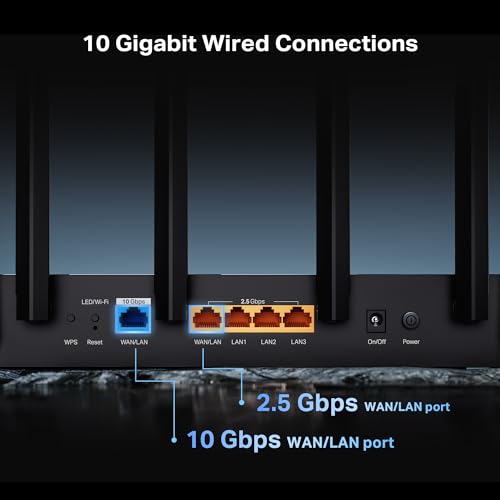
Ports: 4 × 2.5G Ethernet ports and 1 USB port per unit

10.0

1
TP-Link Deco 7 Pro BE63 Tri-Band WiFi 7 BE10000 Whole Home Mesh System - 6-Stream 10 Gbps, 4x2.5G Ports Wired Backhaul, 4X Smar...
Speed: Up to 10Gbps
Coverage Area: Up 7600 sq ft
Bands: Tri (2.4GHz, 5GHz, & 6GHz)
Type: WiFi 7 mesh
Ports: 4 × 2.5G Ethernet ports and 1 USB port per unit
2

9.7

TP-Link BE6500 Dual-Band WiFi 7 Router (BE400) – Dual 2.5Gbps Ports, USB 3.0, Covers up to 2,400 sq. ft., 90 Devices, Quad-Core...
Speed: Up to 6.5 Gbps
Coverage Area: Up to 2400 sq ft
Bands: Dual (2.4GHz & 5GHz)
Type: WiFi 7
Ports: 2x 2.5G Ports + 3x Gigabit Ports
Compare

9.7

2
TP-Link BE6500 Dual-Band WiFi 7 Router (BE400) – Dual 2.5Gbps Ports, USB 3.0, Covers up to 2,400 sq. ft., 90 Devices, Quad-Core...
Speed: Up to 6.5 Gbps
Coverage Area: Up to 2400 sq ft
Bands: Dual (2.4GHz & 5GHz)
Type: WiFi 7
Ports: 2x 2.5G Ports + 3x Gigabit Ports
3

9.5

TP-Link AXE5400 Tri-Band WiFi 6E Router (Archer AXE75), 2025 PCMag Editors' Choice, Gigabit Internet for Gaming & Streaming, Ne...
Speed: Up to 5.4Gbps
Coverage Area: Up to 5500 sq ft
Bands: Tri (6GHz, 5GHz, & 2.4GHz)
Type: WiFi 6E gaming
Ports: 4 gigabit ethernet, WAN, USB
Compare

9.5

3
TP-Link AXE5400 Tri-Band WiFi 6E Router (Archer AXE75), 2025 PCMag Editors' Choice, Gigabit Internet for Gaming & Streaming, Ne...
Speed: Up to 5.4Gbps
Coverage Area: Up to 5500 sq ft
Bands: Tri (6GHz, 5GHz, & 2.4GHz)
Type: WiFi 6E gaming
Ports: 4 gigabit ethernet, WAN, USB
4

9.3

TP-Link Tri-Band BE9700 WiFi 7 Router (Archer BE600) – 10G Port, 2.5G Port, 3× 2.5G LAN, 320MHz Channel, Covers up to 2,600 sq....
Speed: Up to 10Gbps
Coverage Area: Up to 2600 sq ft
Bands: Tri (2.4GHz, 5GHZ, & 6GHz)
Type: WiFi 7
Ports: 1x 10G + 4x 2.5G Ports, 2x WAN
Compare

9.3

4
TP-Link Tri-Band BE9700 WiFi 7 Router (Archer BE600) – 10G Port, 2.5G Port, 3× 2.5G LAN, 320MHz Channel, Covers up to 2,600 sq....
Speed: Up to 10Gbps
Coverage Area: Up to 2600 sq ft
Bands: Tri (2.4GHz, 5GHZ, & 6GHz)
Type: WiFi 7
Ports: 1x 10G + 4x 2.5G Ports, 2x WAN
5

9.2

TP-Link Dual-Band BE3600 Wi-Fi 7 Router Archer BE230 | 4-Stream | 2×2.5G + 3×1G Ports, USB 3.0, 2.0 GHz Quad Core, 4 Antennas |...
Speed: Up to 3.6Gbps
Coverage Area: Not indicated
Bands: Dual (2.4GHz & 5GHz)
Type: WiFi 7
Ports: 3 gigabit ethernet, 2 2.5 gigabit ethernet
Compare

9.2

5
TP-Link Dual-Band BE3600 Wi-Fi 7 Router Archer BE230 | 4-Stream | 2×2.5G + 3×1G Ports, USB 3.0, 2.0 GHz Quad Core, 4 Antennas |...
Speed: Up to 3.6Gbps
Coverage Area: Not indicated
Bands: Dual (2.4GHz & 5GHz)
Type: WiFi 7
Ports: 3 gigabit ethernet, 2 2.5 gigabit ethernet
6

9.1

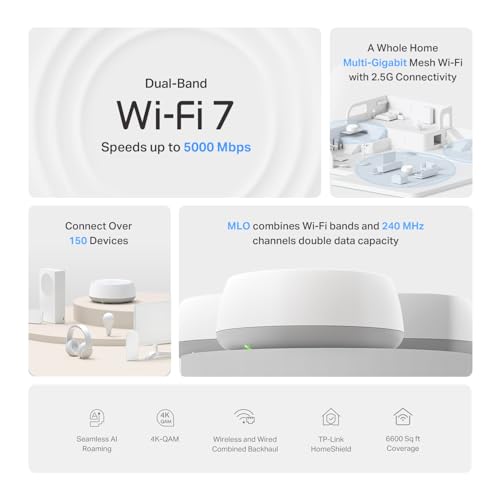
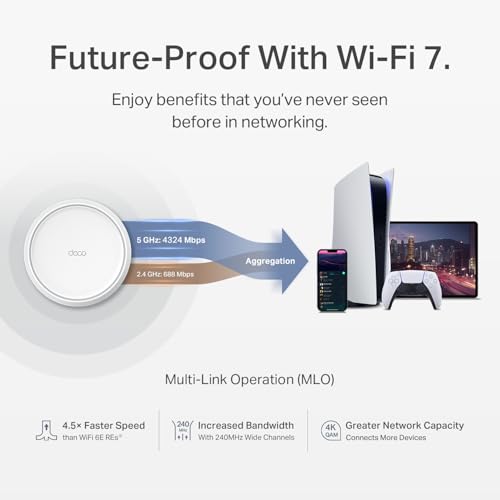
TP-Link Deco 7 BE25 Dual-Band BE5000 WiFi 7 Mesh Wi-Fi System | 4-Stream 5 Gbps, 240 Mhz | Covers up to 6,600 Sq.Ft | 2X 2.5G P...
Speed: Up to 5Gbps
Coverage Area: Up to 6600 sq ft
Bands: Dual (2.4GHz & 5GHz)
Type: WiFi 7 mesh
Ports: 2 gigabit ethernet per unit
Compare

9.1

6
TP-Link Deco 7 BE25 Dual-Band BE5000 WiFi 7 Mesh Wi-Fi System | 4-Stream 5 Gbps, 240 Mhz | Covers up to 6,600 Sq.Ft | 2X 2.5G P...
Speed: Up to 5Gbps
Coverage Area: Up to 6600 sq ft
Bands: Dual (2.4GHz & 5GHz)
Type: WiFi 7 mesh
Ports: 2 gigabit ethernet per unit
7

9.0

TP-Link Deco X55 AX3000 WiFi 6 Mesh System - Covers up to 6500 Sq.Ft, Replaces Wireless Router and Extender, 3 Gigabit Ports pe...
Speed: Up to 3Gbps
Coverage Area: Up to 6500 sq ft
Bands: Dual (2.4GHz & 5GHz)
Type: WiFi 6 mesh
Ports: 3 gigabit ethernet pet unit
Compare

9.0

7
TP-Link Deco X55 AX3000 WiFi 6 Mesh System - Covers up to 6500 Sq.Ft, Replaces Wireless Router and Extender, 3 Gigabit Ports pe...
Speed: Up to 3Gbps
Coverage Area: Up to 6500 sq ft
Bands: Dual (2.4GHz & 5GHz)
Type: WiFi 6 mesh
Ports: 3 gigabit ethernet pet unit
8

8.8

TP-Link Deco XE75 AXE5400 Tri-Band WiFi 6E Mesh System - Wi-Fi up to 7200 Sq.Ft, Engadget Rated Best Mesh for Most People, Repl...
Speed: Up to 5.4Gbps
Coverage Area: Up to 7200 sq ft
Bands: Tri (2.4GHz, 5GHz, & 6GHz)
Type: WiFi 6E mesh
Ports: 3 gigabit ethernet per unit
Compare

8.8

8
TP-Link Deco XE75 AXE5400 Tri-Band WiFi 6E Mesh System - Wi-Fi up to 7200 Sq.Ft, Engadget Rated Best Mesh for Most People, Repl...
Speed: Up to 5.4Gbps
Coverage Area: Up to 7200 sq ft
Bands: Tri (2.4GHz, 5GHz, & 6GHz)
Type: WiFi 6E mesh
Ports: 3 gigabit ethernet per unit
9

8.7

TP-Link Deco XE75 AXE5400 Tri-Band WiFi 6E Mesh System - Covers up to 5500 Sq.Ft, Replaces WiFi Router and Extender, AI-Driven ...
Speed: Up to 5.4Gbps
Coverage Area: Up to 5500 sq ft
Bands: Tri (2.4GHz, 5GHz, & 6GHz)
Type: WiFi 6E mesh
Ports: 3 gigabit ethernet per unit
Compare

8.7

9
TP-Link Deco XE75 AXE5400 Tri-Band WiFi 6E Mesh System - Covers up to 5500 Sq.Ft, Replaces WiFi Router and Extender, AI-Driven ...
Speed: Up to 5.4Gbps
Coverage Area: Up to 5500 sq ft
Bands: Tri (2.4GHz, 5GHz, & 6GHz)
Type: WiFi 6E mesh
Ports: 3 gigabit ethernet per unit
10

8.6

TP-Link Deco 7 Pro BE14000 Tri-Band Wi-Fi 7 Whole Home Mesh System | 8-Stream 14 Gbps | 10 Gbps WAN/LAN Port | Up to 8100 Sq.ft...
Speed: Up to 14Gbps
Coverage Area: Up to 8100 sq ft
Bands: Tri (2.4GHz, 5GHz, & 6GHz)
Type: WiFi 7 mesh
Ports: 1x 10G, 1x 2.5G, 1x Gigabit port per unit; USB 3.0
Compare

8.6

10
TP-Link Deco 7 Pro BE14000 Tri-Band Wi-Fi 7 Whole Home Mesh System | 8-Stream 14 Gbps | 10 Gbps WAN/LAN Port | Up to 8100 Sq.ft...
Speed: Up to 14Gbps
Coverage Area: Up to 8100 sq ft
Bands: Tri (2.4GHz, 5GHz, & 6GHz)
Type: WiFi 7 mesh
Ports: 1x 10G, 1x 2.5G, 1x Gigabit port per unit; USB 3.0

Our Top Choice

1

10.0

TP-Link Deco 7 Pro BE63 Tri-Band WiFi 7 BE10000 Whole Home Mesh System - 6-Stream 10 Gbps, 4x2.5G Ports Wired Backhaul, 4X Smar...
Speed: Up to 10Gbps
Coverage Area: Up 7600 sq ft
Bands: Tri (2.4GHz, 5GHz, & 6GHz)
Type: WiFi 7 mesh
Ports: 4 × 2.5G Ethernet ports and 1 USB port per unit

10.0

1
TP-Link Deco 7 Pro BE63 Tri-Band WiFi 7 BE10000 Whole Home Mesh System - 6-Stream 10 Gbps, 4x2.5G Ports Wired Backhaul, 4X Smar...
Speed: Up to 10Gbps
Coverage Area: Up 7600 sq ft
Bands: Tri (2.4GHz, 5GHz, & 6GHz)
Type: WiFi 7 mesh
Ports: 4 × 2.5G Ethernet ports and 1 USB port per unit

Compare Features

Coverage Area
Best Wi-Fi Router
1. TP-Link Whole Home Mesh System (Deco BE63)
TP-LINK Preview TP-LINK Preview
TP-LINK
at Amazon
2. TP-Link Archer BE6500 Dual-Band Wi-Fi 7 Router
TP-LINK Preview TP-LINK Preview
TP-LINK
at Amazon
3. TP-Link AXE5400 Tri-Band WiFi 6E Router
TP-LINK Preview TP-LINK Preview
TP-LINK
at Amazon
4. TP-Link Tri-Band BE9700 WiFi 7 Router
TP-LINK Preview TP-LINK Preview
TP-LINK
at Amazon
Best Value
5. TP-Link BE3600 Wi-Fi 7 Router
TP-LINK Preview TP-LINK Preview
TP-LINK
at Amazon
6. TP-Link Dual-Band BE5000 WiFi 7 Mesh System
TP-LINK Preview TP-LINK Preview
TP-LINK
at Amazon
Popular
7. TP-Link Deco AX3000 Mesh WiFi 6 System
TP-LINK Preview TP-LINK Preview
TP-LINK
at Amazon
8. TP-Link Deco AXE5400 WiFi 6E Mesh System
TP-LINK Preview TP-LINK Preview
TP-LINK
at Amazon
9. TP-Link Deco AXE5400 Mesh WiFi 6E System
TP-LINK Preview TP-LINK Preview
TP-LINK
at Amazon
Premium Pick
10. TP-Link Deco BE67 Mesh System
TP-LINK Preview TP-LINK Preview
TP-LINK
at Amazon
Deal
-28% -17% -12% -20% -28% -20% -21% -27% -18% -16%
Deal -28% -17% -12% -20% -28% -20% -21% -27% -18% -16%
Speed
Up to 10Gbps Up to 6.5 Gbps Up to 5.4Gbps Up to 10Gbps Up to 3.6Gbps Up to 5Gbps Up to 3Gbps Up to 5.4Gbps Up to 5.4Gbps Up to 14Gbps
Speed
Up to 10Gbps Up to 6.5 Gbps Up to 5.4Gbps Up to 10Gbps Up to 3.6Gbps Up to 5Gbps Up to 3Gbps Up to 5.4Gbps Up to 5.4Gbps Up to 14Gbps
Coverage Area
Up 7600 sq ft Up to 2400 sq ft Up to 5500 sq ft Up to 2600 sq ft Not indicated Up to 6600 sq ft Up to 6500 sq ft Up to 7200 sq ft Up to 5500 sq ft Up to 8100 sq ft
Coverage Area
Up 7600 sq ft Up to 2400 sq ft Up to 5500 sq ft Up to 2600 sq ft Not indicated Up to 6600 sq ft Up to 6500 sq ft Up to 7200 sq ft Up to 5500 sq ft Up to 8100 sq ft
Bands
Tri (2.4GHz, 5GHz, & 6GHz) Dual (2.4GHz & 5GHz) Tri (6GHz, 5GHz, & 2.4GHz) Tri (2.4GHz, 5GHZ, & 6GHz) Dual (2.4GHz & 5GHz) Dual (2.4GHz & 5GHz) Dual (2.4GHz & 5GHz) Tri (2.4GHz, 5GHz, & 6GHz) Tri (2.4GHz, 5GHz, & 6GHz) Tri (2.4GHz, 5GHz, & 6GHz)
Bands
Tri (2.4GHz, 5GHz, & 6GHz) Dual (2.4GHz & 5GHz) Tri (6GHz, 5GHz, & 2.4GHz) Tri (2.4GHz, 5GHZ, & 6GHz) Dual (2.4GHz & 5GHz) Dual (2.4GHz & 5GHz) Dual (2.4GHz & 5GHz) Tri (2.4GHz, 5GHz, & 6GHz) Tri (2.4GHz, 5GHz, & 6GHz) Tri (2.4GHz, 5GHz, & 6GHz)
Type
WiFi 7 mesh WiFi 7 WiFi 6E gaming WiFi 7 WiFi 7 WiFi 7 mesh WiFi 6 mesh WiFi 6E mesh WiFi 6E mesh WiFi 7 mesh
Type
WiFi 7 mesh WiFi 7 WiFi 6E gaming WiFi 7 WiFi 7 WiFi 7 mesh WiFi 6 mesh WiFi 6E mesh WiFi 6E mesh WiFi 7 mesh
Ports
4 × 2.5G Ethernet ports and 1 USB port per unit 2x 2.5G Ports + 3x Gigabit Ports 4 gigabit ethernet, WAN, USB 1x 10G + 4x 2.5G Ports, 2x WAN 3 gigabit ethernet, 2 2.5 gigabit ethernet 2 gigabit ethernet per unit 3 gigabit ethernet pet unit 3 gigabit ethernet per unit 3 gigabit ethernet per unit 1x 10G, 1x 2.5G, 1x Gigabit port per unit; USB 3.0
Ports
4 × 2.5G Ethernet ports and 1 USB port per unit 2x 2.5G Ports + 3x Gigabit Ports 4 gigabit ethernet, WAN, USB 1x 10G + 4x 2.5G Ports, 2x WAN 3 gigabit ethernet, 2 2.5 gigabit ethernet 2 gigabit ethernet per unit 3 gigabit ethernet pet unit 3 gigabit ethernet per unit 3 gigabit ethernet per unit 1x 10G, 1x 2.5G, 1x Gigabit port per unit; USB 3.0

Why These Features Matter:

A Wi‑Fi router is one of those household objects you only notice when it’s ruining your life. When it’s good, it disappears into the background like a competent doorman. When it’s bad, your movie buffers at the exact moment everyone finally shut up, your Zoom turns you into a pixelated ghost, and the “smart” doorbell is suddenly very dumb.

The tricky part: most routers are described like you’re building a data center, not trying to stream in a prewar apartment with radiators that seem to actively resent Bluetooth. So here’s what actually matters in a real home — the stuff you feel day to day — and how to choose a router that won’t become another small source of domestic resentment.

Coverage That Matches the Shape of Your Home (Not the Square Footage on the Box)

Homes are never the neat, open rectangles router packaging seems to imagine. They’re chopped up: hallways, old plaster walls, a kitchen that’s basically a Faraday cage, and that one bedroom where the internet goes to die.

  • What you’ll notice: fewer “dead spots,” less pacing around holding your phone like a divining rod.
  • What helps: routers with stronger range and, for bigger or weirder layouts, a mesh setup (multiple units placed around your home) rather than one heroic router trying to do it all.
  • Real-life tell: if your best signal is in the room where the modem happens to be (often the least convenient room), you’ll benefit from either better placement options or mesh.

Mesh vs. Single Router: The “Do I Want Another Little White Object?” Question

Mesh systems are fantastic for coverage and stability, but they come with a lifestyle implication: you are inviting additional small boxes into your home. They need power. They occupy outlets. They sometimes glow faintly at night like a tiny robot aquarium.

  • Mesh is for: long apartments, multi-floor houses, homes with thick walls, and families where three people are always on video calls while someone else is “just downloading a quick update.”
  • Single router is for: studios, smaller apartments, or anyone who refuses to add one more object to their surfaces on principle.
  • Things to know: a good mesh setup is less about raw speed and more about consistent speed everywhere — the difference between “fast in the living room” and “fine in the bedroom too.”

Stability: The Boring Feature That Saves Your Evenings

Speed gets all the attention, but stability is what keeps you from angrily toggling Wi‑Fi off and on like it’s a ritual sacrifice. A stable router handles lots of devices without turning your home network into a petty bureaucracy.

  • What it feels like: fewer random dropouts, fewer “why is this taking forever” moments, less internet drama at 9 p.m.
  • Look for: systems known for handling many connected devices well (phones, laptops, TVs, smart speakers, thermostats, doorbells, that air purifier you swear you didn’t buy).
  • Quiet win: good “device management” so one person’s giant upload doesn’t ruin everyone else’s night.

Placement and Design: Routers Are Now Part of Your Decor (Sorry)

You can pretend you’ll hide it in a cabinet, but Wi‑Fi routers hate cabinets the way houseplants hate dark corners. For most people, the router ends up semi-visible: on a shelf, on a credenza, perched near the modem like it’s in time-out.

  • Good design is practical: subtle indicator lights, a shape that doesn’t topple when you brush past it, and a footprint that doesn’t eat the whole shelf.
  • Heat matters: routers can run warm; if it’s hot to the touch, it’s not “efficient,” it’s “trapped.” Give it air.
  • Small apartment reality: if the only good spot is near your bed, you’ll appreciate a router that doesn’t shine like a mini lighthouse at 2 a.m.

Setup: You Want “Ten Minutes, No Tears”

Some routers are genuinely easy to set up. Others act like you’re applying for citizenship. You want the kind with an app that doesn’t make you feel dumb — and doesn’t insist on 14 permissions to do basic things.

  • Look for: clear setup instructions, good in-app guidance, and automatic updates that don’t require you to remember a password from 2017.
  • Nice to have: the ability to rename networks and set guest Wi‑Fi without digging through labyrinthine menus.
  • Honest caveat: even “easy” routers can get weird if your internet provider’s modem is moody. Factor in one troubleshooting session as the cost of admission.

Ports and Wired Options: The Stuff You Forget Until You Need It

Even in 2026, some things behave better with a wire. A wired connection can make a work desktop more stable, help a gaming console stop sulking, or keep a TV from buffering during a party (which is the specific kind of humiliation no one deserves).

  • If you have a home office: you may want enough Ethernet ports for a computer, a dock, or a switch.
  • If you have a media setup: wiring your streaming box/TV can reduce “why is this suddenly grainy” moments.
  • Small annoyance: some routers don’t include many ports, which means you’ll end up buying a small extra box anyway. Plan ahead if you hate accessory creep.

Security and Parental Controls: Useful, But Don’t Let It Get Weird

Security features are essential — but a lot of routers sell “peace of mind” in a way that starts to feel like a dystopian daycare. The best implementations are quietly effective: they block obvious threats, update automatically, and let you create a guest network so visitors aren’t accidentally on the same network as your printer that’s been “offline” since 2022.

  • Actually useful: automatic firmware updates, guest networks, and basic threat blocking.
  • Parental controls that make sense: pause internet for a kid’s device at dinner, schedule bedtime Wi‑Fi, filter obvious stuff.
  • Things to know: some advanced security features come with subscriptions. Decide now if you’re okay paying yearly to keep features you assumed were included.

Noise, Lights, and Other Tiny Annoyances That Become Big Annoyances

Routers don’t usually “make noise,” but a few do have fans or coil whine — rare, but maddening if the unit sits in a quiet bedroom. And indicator lights: why are they always so bright? Why are they always blue?

  • Look for: the option to dim/disable LEDs, and designs that don’t run hot enough to feel like a mug warmer.
  • If you’re sensitive to noise: prioritize fanless designs and read user reviews for mentions of buzzing/whining (people will absolutely complain, bless them).

How to Choose the Right Router for Your Actual Life

Here’s the blunt shortlist when friends text, “Help, my Wi‑Fi is terrible” — usually from a hallway, for reasons that become obvious.

  • You live in a small apartment and it’s just you (or you + one roommate): a strong single router is often enough. Put it in the most open, central spot you can manage without hating your living room.
  • You live in an old building with thick walls or a long layout: mesh will save you. One unit near the modem, another placed halfway toward the problem zone. Don’t hide them in cabinets unless you enjoy disappointment.
  • You work from home and cannot have “internet vibes” days: prioritize stability, wired options, and good device management. If you can run Ethernet to your desk, do it and feel morally superior.
  • You have kids/housemates and a busy network: you’ll appreciate controls (guest network, device prioritization, basic schedules) and a system that doesn’t start acting fragile when 30 devices connect.

Things to Know Before You Blame the Router

Sometimes the router is innocent. (Not always. But sometimes.)

  • Your ISP plan might be the bottleneck: no router can conjure speed you’re not paying for.
  • Your modem matters: older ISP-provided modems can be the weak link. If your internet drops randomly, the modem/router combo might be the culprit, not just “Wi‑Fi.”
  • Placement is half the battle: high-ish, central, out in the open beats “hidden behind the TV in a nest of cables.”
  • Interference is real: microwaves, thick walls, and crowded apartment-building networks can all contribute to the vibe of constant struggle.

The Bottom Line

The best Wi‑Fi router isn’t the one with the most dramatic claims — it’s the one that makes your home feel calmer. Your shows load. Your calls don’t freeze on your worst face. Your smart devices stop acting haunted. And you stop thinking about your router at all, which is the highest compliment you can pay an object that mostly exists to be ignored.



