

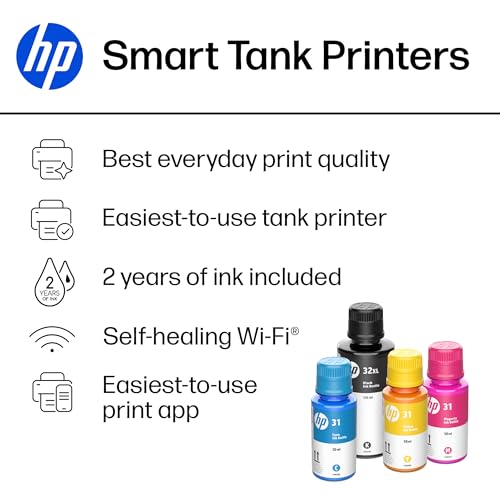


- Functionality: Print, scan, copy
- Resolution: 1200 x 1200 dpi
- Color Print Speed: 5 ppm
- Monochrome Print Speed: 12 ppm
- Two-Sided Printing: Yes
- Max Paper Size: 8.5" x 14"




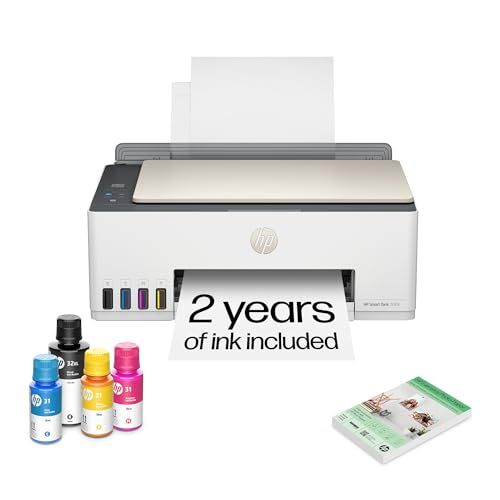
HP Smart Tank 5103 Wireless All-in-One Printer
Review and Everyday Performance

The HP Smart Tank 5103 Wireless All-in-One Printer is designed for people who print regularly and want to avoid the constant expense and interruption of swapping cartridges. As part of HP’s refillable ink tank lineup, it targets households, students, and small home offices that need dependable color printing, occasional scanning and copying, and simple wireless operation. In day-to-day use, its biggest appeal is the combination of low running costs and a straightforward experience once it’s set up properly.
For general home printing, the Smart Tank 5103 feels well-suited to mixed workloads such as school assignments, shipping labels, forms, recipes, and occasional color pages. Text output is typically crisp enough for homework and business documents, and color graphics look pleasing for charts, presentations, and casual photo printing. While it isn’t positioned as a dedicated photo printer, it can produce attractive color prints on the right paper, especially for family use where “good-looking” matters more than gallery-level precision.
Speed and responsiveness are adequate for a home all-in-one. It’s not the kind of printer you buy to churn through large office batches at top speed, but it handles routine jobs without feeling sluggish. The scan and copy functions add practical value for a household that needs to digitize school paperwork, IDs, or signed forms. Scans are generally clean and serviceable for archiving and emailing, and copies are fine for everyday needs, though heavy-duty copy performance is not its core mission.
Wireless printing is a major part of the experience here. When your network is stable, printing from laptops and phones is convenient and reduces the friction that makes people avoid using printers at home. The HP Smart app integration tends to be the central hub for setup and mobile printing. If you are comfortable managing devices through an app, it’s a smooth path to getting up and running. If you prefer a fully computer-driven, no-app setup, you may find the process more opinionated than older plug-and-play printers, though once configured it behaves predictably.
Build quality and design lean toward practical rather than premium, but that is consistent with the value proposition. The refillable tank format is the main reason to buy it, and it changes the ownership experience: you spend less time thinking about ink, and you’re less likely to be surprised by how quickly cartridges run out. Refilling is generally cleaner than older DIY systems, but it still rewards a bit of care and patience, particularly if you’re refilling for the first time.
Factors to Consider Before Buying and What Matters Most
The most important factor for most buyers is total cost of ownership, not the sticker price. The Smart Tank 5103’s refillable ink system is aimed at delivering a lower cost per page than traditional cartridge printers, especially for people who print frequently or in color. If your household prints dozens of pages a month, the economics can make sense quickly. If you print only a few pages per month and can go long stretches without printing, the value is less obvious, and you may be better served by a simpler model or even a laser printer for primarily black text.
Print volume and print habits should guide the decision. If you print school packets, worksheets, study guides, or color-heavy projects, a tank printer can be a relief. If you mainly print shipping labels or occasional forms, consider whether you want to maintain an inkjet at all. Infrequent inkjet use can sometimes lead to nozzle maintenance routines, and while modern printers manage this better than they used to, it’s still a reality of inkjet ownership that is worth acknowledging.
Connectivity needs are another major consideration. The Smart Tank 5103 is marketed around wireless convenience, so you should be comfortable with Wi‑Fi setup and printing from multiple devices. If your home Wi‑Fi is unreliable or segmented in a way that complicates device discovery, you might spend more time troubleshooting than you’d like. In that case, it’s wise to confirm the connection options you need, such as whether your household prefers printing from phones, tablets, Chromebooks, Windows PCs, or Macs. The best printer is the one everyone in the home can use without asking for help.
Space and ergonomics matter more than people expect. An all-in-one printer needs a stable spot where paper can feed reliably and where the scanner lid can open fully. If you plan to keep it on a shelf or in a tight corner, measure first. Also consider how often you will access the ink tanks for refills and whether the location makes that convenient. A printer that is technically “wireless” but constantly moved around because it doesn’t fit well becomes annoying quickly.
Paper handling and output expectations are also key. If you need crisp text for professional documents, the Smart Tank 5103 is generally a strong fit for home and light office work. If you need true photo-lab quality, accurate skin tones, and fine grayscale detail, you may want a photo-focused printer with more inks and more control. For most households, though, the Smart Tank 5103 hits the sweet spot: documents look sharp, color is vibrant enough for school and casual creative projects, and the running cost stays reasonable.
Finally, consider your tolerance for app-based workflows and the broader ecosystem. Many modern consumer printers lean heavily on companion apps for setup, maintenance prompts, and features. If you prefer managing everything from your computer and avoiding accounts or app permissions, you should confirm whether the features you care about work the way you expect. For many users, the app is convenient, but for some it can feel like one more thing to manage.
Common Questions
Can the HP Smart Tank 5103 save money compared to cartridge printers?
Yes, for many users it can. The main advantage of a refillable ink tank printer is a lower cost per page, particularly for color printing. If you print regularly, you’ll likely notice fewer ink-related interruptions and lower ongoing spend than with standard cartridges.
Is it good for students and home offices?
It’s a strong match for students and light home office use because it combines printing, scanning, and copying with wireless convenience. It handles everyday documents well and makes it easier to print from multiple devices in a household. If your workload is very high or highly time-sensitive, you may want a business-class model designed for heavier duty cycles.
Will it work well if I rarely print?
It can, but infrequent printing is where any inkjet can be less ideal. If you print only a few pages every couple of months, you may encounter more maintenance behavior than you would with a monochrome laser printer. If you do choose it, printing a small page periodically can help keep things running smoothly.
How hard is it to set up and use wirelessly?
For most people with a stable Wi‑Fi network, setup is straightforward, especially when following the guided steps in the HP Smart app. Wireless reliability depends heavily on your router, signal strength, and network configuration. If your network is complicated or unstable, placement closer to the router and ensuring you’re on the correct band can make a noticeable difference.
Is it a good choice for photo printing?
It can produce attractive photos for home use, especially on proper photo paper, but it is not a specialized photo printer. If your priority is the best possible photo realism, color accuracy, and tonal range, a dedicated photo printer is more appropriate. If you want occasional photos plus lots of documents at low running cost, it’s a sensible compromise.
Overall, the HP Smart Tank 5103 Wireless All-in-One Printer stands out for its refillable tank value proposition, making it a practical option for households that print frequently and want to keep long-term costs in check. The most important purchase considerations are your typical monthly print volume, your comfort with wireless and app-based setup, and whether your needs lean more toward everyday documents or high-end photo work. If your home prints steadily across school, work, and personal projects, the Smart Tank 5103 is an easy printer to live with and a cost-conscious upgrade from cartridge-based models.