


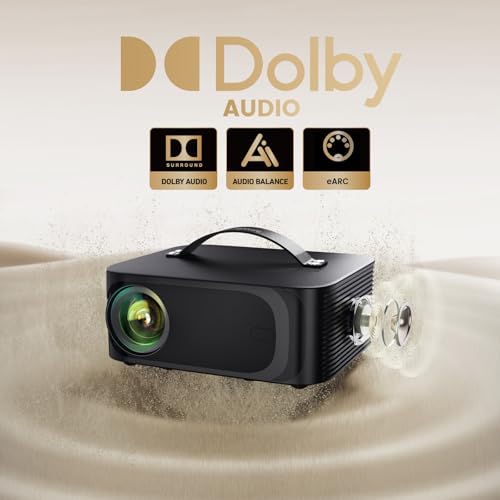
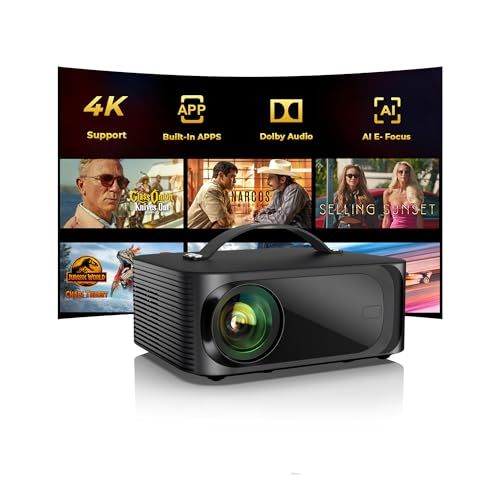
- Type: Portable LED
- Outdoor Use: Yes
- Resolution: 1080p FHD with 4K support
- Brightness: 2000 ANSI lumens
- Projection Screen: 60" to 300"
- Sound: Dolby audio & built-in speaker




ONOAYO ONO3 Plus Smart Projector
Overall performance and everyday experience

The ONOAYO ONO3 Plus Smart Projector is the kind of compact, all-in-one projector that aims to remove friction from casual home theater setups. It’s designed for people who want a big-screen experience without committing to a permanent TV installation, and it generally succeeds by focusing on convenience: quick setup, a smart interface for streaming, and a portable form factor that can move from living room to bedroom to backyard with minimal effort.
In day-to-day use, the biggest determinant of satisfaction is how and where you plan to watch. In a dim or dark room, the ONO3 Plus can produce a pleasing image with enough perceived punch for movies, shows, sports, and casual gaming. Colors tend to look lively when the projector is properly positioned and the image is sized appropriately for the space. As with most compact smart projectors, the viewing experience is at its best when you treat it like a “lights down” device rather than a TV replacement for bright afternoon viewing. If your plan is to watch primarily in a sunlit living room with lots of ambient light, you’ll likely find yourself wishing for higher brightness or stronger contrast, or you’ll need to adjust expectations by reducing screen size and controlling light.
Sharpness and clarity depend heavily on focus, throw distance, and the surface you’re projecting onto. A smooth wall can look surprisingly good, but a proper screen helps with uniformity and perceived contrast, especially if your wall has texture or color. The ONO3 Plus is well-suited to the common use case of projecting a large image for streaming content, and it feels most at home as a flexible entertainment device rather than a reference-grade cinema tool.
Audio is another “it depends” category. Built-in speakers are convenient and can be perfectly serviceable for small rooms, late-night viewing, or travel. For fuller sound—especially for action films, bass-heavy music, or a room with any background noise—you’ll want to pair it with a soundbar or Bluetooth speaker, or connect to an external audio system if your setup allows. That optional upgrade is worth planning for because sound quality can be the difference between “neat gadget” and “movie night centerpiece.”
Smart features, connectivity, and ease of setup
A major appeal of the ONOAYO ONO3 Plus Smart Projector is the promise of a self-contained streaming experience. A projector that can handle apps and navigation without requiring an external streaming stick reduces clutter and makes it easier to set up anywhere. The smart platform experience matters here: responsiveness, stability, and app availability will shape how much you enjoy using it. If the interface is smooth and the apps you rely on are supported, you can treat it like a compact TV that happens to project onto a wall.
Connectivity is the second half of the “smart” story. Even if you plan to stream directly, you’ll likely want the option to plug in a game console, laptop, or streaming device. Before buying, it’s worth confirming the inputs you need and how you’ll run audio. Many users underestimate how often they’ll use HDMI for a console, a cable box, or a laptop for presentations. If you have a specific use case—like connecting a Nintendo Switch, a Blu-ray player, or a work laptop—make sure the ports and cables fit your routine and that the projector placement won’t force awkward cable runs across the room.
Ease of setup is where the ONO3 Plus can shine for non-enthusiasts. Smart projectors in this category are often chosen precisely because they lower the barrier to entry: place the unit, point it at the wall or screen, adjust image size, and you’re ready. However, the most important practical element is how forgiving the projector is about placement. If you expect to place it off-center on a coffee table, or move it frequently between rooms, you’ll want dependable correction tools and a focus process that doesn’t become a recurring annoyance. Convenience is a feature, but only if it stays convenient after the first week.
Wi-Fi performance also matters more than people anticipate. Streaming is only as good as your network, and any projector used farther from the router or in a backyard scenario may face signal issues. If your home has weak Wi-Fi zones, you may want to plan for a mesh network, a closer access point, or simply rely on an external device with stronger connectivity options.
What to consider before buying and what matters most
Before purchasing the ONOAYO ONO3 Plus Smart Projector, start with the environment you’ll use it in. Ambient light control is the single biggest factor in whether you’ll love a projector or feel underwhelmed. If you can dim the room, close curtains, or watch mainly at night, you’ll get far better perceived contrast and a more cinematic image. If you can’t control light, your best strategy is to keep the projected image smaller and consider a screen designed to help with contrast in brighter rooms, though those screens add cost.
Next, think about image size and throw distance. People often buy a projector for a huge picture, then discover their room layout limits placement. Measure the distance from where the projector will sit to where the image will land, and consider how large you realistically want the screen to be. A slightly smaller image that looks brighter and sharper can be more satisfying than pushing for maximum size and ending up with a dimmer picture.
Sound should be your third priority, because it’s frequently the hidden weak link. If you’re buying this projector to host movie nights or watch sports with friends, plan for external audio. Even an affordable soundbar can dramatically improve immersion and dialogue clarity. If you’re using it primarily in a bedroom or for solo viewing, the built-in speakers may be enough, but it’s still wise to ensure you have an easy way to connect better audio later.
Finally, consider longevity and flexibility: how often you’ll move it, how many sources you’ll connect, and whether you prefer the built-in smart experience or a dedicated streaming stick. Many users find that even with a smart projector, a familiar external streamer can offer faster updates and a more consistent app ecosystem. That doesn’t negate the value of built-in smart features; it simply means you should view them as a convenience rather than the only way you’ll ever watch.
When it comes to what matters most, room lighting and placement flexibility lead the list because they determine the baseline picture quality you’ll actually see. After that, connectivity and audio options decide how seamlessly the projector integrates into your lifestyle. Specs on paper matter, but the real question is whether the ONO3 Plus fits your room, your habits, and your tolerance for dim-room viewing.
Common Questions
Can I use the ONOAYO ONO3 Plus Smart Projector in a bright room? You can, but you’ll get the best results in dim lighting. In brighter conditions, reduce the image size, avoid projecting onto dark or textured walls, and consider using curtains or a screen to improve contrast.
Do I need a separate streaming device? Not necessarily. The smart features can cover basic streaming, but some users still prefer an external streaming stick for a more familiar interface, broader app support, or faster updates. It’s helpful that you can choose either approach depending on your needs.
Is the built-in sound good enough for movies? For casual viewing in a small room, it can be fine. For a more cinematic experience or for group viewing, external audio is strongly recommended because it improves dialogue clarity and overall impact.
What should I project onto for the best image? A dedicated projector screen generally provides the most consistent results, especially for contrast and uniformity. A smooth white wall can work well, but wall texture and paint color can reduce sharpness and accuracy.
As a smart, portable projector built around convenience, the ONOAYO ONO3 Plus fits best for users who can control room lighting and want an easy path to a big-screen experience. If you prioritize flexible placement, straightforward streaming, and the option to upgrade audio, it can be a satisfying centerpiece for movie nights and casual entertainment, especially when paired with a decent screen and a simple external speaker setup.