












We also considered 10 others:


Our Top Choice
The order above is not editorial opinion, and it is not paid placement. It comes from what shoppers across our network actually do - which usb microphones they compare, and which they ultimately buy. We re-rank as new data comes in, so the long-term favorites have to keep earning their spot against new entrants. The full method, including how we make money.
USB Microphones Buyer's Guide
Buying a USB microphone is a tradeoff between plug-and-play simplicity and the control you would get from a full audio-interface setup. The sharpest concerns are spoken-voice clarity in a real room, stable compatibility with your device and apps, and whether the stand, controls, and noise handling can keep up with live recording or streaming.
Voice Quality
USB microphones are usually bought to make a voice sound clearer than a laptop, webcam, or headset mic. The best choices improve intelligibility without forcing the user into a complicated studio setup. A mic that clips easily, sounds thin, or exaggerates room echo can still disappoint even if it has impressive specifications.
Prioritize a USB mic that is tuned for close spoken voice, not just “high resolution” specs. For podcasting, streaming, video calls, and voiceover, look for clear midrange presence, low self-noise, enough gain without hiss, and resistance to harsh sibilance; avoid mics that sound impressive only when the room is perfectly treated or the speaker stays unnaturally close. Owner feedback strongly supports sound quality as the main reason to buy in this category, with buyers describing clear, crisp, professional-sounding voice capture and strong results for YouTube-style recording, podcasts, calls, streams, and voice work.
Noise Control
Many USB microphones are sensitive enough to capture more than just the speaker’s voice. That sensitivity is useful for detail, but it can also expose untreated rooms, desk vibrations, keyboard noise, and computer fans. Buyers should judge noise handling by real recording conditions, not by a simple claim of noise cancellation.
Treat noise control as a placement-and-pattern problem first, not a magic feature. For untreated bedrooms, offices, and gaming desks, choose a cardioid-focused mic, keep it 4–8 inches from the mouth, use a pop filter or windscreen, reduce gain, and avoid placing it near keyboards, fans, hard walls, or PC towers; software noise reduction can help, but it may add artifacts or fail with sudden clicks and hums. Owner sentiment is mixed here: many users get fairly clean voice pickup, but feedback also says room sounds, hums, clicks, and background noise can still come through unless placement and settings are dialed in.
Compatibility
A USB mic is only convenient if the computer or mobile device consistently recognizes it as the intended input and output. Different operating systems, adapters, hubs, and apps can handle microphones differently. Stable connection behavior matters as much as sound quality for live calls and streams where troubleshooting mid-session is not acceptable.
Look for true class-compliant plug-and-play USB operation for the devices you actually use: Windows, macOS, tablets, phones, consoles, or streaming hardware. Check whether the mic uses USB-C or USB-A, whether mobile use requires OTG or Lightning/USB-C adapters, whether it draws too much power for a phone, and whether it remains stable through sleep/wake, video-call apps, and USB hubs; avoid assuming every included adapter guarantees reliable mobile compatibility. Owner feedback praises simple plug-and-play setup and broad use across calls, gaming, podcasting, chat, recording, streaming, and YouTube workflows, but it also flags mixed compatibility and reliability issues such as units stopping or not turning on in some setups.
Live Controls
USB microphones often double as both recording input and headphone audio device. Good physical controls make it easier to manage clipping, muting, and monitoring during a call, stream, or recording session. Poor controls can make a technically capable mic frustrating because small mistakes become audible immediately.
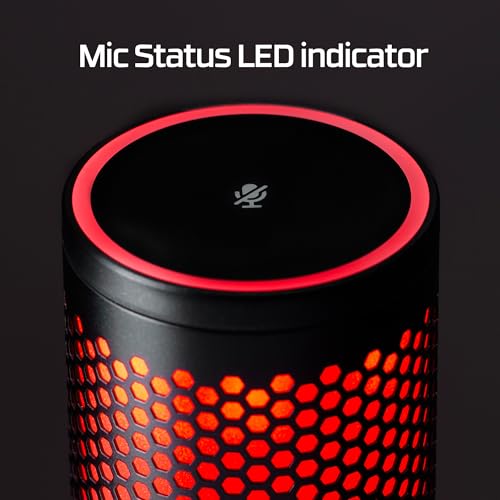
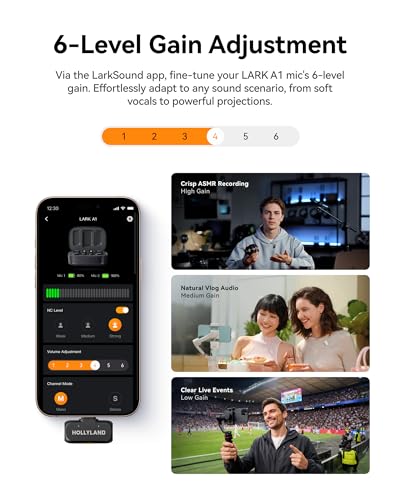
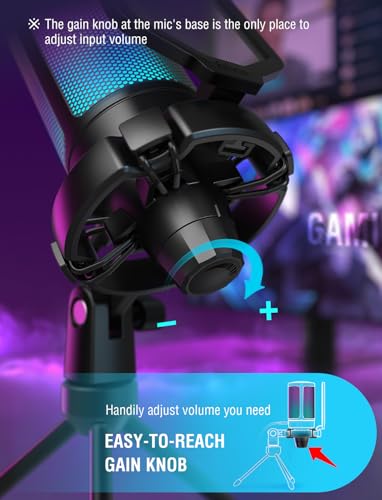
Favor onboard controls that solve live recording problems without opening software: gain to prevent clipping, a physical mute with a clear indicator, headphone monitoring for latency-free listening, and separate headphone volume if you need to hear yourself or guests. Extra controls such as echo, mix, or pattern modes can be useful, but they should be clearly labeled and hard to bump accidentally; beginners often get worse audio by leaving gain too high or enabling effects they do not understand. Owners specifically value beginner-friendly controls such as gain, volume, mute, monitoring, and echo adjustments, alongside simple everyday operation.
Mount Stability
Voice quality depends heavily on consistent mic position. Even a strong capsule can sound distant, boomy, or noisy if the stand sags, transmits desk vibration, or cannot hold the correct angle. Mounting hardware should match the buyer’s desk layout and survive repeated adjustment.
Inspect the stand and mounting path as carefully as the microphone itself. A good USB mic setup should hold its angle without drooping, isolate desk bumps, fit common boom-arm threads or include reliable adapters, and place the capsule close to the mouth without blocking the screen; weak desktop tripods, sagging arms, and loose pivots often cause inconsistent sound because the mic slowly moves off-axis. Owner feedback says some mics feel solid and professional, but sturdiness is mixed, with arms or bases sometimes sagging or bending over time.
Workflow Fit
The right USB microphone is not the same for every buyer. Use case determines which tradeoffs matter most: portability, controls, monitoring, mounting, noise rejection, or multi-person recording. A good value pick is the one that improves the actual workflow without adding unnecessary complexity.
Match the mic to the workflow before judging value: a solo podcaster may need close cardioid voice quality and monitoring, while a meeting user may prioritize easy mute and stable app compatibility, and a streamer may need boom-arm support plus quick gain control. USB models can be excellent value when they replace a basic headset or avoid the need for an audio interface, but avoid overbuying features you will not use or underbuying if you need multiple speakers, advanced routing, or future XLR expansion. Owner sentiment repeatedly points to strong price-to-performance and creator-friendly capability, with buyers using USB mics successfully for streaming, podcasting, video calls, gaming, recording, and YouTube-style work without extra studio gear.
1,000,000+ shoppers use Buyer's Guide every week to find the best products and services online.

Helping millions of users make smarter purchases online.


