

















We also considered 10 others:


Our Top Choice
Compare Features


The order above is not editorial opinion, and it is not paid placement. It comes from what shoppers across our network actually do - which wireless tens units they compare, and which they ultimately buy. We re-rank as new data comes in, so the long-term favorites have to keep earning their spot against new entrants. The full method, including how we make money.
Wireless TENS Units Buyer's Guide
Wireless TENS units trade cord-free movement for new things to verify: adhesive pad security, on-body pod bulk, reliable controls, and enough battery for full sessions away from an outlet. For this category, the safest and most useful choice is one that lets you place pads accurately, adjust intensity gradually, stop stimulation quickly, and avoid use in contraindicated situations such as over implanted electronic devices, across the chest, on the neck, or without medical guidance for certain conditions.
Portability
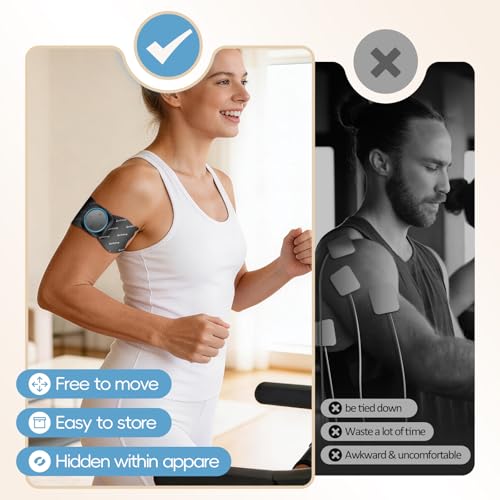
Portability matters if you want pain relief at work, while traveling, or as you move around the house, so look for a compact unit that’s easy to pack, clip on, or wear discreetly under clothing. Wireless designs can reduce cord tangles and make movement easier, but check that the controls are still simple to use, the pads stay secure, and the battery life fits your typical session length.
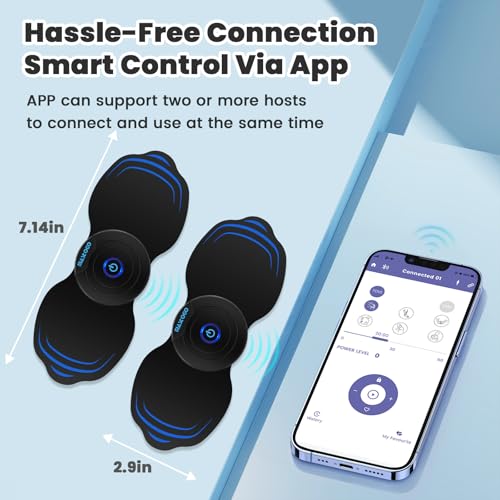
Choose a wireless TENS unit that is truly wearable for the body areas you need to treat: the control pod should not be so heavy that it pulls pads loose on the low back, hip, shoulder, or leg, and the shape should sit flat under clothing if you plan to move, work, travel, or use it discreetly. Check whether the pads are reusable and easy to replace, because portability drops sharply if the adhesive fails during activity or if replacements are hard to find. Owner feedback supports this priority: shoppers repeatedly value compact wireless designs because they avoid cord tangles, make back placement easier with a remote or phone nearby, and are convenient at home, while gardening, working, traveling, or flying.
Relief
Relief matters because a TENS unit is only useful if it noticeably reduces your pain, eases muscle tension, or helps you relax during and after a session. Look for adjustable intensity levels, multiple modes, and settings that let you fine-tune the sensation to your body, and be cautious of units that feel too weak, too harsh, or inconsistent across treatment areas.
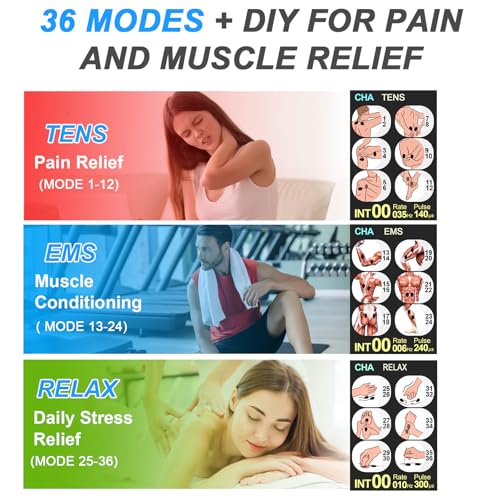
For meaningful relief, look beyond the word “massage” and check whether the unit offers enough adjustable intensity, multiple pulse patterns, and pad configurations for your specific pain area; sciatica, low-back tension, neck/shoulder soreness, and broad muscle aches often need different placements and stimulation styles. A good wireless unit should let you start low, increase gradually, and maintain a steady output without sudden jumps, especially if you are treating sensitive nerve pain. Owner sentiment aligns with this: buyers often report noticeable drug-free relief for back, neck, muscle, nerve, joint, hip, leg, and sciatica-related discomfort, and they particularly appreciate units with many modes, intensity levels, and flexible channel or placement options.
Usability
A TENS unit should be easy to set up and adjust, especially if you’ll use it during a pain flare or on hard-to-reach areas. Look for clear instructions, intuitive controls, readable labels, and straightforward pad placement guidance so you can change modes and intensity safely without guesswork. Watch out for units with confusing menus, vague manuals, or controls that are easy to bump accidentally.
Prioritize a setup you can operate while the pads are already on your body, especially for hard-to-reach areas like the lower back; the app, remote, or onboard buttons should make it obvious how to change mode, raise or lower intensity, pause, and stop the session. If you are not tech-focused, avoid units that depend on confusing app pairing or tiny unlabeled controls, because a TENS unit should be adjustable immediately if the sensation becomes uncomfortable. Owners commonly describe the better experiences as straightforward, with clear displays or intuitive apps, quick setup, easy session-time and intensity changes, and less frustration than older corded units.
Quality
A well-built TENS unit matters because you’re relying on it for consistent relief, often through repeated sessions, travel, and daily handling. Look for sturdy controls, secure lead-wire connections, reliable battery performance, and pads or accessories that don’t feel flimsy; watch out for devices with loose ports, inconsistent intensity output, or reviews that point to early failures.
Judge quality by the parts that fail first in wireless TENS use: pad adhesion, snap or magnetic connection strength, charging port durability, pod casing, remote/app reliability, and whether stimulation remains consistent as the battery drains. Because wireless pods sit directly on the electrode pad, flimsy construction can mean falling off during movement, weak contact, or uneven stimulation; sturdier-feeling units with reliable pads are worth prioritizing. Owner feedback supports this focus, with many buyers describing compact wireless models as solid, well made, powerful for their size, durable over time, and less disposable than expected, while also valuing rechargeable designs and the absence of cord hassles.
Controls
The controls determine how well you can tailor a TENS unit to different pain areas, sensitivities, and treatment goals, so look for clear settings, multiple modes, a useful intensity range, and easy step-by-step adjustability. If you’ll use it on your back or other hard-to-reach spots, remote operation or simple lockable controls can make sessions easier, while overly complicated menus or big intensity jumps can make the device frustrating or uncomfortable.
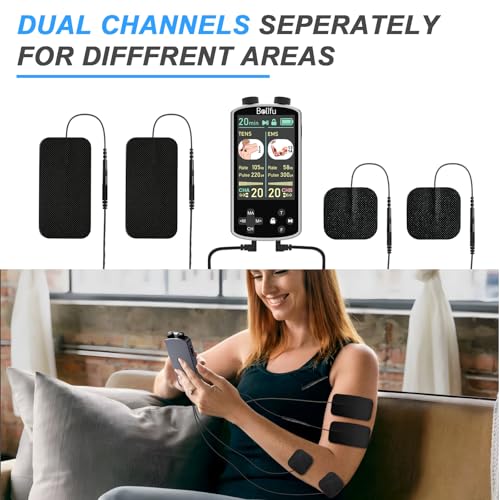
Controls should allow precise, independent adjustment rather than broad jumps in strength; look for fine intensity steps, a visible level indicator, a timer, mode memory, and an easy emergency pause or power-off. If the unit has multiple channels or pads, confirm whether you can control each side separately, since one area of the body may tolerate much less stimulation than another. Owners consistently praise units that make this easy: clear buttons, readable screens, simple mode and intensity changes, enough stimulation patterns to tailor treatment, and convenient remote control for back use without reaching awkwardly.
Battery
Battery life matters because a TENS unit needs to last through your typical session without fading or shutting off, especially if you use it away from an outlet. Look for enough runtime for your treatment routine, easy recharging or battery replacement, and a clear low-battery indicator; be wary of units that require frequent charging or use hard-to-find batteries.
For wireless TENS units, battery life matters not just for convenience but for treatment consistency: verify that the device can complete your typical session length, handle repeated daily sessions, and recharge easily before travel or work use. Also check whether the battery is in each wearable pod, whether both sides charge together, and whether performance weakens noticeably near the end of a charge. Owner sentiment strongly supports prioritizing runtime, with buyers often praising rechargeable units that last for hours, keep going through extended or repeated sessions, charge easily, and arrive with enough power to start trying them right away.
1,000,000+ shoppers use Buyer's Guide every week to find the best products and services online.

Helping millions of users make smarter purchases online.


