


- Speed: Up to 9.3Gbps
- Coverage Area: Up to 2500 sq ft
- Bands: Tri (2.4GHz, 5GHz, & 6GHz)
- Type: WiFi 7
- Ports: 1x 5 gigabit ethernet, 2x 2.5 gigabit ethernet, 2x gigabit ethernet, 1x USB 3.0





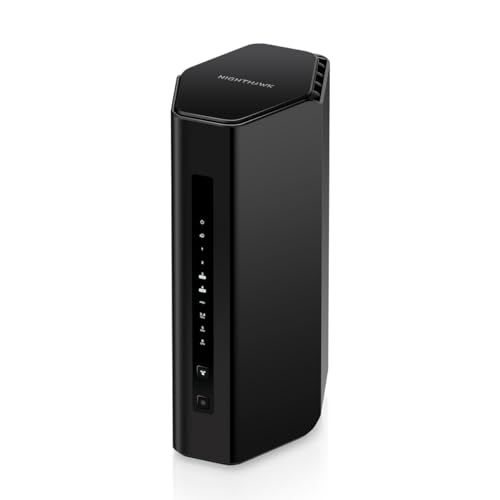
Netgear Nighthawk BE9300 WiFi 7 Router Review
Performance, Coverage, and Real-World Experience

The Netgear Nighthawk BE9300 WiFi 7 Router is aimed at people who want a meaningful jump in wireless performance without turning their home network into a complicated project. Built around the WiFi 7 standard, it’s designed to handle modern traffic patterns: multiple people streaming at once, cloud backups running in the background, large game downloads, and video calls that you don’t want stuttering the moment someone else starts browsing. In practice, the biggest “feel” improvement over older WiFi generations tends to show up in consistency. When the network is busy, WiFi 7’s efficiency features can keep latency steadier and reduce the random slowdowns that make a fast connection feel unreliable.
Coverage is the other half of the story. A router like the BE9300 is typically most satisfying in a medium to large home where you need strong signal beyond a single room. Placement still matters. If the router is tucked in a cabinet or placed near interference sources, you can lose much of what you’re paying for. When positioned in a central, open location, it can provide strong whole-home performance, but thick walls, metal ducting, and long distances can still challenge any single-router setup. For homes with tricky layouts, this model can be a solid starting point, but you should be open to adding a mesh system or extender if there are dead zones, because WiFi 7 doesn’t magically defeat physics.
Speed claims can be confusing. “BE9300” is a class rating that reflects the theoretical combined capacity across bands, not a single device’s speed in one room. Your laptop or phone will connect on one band at a time, and its top speed depends on the client device’s WiFi capabilities, signal strength, and network conditions. That said, if you already have gigabit internet or faster and modern WiFi devices, a WiFi 7 router can reduce bottlenecks inside your home, especially for local transfers such as moving large files between a computer and a NAS, or streaming high-bitrate video from a media server.
One of the most compelling benefits of moving to WiFi 7 is headroom. Even if your internet speed is modest, your home network can still become congested because of internal traffic. A router in this class is built to keep pace with many simultaneous connections, which is increasingly important as households add smart devices, cameras, and voice assistants. If you’re upgrading from an older WiFi 5 router, the jump can feel dramatic. If you’re coming from a strong WiFi 6 or WiFi 6E model, the upgrade is more about future-proofing and better handling of crowded networks than it is about doubling your everyday speed overnight.
Factors to Consider Before Buying (and What Matters Most)
Before purchasing the Netgear Nighthawk BE9300, the first factor to weigh is whether you have devices that can actually take advantage of WiFi 7. If most of your devices are WiFi 5 or early WiFi 6, you will still benefit from a better router, but you won’t unlock the full potential of the standard. The most important consideration here is your upgrade timeline. If you tend to keep networking gear for many years, buying WiFi 7 now can make sense because future phones, laptops, and streaming devices will increasingly support it. If you replace routers frequently, you might value present-day performance-per-dollar more than new-standard headroom.
The second major factor is your internet plan and how you use it. If you have a gigabit or multi-gig connection, a router like this is much easier to justify. Multi-gig WAN and LAN capabilities, when present and used correctly, can keep your wired backbone from becoming the choke point. If your internet is 200–400 Mbps and your home usage is light, the router can still be a quality purchase, but it becomes more of a comfort and reliability investment than a raw-speed necessity. In that scenario, stability, range, and good device handling become the meaningful reasons to upgrade.
Your home layout is also critical. Square footage alone is less important than construction materials and where the router can be placed. Open floor plans are friendly to single-router solutions; older homes with plaster walls, brick, or dense insulation can be difficult. The most important question is whether you need one powerful router or a true mesh setup. If you must cover multiple floors and the router cannot be placed centrally, you may get more consistent results from mesh even if the top-end speed is lower in some rooms. If you can place the BE9300 in an ideal location and your home is not overly RF-hostile, a single strong router can deliver a simpler, cleaner network.
Another purchase factor is how much you rely on wired devices. Many households now have a mix: TVs, consoles, desktops, work docks, smart hubs, and switches. If you do a lot of gaming, media streaming, or work from a fixed workstation, you’ll want to pay close attention to the number and speed of Ethernet ports, and whether your core devices can take advantage of multi-gig. The most important part of this is avoiding a situation where your WiFi is excellent but your wired side is forced through a slower link that bottlenecks everything.
Finally, consider software features and ongoing costs. Netgear routers often come with companion app management and optional security subscriptions. Some buyers appreciate guided setup, remote management, and extra security layers; others prefer a router that remains fully featured without subscriptions. The most important step is to decide what you consider “must-have” versus “nice-to-have.” If you want robust parental controls, threat protection, or easy device profiles, you should confirm exactly what is included for free and what becomes a paid add-on later. Long-term value is not just the purchase price; it’s also the cost and convenience of keeping the router configured the way you want.
Common Questions
Does the Netgear Nighthawk BE9300 make sense if my devices aren’t WiFi 7 yet? Yes, it can still be worthwhile for improved coverage, better handling of multiple devices, and a more capable processor and radios than older routers. You just shouldn’t expect WiFi 7 headline speeds on WiFi 5 or WiFi 6 clients, and the biggest gains may be consistency rather than peak throughput.
Will this router improve gaming latency? It can, especially if your current router struggles under load or has poor buffer management. However, your internet connection quality and distance to game servers matter more than router class once your home network is stable. For the best results, use Ethernet for gaming when possible and place the router to minimize obstacles and interference.
Do I need a mesh system instead of this router? If you have dead zones that come from distance and heavy walls, mesh can be the more reliable option. If your home is moderately sized and you can place the router centrally, a single powerful router like the BE9300 may provide simpler management and excellent performance without additional nodes.
Is the “BE9300” speed what I’ll see on my phone? No, it’s a combined theoretical rating across bands. Your phone will connect on a specific band and its real-world speed depends on its WiFi capabilities, signal strength, and how busy your network is. The rating is best used as a rough indicator of overall class and capacity rather than a promise of per-device speed.
Overall, the Netgear Nighthawk BE9300 WiFi 7 Router is a strong choice for households that want modern wireless capacity, better consistency under load, and a router that won’t feel outdated as new devices adopt WiFi 7. The most important purchase considerations are whether you’ll benefit from WiFi 7 clients in the near future, whether your home layout can be served well by a single router, and whether your wired and internet speeds justify the step up. If those boxes are checked, the BE9300 is positioned as a capable, forward-looking upgrade that can make everyday connectivity feel smoother and more dependable.