




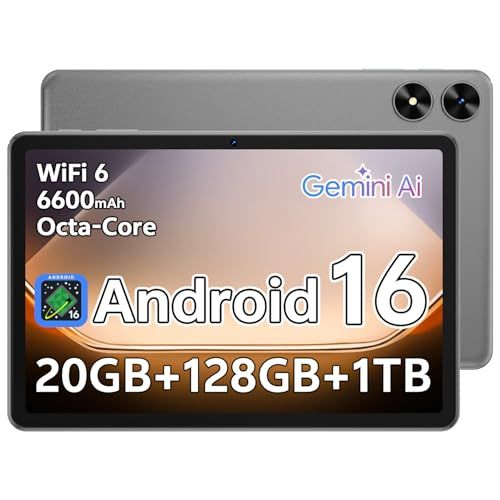
- Screen: 10.1"
- Resolution: 1280 x 800
- Processor: Unisoc T7250 8-core
- Storage: 128GB
- Battery Life: Up to 12 hours
- Camera: 2MP front & 8MP rear
- Operating System: Android





Sharecloud 10.1" Tablet
Overall Experience and Performance

The Sharecloud 10.1" Tablet aims to be the kind of everyday device that fits comfortably between a phone and a laptop: large enough for reading, streaming, browsing, and light productivity, but simpler and more portable than a full computer. The first thing you notice is the 10.1-inch form factor, which tends to be a sweet spot for many users. It provides enough screen real estate to watch videos without feeling cramped and to read articles or ebooks without constant zooming, while still being small enough to hold on the couch or carry in a bag without much fuss.
In day-to-day use, the tablet’s perceived speed and smoothness will depend heavily on how you plan to use it. For casual tasks such as email, web browsing, YouTube, and social media, a 10.1-inch tablet like this is usually at its best: apps load reasonably quickly, navigation feels straightforward, and the bigger screen is genuinely more comfortable than a phone for longer sessions. If you expect heavier workloads, such as advanced multitasking, creative software, or high-end gaming, a value-oriented tablet can feel constrained. That doesn’t make it a poor choice; it simply means it rewards realistic expectations. The Sharecloud 10.1" Tablet feels most at home as a “family room” device, a student companion for reading and light note-taking, or a travel tablet for entertainment and basic communication.
Audio and video consumption are central to the appeal of tablets, and the 10.1-inch size helps here. A larger display naturally makes movies, video calls, and online classes feel less tiring. Speaker quality is often a deciding factor for people who don’t want to use headphones all the time, so it’s worth paying attention to whether the tablet can get loud enough without sounding thin or distorted. If you mainly watch content in quiet spaces, decent speakers are more than enough; if you travel frequently or watch videos in noisy environments, you may care more about maximum volume and clarity.
Battery life is another part of the experience that can make or break ownership satisfaction. Most users want a tablet that can handle a day of intermittent use without anxiety. Video streaming, high brightness, and gaming will drain the battery faster than reading or simple browsing, so your personal pattern matters. Before buying, it helps to think about whether you need the tablet to last through long flights, school days, or work shifts, or whether you’ll mostly use it near a charger. The Sharecloud 10.1" Tablet is best judged not only on the maximum hours it can run in ideal conditions, but on how predictably it lasts with your typical mix of apps, brightness settings, and Wi-Fi usage.
What to Consider Before Buying (and What Matters Most)
Before purchasing the Sharecloud 10.1" Tablet, it’s wise to focus on a few practical factors that will affect your satisfaction more than any single marketing claim. The most important consideration is your intended use. A tablet purchased for streaming and browsing has different “must-haves” than one used for schoolwork, office tasks, or drawing. If your needs are primarily entertainment and casual use, screen comfort, battery life, and stable Wi-Fi performance tend to matter most. If you plan to do productivity tasks, the keyboard experience, multitasking behavior, and app ecosystem become more critical.
The display is often the most important hardware element because you interact with it constantly. In a 10.1-inch tablet, you’ll want to consider clarity, brightness, and viewing angles. If you use the tablet outdoors or near bright windows, brightness becomes a priority. If you read for long stretches, factors like text sharpness and comfortable color temperature matter more than peak brightness. People sensitive to eye strain may also appreciate settings such as night mode or adjustable color warmth.
Storage and memory are frequently underestimated. If you download movies, keep large photo libraries, or install many apps, running out of space can become a daily annoyance. Similarly, insufficient memory can lead to apps reloading more often when you switch between them, which makes the tablet feel slower than it should. For many users, choosing a configuration with enough storage for the next couple of years is more important than small differences in processor performance. If the tablet supports expandable storage, that can be a meaningful advantage for media-heavy households, but it’s still worth considering how easy it is to manage files and whether apps can use the expansion space effectively.
Connectivity matters in ways that aren’t always obvious on the spec sheet. Reliable Wi-Fi performance is essential for streaming and video calls. Bluetooth stability affects headphones, speakers, keyboards, and controllers. If you plan to connect accessories, check whether the tablet supports the versions you care about and whether the overall experience is smooth. The charging port type is also important because it determines how easy it is to share chargers with other devices and how quickly you can top up the battery. A modern, widely used port makes ownership simpler and reduces cable clutter.
Software support and the app experience can be the most important long-term factor. Even a well-built tablet can feel disappointing if it doesn’t receive updates, struggles with compatibility, or lacks the apps you rely on. Consider how often you replace devices and how comfortable you are with a tablet that may not receive major updates for many years. For families, it’s also worth thinking about profiles, parental controls, and how easy it is to manage multiple users or restrict content.
Finally, consider build quality and comfort. A tablet is something you hold, so weight distribution, bezel size, and overall sturdiness matter. If it’s mainly for kids, durability and a protective case may be more important than slimness. If it’s for commuting, a lighter device may win even if it sacrifices some premium feel. In practical terms, the most important factors for most buyers come down to this: a comfortable screen, enough storage and memory for your habits, reliable battery life, and software that supports the apps you actually want to use.
Common Questions
Is the Sharecloud 10.1" Tablet good for streaming movies and shows? Yes, it’s well suited for streaming because the 10.1-inch display offers a comfortable viewing size for video, and tablets in this class are typically optimized for common entertainment apps. Your experience will depend on your Wi-Fi quality and your preferred brightness level, since higher brightness can reduce battery life during long sessions.
Can I use it for schoolwork or light productivity? Yes, for tasks like reading PDFs, web research, email, and document editing, a 10.1-inch tablet can be a practical tool. If you plan to type frequently, you should consider pairing it with a compatible keyboard and making sure the apps you need run smoothly on the tablet’s operating system.
How much storage do I really need? If you mostly stream content and use cloud services, you can often get by with modest storage. If you download videos for travel, store lots of photos, or install many games, more storage quickly becomes worthwhile. Many users find that buying slightly more storage than they think they need prevents frustration later.
Is it a good choice for kids? It can be, especially as a shared family device for learning apps, videos, and games. The most important considerations for kids are a durable case, easy-to-use parental controls, and enough performance to run educational apps without stuttering. It’s also worth thinking about whether multiple user profiles are supported so the experience stays organized.
Will it replace a laptop? For some users, partially. It can handle many everyday tasks, but it may not fully replace a laptop for heavy multitasking, specialized professional software, or workflows that rely on desktop-class file management. If your work depends on complex spreadsheets, advanced creative tools, or frequent window switching, a laptop or a higher-end tablet might be a better fit.
Overall, the Sharecloud 10.1" Tablet makes the most sense for users who want an accessible, comfortable screen size for daily entertainment and light work without the cost or complexity of more premium devices. If you focus your buying decision on how you’ll actually use it, prioritize a display you enjoy looking at, ensure you have enough storage and memory for your habits, and confirm the software supports your must-have apps, you’ll be far more likely to end up with a tablet that feels like a smart purchase rather than a compromise.