




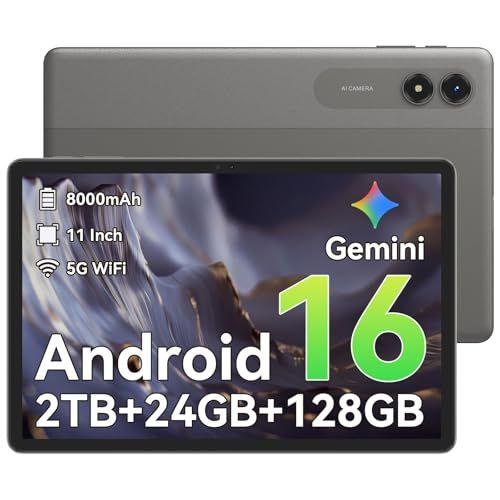
- Screen: 11"
- Resolution: 1280 x 800
- Processor: Unisoc T7250 8-core
- Storage: 128GB
- Battery Life: Not indicated
- Camera: 8MP front & 16MP rear
- Operating System: Android





Tabwee T50 11" Tablet
Overview and everyday experience

The Tabwee T50 11" Tablet positions itself as an approachable, do-most-things device for users who want a large display, modern conveniences, and enough performance for daily entertainment and productivity without paying premium-brand pricing. The first thing you notice is the 11-inch form factor, which strikes a comfortable balance between portability and screen real estate. It’s big enough to feel immersive for video streaming, reading, browsing, and casual creative work, while still being manageable to hold for a while or tuck into a bag for commuting.
In day-to-day use, the T50’s appeal is how naturally it fits into common routines. For streaming apps, web browsing, email, and social media, an 11-inch tablet tends to feel less cramped than smaller models, especially when you’re viewing documents or split-screening with two apps. If you plan to read long articles or PDFs, the extra space reduces the need for constant zooming and panning. The same goes for video calls, where you can keep the call window comfortable while still referencing notes or a browser tab.
As with most tablets in this category, the experience is best when expectations match the intent. The T50 is typically at its strongest for consumption and light productivity: watching shows, managing calendars, taking notes, handling schoolwork, and doing basic photo edits. It can also be a family-friendly shared screen for kids’ learning apps or travel entertainment. Where value tablets often show limitations is in sustained heavy multitasking, demanding 3D gaming, or specialized creative workflows that lean on top-tier GPU performance. If your routine includes those tasks, the more important question becomes whether the T50 can meet them comfortably or whether you’d be better served by a higher-end tablet or a lightweight laptop.
Audio and cameras tend to be secondary on most tablets, but they matter more than people expect. If you plan to watch a lot of content without headphones, speaker quality affects how enjoyable the device feels. If you’re using the tablet for video calls, the front camera and microphones become “everyday features,” not afterthoughts. A large tablet can also be a surprisingly good kitchen companion for recipes or a workshop companion for instructional videos, where readability and volume matter. The core takeaway is that an 11-inch tablet is a lifestyle device; it earns its keep when it reliably handles the small tasks you do constantly.
What to consider before buying, and what matters most
Before purchasing the Tabwee T50 11" Tablet, the most important factors to consider are display quality, performance and memory, battery life, and software support. These determine whether the tablet will feel smooth and satisfying for years or become frustrating after the novelty wears off.
Display quality is the first priority because it touches everything you do. Size alone isn’t enough; you’ll want to pay attention to resolution, brightness, and color. A sharper display makes text clearer and reduces eye fatigue for reading and schoolwork. Higher brightness helps when you’re near windows, commuting, or using the tablet in brightly lit rooms. If you watch a lot of video, contrast and color tuning affect whether movies look rich or washed out. An 11-inch panel can look fantastic, but only if the underlying quality is strong enough to support its size.
Performance and memory are the next biggest factors. Even if you don’t play heavy games, modern apps and web pages can be demanding, and background processes add up. A tablet that feels fast on day one can feel sluggish later if it has limited RAM or a weaker chipset. Think about what “multitasking” means for you. If you regularly switch between a browser with many tabs, a note app, messaging, and streaming, you’ll want enough memory headroom to keep things from reloading. Storage also matters in a practical way: offline video downloads, large app caches, photos, and documents can fill up internal storage faster than expected. If the model you’re considering offers multiple storage tiers, choosing a larger option often extends the device’s useful life more than a minor spec bump elsewhere.
Battery life is a close third, and it’s not just about maximum hours. What you really want is predictable battery behavior: the tablet should comfortably get through your typical day without forcing you to manage charging anxiety. Large screens can draw more power, especially at higher brightness. If you plan to use the T50 for travel, classes, or long meetings, battery stability matters more than peak performance. Charging speed and charging port convenience also affect real-world usability. A device that charges quickly or uses a modern standard can be easier to live with than one that sips power slowly.
Software experience and support are often overlooked, but they become critical over time. Look for a clean, stable interface and a reasonable expectation of security updates. App compatibility, parental controls, and multi-user options can be important for families. If you rely on a particular ecosystem, consider how well the tablet integrates with your existing devices and services. The best hardware can still feel “off” if the software is cluttered or inconsistent, while a well-tuned software experience can make modest hardware feel more responsive.
Finally, consider the accessories and connectivity that shape how you’ll actually use the device. If you intend to type often, keyboard support becomes pivotal, and a good case can transform a tablet into a capable writing tool. If you want to take handwritten notes or sketch, stylus compatibility and palm rejection matter more than raw benchmarks. For connectivity, assess whether you need Wi‑Fi only or cellular, and verify that Bluetooth reliability is strong if you use wireless earbuds or a keyboard. Ports and expansion options can also influence your decision if you frequently move files, connect external storage, or use wired audio equipment.
Common Questions
Is the Tabwee T50 11" Tablet good for students and remote learning? Yes, for most students it can be a strong fit because the larger screen helps with reading and split-screen use, and it typically handles video conferencing, document editing, and web research well. If your coursework requires specialized software that only runs on a desktop operating system, you may still need a laptop alongside it.
Can it replace a laptop for work? It depends on your work style. If your work is mainly email, web-based tools, PDFs, light document editing, and meetings, the tablet can cover a lot, especially with a keyboard accessory. If you depend on heavy multitasking, advanced spreadsheets, coding environments, or professional creative suites, it’s more realistic to treat it as a companion device rather than a full replacement.
Is 11 inches too big to carry around? For many people, 11 inches is the “sweet spot” between comfort and portability. It’s larger than small tablets and may feel less pocketable, but it remains easy to carry in a backpack or tote. If you often hold a tablet one-handed for long periods, you may want to consider the overall weight and a case that improves grip.
What should I prioritize if I’m buying on a budget? Prioritize enough RAM and storage for your usage, followed closely by display quality. These factors have the biggest impact on how smooth the tablet feels and how long it stays useful. Battery reliability is the next key concern, because a tablet that can’t last through your routine becomes inconvenient regardless of price.
Conclusion: The Tabwee T50 11" Tablet stands out as a practical large-screen option for entertainment, learning, and everyday productivity, especially if you value screen space and flexibility over premium-brand extras. If you focus your purchase decision on display quality, memory and storage, and battery consistency, you’ll be far more likely to end up with a tablet that feels satisfying long after the initial setup.