



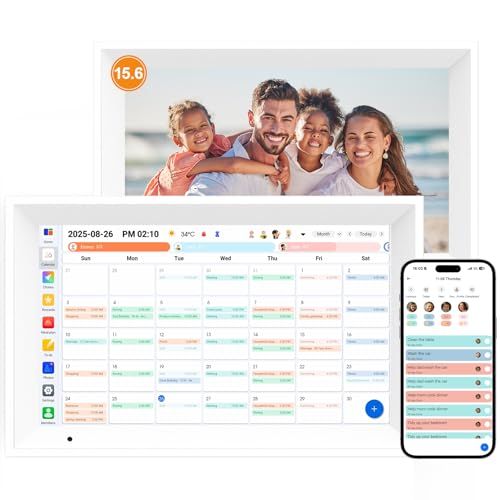
- Screen: 15.6" touchscreen
- Orientation: Landscape or portrait
- Auto Sync Calendars: Google, yahoo, iCloud, Outlook, Cozi, and more
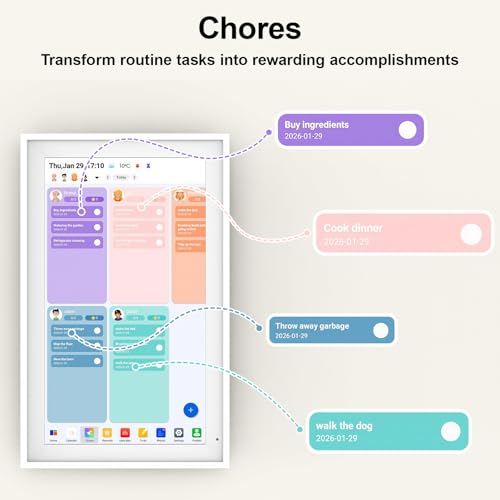
- Features: Digital picture frame, chore chart, meal planner
- Dimensions: 18" wide x 11" tall
.png)
.png)




Linkdaze Digital Calendar
Overview and Everyday Experience

The Linkdaze Digital Calendar is designed for people who want a clearer, more reliable way to keep track of time, appointments, and daily routines without the friction that sometimes comes with juggling multiple apps or paper planners. At its best, it feels less like a gadget and more like a steady household or office fixture: always visible, easy to reference at a glance, and helpful for keeping everyone aligned. The core appeal is simple: it puts the day, date, and schedule information where you can see it instantly, reducing the “What day is it?” moments and the small miscommunications that happen when calendars live only on individual phones.
In day-to-day use, the biggest value of the Linkdaze Digital Calendar is how it turns scheduling into a shared visual. For families, it can become a central hub for school events, practices, medical appointments, and travel plans. For busy professionals, it can function as a secondary “command display” that reinforces the day’s priorities and reduces the chance of missing a meeting. For caregivers and older adults, the clear presentation of date and day-of-week can reduce confusion and create a reassuring structure. If you’ve ever found that notifications vanish too quickly or paper notes end up misplaced, a dedicated calendar display can feel refreshingly grounded.
Another strong point is the psychological effect of a persistent display. Phones are excellent at reminding you, but they’re also portals to distraction. A digital calendar that mainly does calendar work encourages quick check-ins without pulling you into email, social media, or endless to-do shuffling. This is especially meaningful in shared spaces like kitchens, entryways, or office reception areas, where people need information quickly and consistently.
That said, the experience will depend heavily on how well the Linkdaze Digital Calendar fits your environment and habits. If you’re already disciplined with a digital calendar on your phone and you live alone, the incremental benefit may be smaller. If you’re coordinating multiple people, multiple schedules, or a changing routine, the value tends to rise quickly because a centralized, glanceable display reduces repeated questions and last-minute surprises.
What to Consider Before Buying (and What Matters Most)
Before purchasing the Linkdaze Digital Calendar, most buyers should focus on a few practical factors that determine whether it will feel effortless or finicky. The most important consideration is how the calendar syncs with your existing system. If you rely on Google Calendar, iCloud, Outlook, or shared family calendars, you’ll want confidence that integration is straightforward and reliable. A digital calendar can look great, but if syncing is inconsistent or the setup process is cumbersome, it stops being a time-saver and becomes one more thing to manage. For most users, compatibility and sync stability are the top priorities because they affect the calendar every single day.
The second most important factor is readability and display quality in your intended location. Think about lighting, distance, and who will be reading it. A calendar placed in a bright kitchen needs a display that remains clear in daylight, while a bedroom placement benefits from comfortable brightness that won’t be harsh at night. Consider font size, contrast, and the ability to show information in a clean layout rather than cramming too many items into a small view. If the Linkdaze Digital Calendar will be used by older adults or in a multi-person household, readability becomes nearly as critical as syncing.
Ease of setup and ongoing use is another factor that can make or break satisfaction. Many people buy a digital calendar to reduce mental load, so the device should not require constant troubleshooting or a steep learning curve. Consider whether it can be managed from a phone app or web dashboard, whether adding events is intuitive, and whether it supports multiple users without complicated permissions. If you expect grandparents, kids, or guests to rely on it, simple navigation and clear controls matter.
Privacy and account security deserve special attention, especially if the display sits in a shared or semi-public space. A calendar can reveal addresses, appointment titles, and personal routines. It’s worth thinking about whether you can limit what details appear on-screen, whether you can hide sensitive event descriptions, and whether there are options for controlling visibility by calendar type. The most practical approach is to plan what information you want visible and then ensure the calendar’s display settings can match that preference.
Also consider the physical design and placement. Will it sit on a counter, mount on a wall, or live on a desk? Does it look neutral enough to blend into your space? Is the power cable long enough, and is there a sensible place to plug it in without creating clutter? These details sound small, but they determine whether the calendar ends up being a permanent, helpful tool or something that gets relocated repeatedly and used less over time.
Finally, consider the total cost over time. Beyond the upfront price, check whether any features require a subscription or optional add-ons. Even if the Linkdaze Digital Calendar performs well, long-term value depends on whether you’ll still feel good about the purchase after months of use, not just on day one. For most buyers, the “big three” are sync compatibility, readability, and ease of use, because those directly affect whether the device genuinely reduces friction in your routine.
Common Questions
Does the Linkdaze Digital Calendar replace my phone calendar? It usually works best as a companion rather than a replacement. Your phone remains the fastest way to create events on the go, while the Linkdaze Digital Calendar shines as a shared, always-visible reference point that reinforces plans and reduces missed commitments.
Is it suitable for older adults or anyone who gets confused by dates? Yes, this is one of the most common reasons people choose a dedicated digital calendar. A persistent, high-visibility day and date display can be reassuring and helpful, particularly when paired with a simple layout and clear text. The key is placing it somewhere it will be checked naturally throughout the day.
Can multiple people use it? In most households, that’s the goal. The real advantage comes when it reflects shared schedules so that everyone can see what’s coming up. Before buying, confirm that your preferred calendar platform supports sharing in the way you need and that the display can show combined calendars without becoming visually cluttered.
Will private appointments show up for everyone to see? Potentially, yes, depending on how you configure your calendars and what the device displays. A smart approach is to separate personal and shared calendars, then choose display settings that limit sensitive details. If privacy is a major concern, prioritize the ability to hide event titles or display only “busy” blocks for certain calendars.
Where does it work best in a home or office? The best spot is a high-traffic area where people naturally pause for a moment, such as a kitchen counter, entryway table, or near a home office workspace. In a workplace, it can be effective at reception, in a break room, or near team workstations where a shared schedule is useful.
Overall, the Linkdaze Digital Calendar is a strong fit for anyone who benefits from a shared, glanceable view of the day and week, especially families, caregivers, and busy professionals coordinating multiple commitments. If you prioritize reliable syncing, clear readability, and simple day-to-day operation, it can meaningfully reduce scheduling friction and help your routines feel calmer and more organized.