


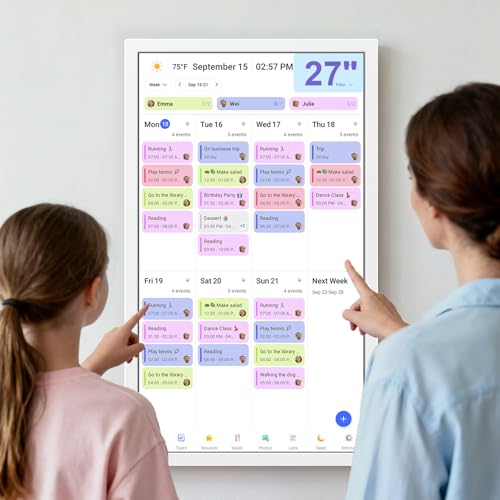


- Screen: 27" touchscreen
- Orientation: Landscape or portrait
- Auto Sync Calendars: Google, Yahoo, iCloud, Outlook, Cozi, and more
- Features: Digital picture frame, chore chart, meal planner
- Dimensions: 25" wide x 14.8" tall
.png)
.png)




BQQJDD Smart Calendar Max
Overview and everyday experience

The BQQJDD Smart Calendar Max aims to replace the messy trio of paper planners, sticky notes, and half-forgotten phone reminders with a single shared hub you can actually see. In day-to-day use, its biggest value is visibility: appointments, routines, and family schedules stop living only inside individual phones and become something everyone can glance at in the kitchen, entryway, or home office. For households juggling school pickups, work calls, practices, and recurring errands, a smart calendar display can reduce the constant “What time is that again?” back-and-forth and help prevent double-booking.
As a concept, the Smart Calendar Max works best when it’s treated like a household “source of truth.” The best setups are the ones where each person’s calendar is connected (or at least the main decision-maker’s calendar is), key recurring items are entered once, and the display becomes part of a daily rhythm. When that happens, the device functions like a gentle coordination tool rather than another screen competing for attention. If you already rely heavily on digital calendars and you like the idea of making them communal without handing everyone a phone, the BQQJDD Smart Calendar Max is trying to solve a real problem.
What you’ll likely notice early on is how the format changes behavior. A wall or counter display encourages quick confirmation rather than deep interaction. That’s a good thing: you don’t need to open an app, navigate to a view, and interpret a tiny grid. The trade-off is that any smart calendar is only as good as its configuration. If syncing isn’t set up correctly, if notifications are too aggressive, or if the placement is awkward, you’ll stop looking at it. In that sense, the Smart Calendar Max isn’t a “set it and forget it” purchase on day one; it’s a “set it up thoughtfully and enjoy it for months” type of product.
What to consider before buying (and what matters most)
Before purchasing the BQQJDD Smart Calendar Max, the most important factor to consider is calendar compatibility and syncing reliability. If the device can’t smoothly reflect the calendars you already use, the novelty will wear off fast. A smart calendar display has to feel effortless, meaning changes made on your phone or laptop appear on the display quickly and consistently, and edits made on the display (if supported) should sync back without creating duplicates or odd conflicts. In practical terms, you should confirm which calendar services you rely on most and whether the Smart Calendar Max integrates with them in a way that matches your household’s habits. If there’s one make-or-break requirement, it’s that the calendar data stays accurate without constant troubleshooting.
Second, think about visibility and placement, because a smart calendar only works if people actually read it. Consider where it will live, how far away it needs to be legible, and whether the screen size and brightness are suitable for that space. A “Max” labeled display suggests it’s designed for easier viewing at a glance, but what matters is your environment: bright sunlight near a window, dim hallways, or a busy kitchen can all affect readability. If the display becomes hard to see or looks like a glowing distraction at night, it will end up ignored or turned off.
Third, privacy and household boundaries deserve real attention. A shared display is great for coordination but can expose more than you intend, especially if you have work calendars with sensitive meeting titles or medical appointments you’d rather keep private. Look for options that allow you to hide event details, show only busy/free status, or separate personal calendars from the communal view. The best smart calendar experience comes from clarity without oversharing. This factor becomes even more important if the device supports voice assistants, cameras, or microphones, since “smart home convenience” can conflict with “I don’t want always-on sensors in my kitchen.”
Fourth, consider how input works and who will maintain it. Some households want a display that’s strictly a mirror of existing calendars. Others want to tap the screen and quickly add “Buy poster board” or “Vet appointment” without pulling out a phone. If the Smart Calendar Max is primarily used as a viewer, ease of navigation matters less than clarity. If you plan to use it as an entry point, then responsiveness, on-screen keyboard usability, and frictionless editing become far more important. Also think about whether kids, guests, or babysitters will interact with it; a device that’s too complex won’t be used consistently.
Fifth, evaluate recurring costs and long-term support. Many smart displays today are sold as hardware plus optional software features. If core features require a subscription, you’ll want to decide whether the calendar remains useful without it, and whether the paid tier provides real value or just unlocks basics. Similarly, software updates matter because calendar services change over time. A device can be wonderful for a year and then become temperamental if it doesn’t receive updates to keep integrations stable.
Finally, don’t overlook aesthetics and physical practicality. A smart calendar sits in your space all day. The frame style, thickness, mount options, and cable management can be the difference between “this looks like part of the home” and “this looks like a tablet we forgot to put away.” You should also consider power requirements and whether you can hide the cord or whether you’ll need an outlet installed nearby. These sound like minor details, but they strongly influence whether the device feels like a permanent, welcome tool.
If you rank these factors, syncing reliability and compatibility come first, followed by privacy controls and visibility in your chosen location. Everything else becomes secondary if those top needs aren’t met.
Common Questions
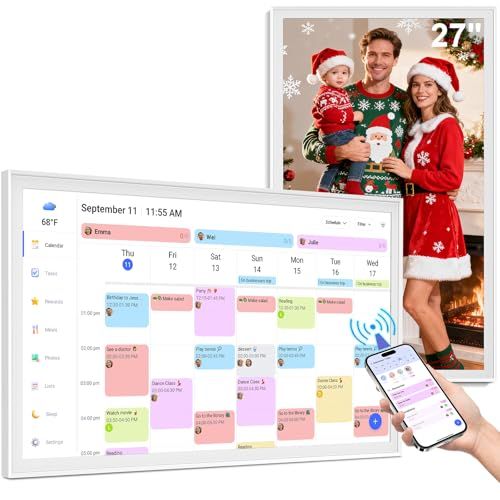
Will the BQQJDD Smart Calendar Max work if my family uses different calendar services? It can, as long as the device supports connecting multiple accounts and displaying them in a combined view. The key is whether it can keep each person’s calendar distinct with clear color-coding or labels, and whether it can handle permissions properly. If it can only connect to one service cleanly, it may still work as a household hub, but you’ll need to decide whose calendar becomes the primary source.
Can I keep certain events private while still using a shared display? That depends on whether the Smart Calendar Max supports privacy modes such as hiding event titles, showing only busy blocks, or requiring a passcode to reveal details. For many buyers, this is a crucial feature because the whole point is shared visibility without unintentionally sharing everything. If you anticipate sensitive events, you should treat privacy controls as a must-have rather than a nice-to-have.
Is a smart calendar redundant if we already use phones and smart speakers? It can be redundant if your household already checks digital calendars consistently and communicates changes well. Where a display earns its place is in reducing friction and misunderstandings: it’s always visible, it doesn’t require asking a device aloud, and it helps everyone align quickly. If scheduling is a recurring stress point in your home, a dedicated display can be surprisingly effective even if you’re already “digitally organized.”
What if someone forgets to add events? No smart calendar can solve missing data, but a shared display can create gentle accountability. When the calendar is visible, omissions become obvious sooner, and routines like adding events immediately after making plans are easier to reinforce. The most successful households decide on a simple rule, such as “If it’s not on the calendar, it’s not real,” and the display becomes the constant reminder.
Overall, the BQQJDD Smart Calendar Max makes the strongest case for families, roommates, and busy couples who want a shared, glanceable schedule without constant phone checking. If you confirm strong syncing with your existing calendars, ensure privacy settings match your comfort level, and choose a placement where the screen is easy to read, it can become a genuinely useful household anchor rather than just another smart device.