




- Functionality: Print, scan, copy
- Resolution: 1200 x 1200 dpi
- Color Print Speed: 5.5 ppm
- Monochrome Print Speed: 7.5 ppm
- Two-Sided Printing: Yes
- Max Paper Size: 8.5" x 14"





HP DeskJet 2827e All-in-One Printer Review
Introduction to the HP DeskJet 2827e All-in-One Printer

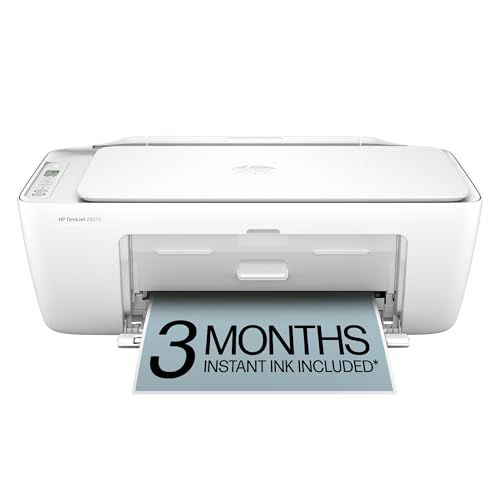
The HP DeskJet 2827e All-in-One Printer represents the convergence of efficiency, compact design, and cost-effectiveness, making it an appealing choice for both home and small office environments. As part of the HP DeskJet series, this model promises an intuitive user experience packed with essential features for everyday printing tasks, along with modern connectivity options to facilitate seamless integration into any setup.
In-depth analysis of its performance, usability, and value for money will help potential buyers determine if this is the right printer for their needs.
Key Considerations Before Purchasing
Before deciding to purchase the HP DeskJet 2827e, several factors come into play that prospective users should consider. First among these is the printer’s functionality. The 2827e is an all-in-one device capable of printing, scanning, and copying. This multi-function capability is crucial for users looking for a versatile machine that can handle multiple tasks beyond mere printing.
Print quality is another paramount consideration. The DeskJet 2827e delivers prints with adequate resolution for most home or small office needs, making it suitable for documents, simple graphics, and photos. However, those requiring very high-resolution prints might need to consider other options.
Connectivity options greatly affect how conveniently users can interact with their printer. The 2827e offers USB connectivity as well as Wi-Fi, which supports HP Smart App, Apple AirPrint, and other mobile printing solutions. This range of options ensures that users can print from virtually any device, anywhere in the home or office.
Cost efficiency is critical. The DeskJet 2827e is attractively priced and uses high-yield ink cartridges intended to offer more prints per cartridge, which can be a significant saving for frequent users. Moreover, the initial cost versus ongoing operating expenses should be balanced as ink costs can accumulate over time.
Lastly, the physical size of the printer impacts where it can be placed within a home or office setting. The HP DeskJet 2827e boasts a compact design, making it a good fit even in smaller spaces. This is particularly beneficial for users with limited workspace.
Common Questions
What type of ink does the HP DeskJet 2827e use? The DeskJet 2827e works with HP 67 Black and Tri-Color ink cartridges. High-yield cartridges are available for users who do a lot of printing, potentially reducing the frequency of replacement and downtimes.
Is the HP DeskJet 2827e compatible with voice-activated devices? Yes, it is compatible with voice assistant platforms such as Amazon Alexa and Google Assistant, making it possible to manage print tasks via voice commands, which is a touch of modern convenience many users will appreciate.
Does the printer support dual-sided printing? The HP DeskJet 2827e does not support automatic double-sided printing (duplexing). Users need to manually reinsert pages to print on both sides, which could be a consideration for those who often print multi-page documents.
Conclusion
The HP DeskJet 2827e All-in-One Printer is a compact, efficient, and economical solution for those who require a versatile printer with the capability to print, scan, and copy without requiring complex setup or excessive space. While the printer is ideally suited for home or small office settings thanks to its straightforward functionality and cost-effectiveness, it may fall short for users with heavy-duty printing needs or those requiring high-end print quality. Overall, the DeskJet 2827e stands out as a smart choice for casual or moderate printing tasks, where convenience and budget are key considerations.