



- Type: Film
- Scan Speed: N/A
- Two-Sided Scanning: N/A
- Max Paper Size: Film negatives and film slides only
- Connectivity: USB, HDMI





Kodak Slide N Scan Film Scanner
Overview and real-world performance

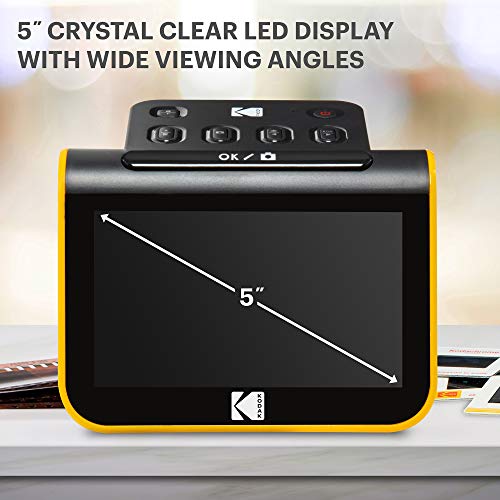
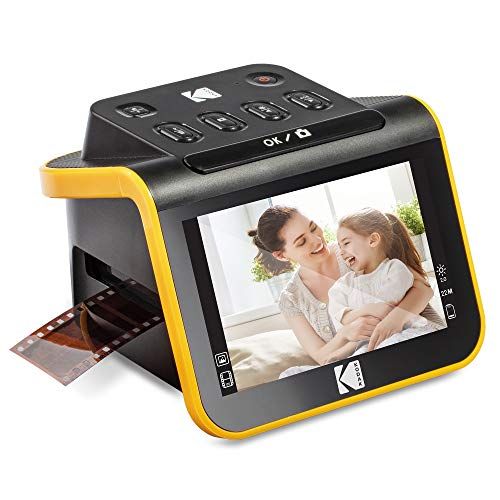
The Kodak Slide N Scan Film Scanner is designed for a specific kind of buyer: someone who wants to digitize old 35mm slides and film negatives at home without turning the process into a technical hobby. It focuses on convenience and speed, combining a built-in screen for framing and previewing with simple controls and wide format support for common consumer film types. In practice, its appeal comes from how quickly you can go from “box of family memories” to shareable image files, without needing a separate computer for every step.
Day-to-day performance is best described as efficient and approachable. Setup is typically straightforward, and the on-device preview makes it easier to correct orientation and basic framing before scanning. This matters because film digitization can be surprisingly fiddly, especially if you have mixed batches of slides and negatives. The Slide N Scan approach reduces the friction by letting you see what you’re doing immediately, then save scans to a memory card for later transfer.
Image quality is where expectations should be calibrated. For many families, the results are more than good enough for sharing online, creating digital albums, or making moderate-size prints. If you are aiming for archival, museum-level reproduction or plan to make large prints from every frame, you may eventually want a higher-end dedicated film scanner with more advanced focusing, dynamic range, and color management. Still, for everyday scanning and reclaiming decades of images from aging film, the Kodak is a practical middle path between phone “backlight and photograph” methods and more complex professional workflows.
Color and contrast are influenced as much by the condition of your originals as by the scanner itself. Old film can have color shifts, faded dyes, dust, scratches, and exposure limitations. The Kodak’s results tend to be most satisfying when the originals are reasonably clean and well-exposed, and when you accept that some images will need small edits afterward. A quick pass in photo software to adjust levels, color balance, and remove dust can elevate the final look dramatically, and that is true of nearly any consumer film scanning solution.
Factors to consider before buying (and what matters most)
The first factor to consider is your goal for the digitized images. If you want shareable files for social media, family group chats, digital frames, and standard photo books, the Kodak Slide N Scan is typically a strong fit because it prioritizes speed and ease. If your goal is to squeeze every last detail out of fine-grain film, retain subtle shadow detail from dense negatives, and maintain consistent color accuracy across varied film stocks, you may find that a more advanced scanner and a more controlled workflow will matter more than convenience. This “use case clarity” is the most important purchase factor because it determines whether the Kodak’s strengths align with what you actually need.
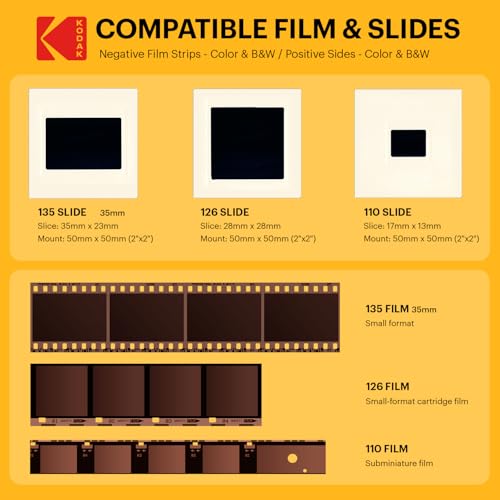
The second factor is format compatibility and the nature of your collection. Many people have a mix of 35mm slides and 35mm negatives, sometimes plus smaller batches of other sizes. Confirming what you own, and how much of it you plan to scan, should guide your decision. If your collection is overwhelmingly one type, your priorities may shift. For example, if you have mostly slides, quick preview and easy handling are key. If you have mostly negatives, good color inversion behavior and consistent exposure handling become more noticeable over hundreds of frames.
Third, consider workflow and time. Film scanning is a volume task, and small frictions compound. The Kodak’s biggest advantage is that it keeps the process simple: load film, preview, save, repeat. If you are scanning thousands of images, the ergonomics of loading carriers, the speed per scan, and how easy it is to keep files organized can matter as much as raw image quality. The most important workflow consideration is whether you will realistically finish the project. A scanner that is “good enough” but easy to use often results in more images rescued from boxes than a higher-end option that feels like work every time you sit down.
Fourth, look at storage and transfer. Because the device is meant to operate without being tethered to a computer for basic scanning, you’ll want a reliable memory card and a clear file-management habit from the start. Plan how you will back up the scans, how you will name folders, and how you will sort by date, event, or film strip. This is not glamorous, but it becomes crucial once you have hundreds or thousands of files, and it’s easier to do right at the beginning than to fix later.
Fifth, consider your tolerance for post-processing. Many users are perfectly happy with the scanner’s direct output, while others prefer to do quick edits to improve skin tones, reduce color casts, or bring back contrast. If you enjoy light editing, the Kodak can be a great “capture device” that gets you to a workable digital file quickly. If you want perfect results with minimal intervention, you may want to read user feedback specifically about how it handles your film type, especially color negatives versus black-and-white negatives.
Finally, factor in handling of dust and film condition. No consumer scanner eliminates the need for basic cleaning. Having a blower, microfiber cloth, anti-static brush, or film cleaning solutions can change your results more than upgrading hardware. If your collection is dusty or has been stored in less-than-ideal conditions, a device that is easy to use and encourages a steady cleaning routine can be more valuable than chasing the last bit of resolution. In most home projects, the most important practical determinants of quality are clean originals, consistent handling, and a repeatable workflow.
Common Questions
Is the Kodak Slide N Scan Film Scanner good enough for printing photos?
For small to moderate prints and photo books, it is often sufficient, especially when the originals are in decent condition and you do minor edits after scanning. For very large prints or critical archival reproduction, a higher-end dedicated film scanner may deliver better detail and tonal range.
Do I need a computer to use it?
Not for the basic scanning process. You can typically scan, preview, and save images directly to a memory card, then transfer the files to a computer later for organization and editing. A computer becomes useful for backups and post-processing, but it is not required to start digitizing.
How long does it take to scan a collection?
Time depends on how many images you have, how much cleaning is needed, and how selective you are. The scanning itself can be fairly quick, but cleaning dust, rotating frames, re-scanning problem shots, and organizing files often take as long as the scanning step. Planning for a steady pace and a consistent workflow usually helps more than focusing on scan speed alone.
Will it fix faded colors or remove dust and scratches automatically?
It can improve the look of some images, but it cannot fully restore heavily faded film or perfectly remove physical damage on its own. The best results come from cleaning the film first and doing light post-processing afterward. For severe dust and scratches, dedicated restoration tools in editing software can make a noticeable difference.
As a home film digitizing tool, the Kodak Slide N Scan Film Scanner succeeds when convenience, speed, and simplicity are the priority. The most important buying decision is matching it to your end goal: if you want to preserve and share family images with minimal fuss, it’s a compelling choice; if you need maximum detail and color accuracy for intensive archival work, you may want to look at more specialized options.