














We also considered 10 others:




Our Top Choice
Compare Features


The order above is not editorial opinion, and it is not paid placement. It comes from what shoppers across our network actually do - which pc desktop computers they compare, and which they ultimately buy. We re-rank as new data comes in, so the long-term favorites have to keep earning their spot against new entrants. The full method, including how we make money.
PC Desktop Computers Buyer's Guide
Desktop PCs offer the most flexibility per dollar, but the tradeoff is that the details matter: form factor, ports, cooling, power supply, and upgrade paths can make two similar-looking systems very different to live with. The sharpest buying risks are refurbished-condition variance and connectivity mismatches, especially wireless adapters and monitor outputs that are not obvious until setup.
Reliability
A reliable desktop PC should run consistently under your everyday workload without frequent crashes, overheating, or premature part failures. Look for solid build quality, good cooling, dependable power delivery, and components that are easy to service or upgrade, and be wary of systems that cut corners on case construction, airflow, or generic internal parts.
For a desktop PC, reliability depends heavily on component condition, cooling, and upgrade-standard parts, so check whether the unit is new or refurbished, what warranty/return window covers dead-on-arrival failures, and whether the storage drive, power supply, GPU, fans, and motherboard are standard enough to replace. Be cautious with small-form-factor or mini systems if you plan sustained workloads, because tight cooling can expose heat-related shutdowns, fan noise, throttling, or early drive failure; for refurbished desktops, look for clear grading, cleaned internals, tested ports, and documented Windows activation. Owner feedback supports this caution: many buyers find low-cost and refurbished desktops solid, clean, and well packaged, but negative reports include broken arrivals, heat issues, black screens, freezing, drive/GPU/PSU/connectivity failures, and difficult support when something fails immediately.
Performance
Performance determines how quickly your desktop feels in daily use and whether it has enough power for gaming, streaming, creative work, and multitasking without stutter or long waits. Look for a balanced CPU, graphics card, memory, and fast storage that match what you actually do, and watch for systems that emphasize one impressive part while cutting corners on cooling, RAM, or upgrade room.
Match the desktop’s CPU, RAM, storage, and GPU to the actual workload rather than relying on “fast” claims: office, school, browsing, streaming, and trading dashboards can run well on modest modern hardware with an SSD and enough RAM, while CAD, video editing, and gaming need stronger multi-core CPUs, more memory, and a real graphics card. For gaming desktops, check the exact GPU model and video memory, not just RGB styling, and compare it to the games and resolution you intend to use; older budget GPUs can be fine for esports and mainstream titles but are not equivalent to current high-end cards. Owner sentiment aligns with this split: buyers often praise everyday speed, fast boot times, multitasking, Windows 11 replacement value, light creative work, CAD-capable performance in some systems, and playable mainstream gaming when expectations match the hardware.
Value
You want a desktop that feels worth what you pay, not just one with impressive specs on paper. Look for a balanced mix of processor performance, memory, storage, upgrade options, build quality, and included essentials, and watch out for systems that cut corners in areas like cooling, expandability, or bundled peripherals to hit an attractive price.
The best desktop value is the configuration that avoids immediate add-on costs: confirm it includes an activated supported operating system, SSD storage, sufficient RAM, the display outputs you need, usable Wi‑Fi/Bluetooth if required, and any monitor/keyboard/mouse bundle quality you are counting on. Refurbished office desktops can be excellent bargains, but only if their CPU supports the OS you need, the case and power supply allow your future upgrades, and the return policy protects you from worn drives or flaky components. Owner reports reinforce that value can be strong: shoppers frequently feel they received capable everyday performance, Windows 11 compatibility, generous storage, and complete low-cost setups for the money, especially when they accept the limits of budget or refurbished hardware.
Setup
A desktop PC that’s easy to set up lets you get from the box to a usable workspace with less frustration, especially if you’re buying for a beginner or someone who doesn’t want to troubleshoot hardware and software right away. Look for clear instructions, well-labeled ports, included essentials when needed, and a simple first-run setup process; watch out for systems that require extra adapters, manual driver installs, or confusing account and security prompts before you can start using them comfortably.
Before buying, verify what “ready to use” actually includes: activated Windows, power cord, display cable type, monitor compatibility, Wi‑Fi/Bluetooth hardware, keyboard/mouse, and whether the initial setup requires a wired internet connection. For refurbished or mini PCs, also plan to run updates, confirm device drivers, check storage health, test every USB/display/audio/network port, and create a recovery drive while the return window is open. Owner feedback is generally encouraging here, with many buyers describing setup as quick, simple, plug-and-play, and easy to start using, but the safest approach is still to test the full system immediately rather than assuming every included part works perfectly.
Connectivity
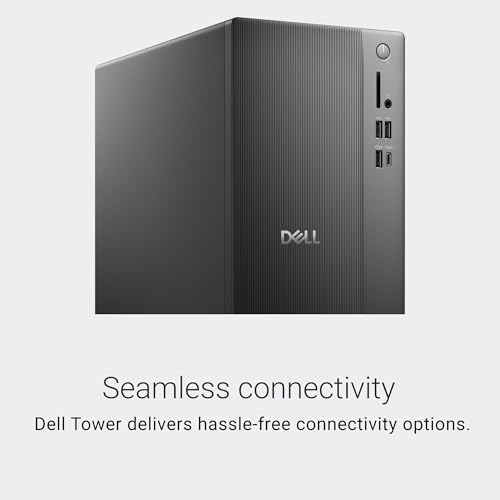
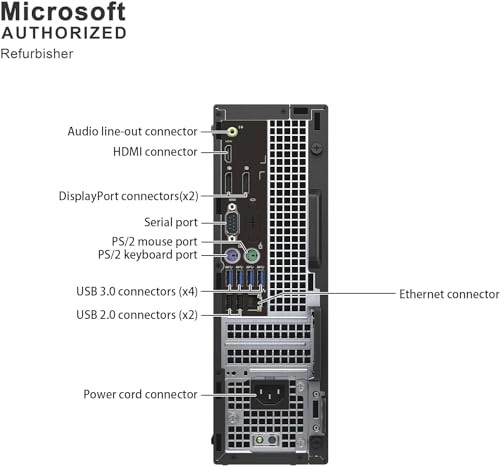
Connectivity determines how easily your desktop fits with the monitor, keyboard, storage drives, speakers, network, and other peripherals you already use or may add later. Look for enough easily accessible USB ports, the right display outputs for your monitor setup, reliable Ethernet and Wi‑Fi options, and Bluetooth if you use wireless accessories. Watch out for compact systems with limited ports or hard-to-reach connections, since adapters and hubs can add clutter and inconvenience.
Connectivity is a desktop-specific dealbreaker to check in detail: confirm the monitor outputs match your display, whether the PC has HDMI, DisplayPort, VGA, or USB‑C video, whether it supports multiple monitors, and whether adapters are active or passive when needed. If you need wireless internet, online gaming, Bluetooth peripherals, or wake-from-sleep reliability, prefer built-in Wi‑Fi/Bluetooth with known standards over a tiny USB dongle, and make sure there are enough rear USB ports left after keyboard, mouse, Wi‑Fi, Bluetooth, webcam, headset, storage, and printer devices. Owner sentiment makes this a major watch-out: buyers often report missing or wrong monitor cables, Wi‑Fi adapters that detect networks but do not connect, networks not appearing, port troubleshooting, Bluetooth issues, and online gaming/internet setup problems, even though some systems work smoothly for common home and office connections.
Design
Because a desktop PC often sits in plain view, its appearance can affect how well it fits into your workspace, gaming setup, or home office. Look for a design that matches your taste and room layout while still supporting practical needs like good airflow, easy access to ports, and enough space for future upgrades. Be careful not to choose looks alone, since flashy lighting, unusual shapes, or compact cases can sometimes make the system louder, hotter, or harder to service.
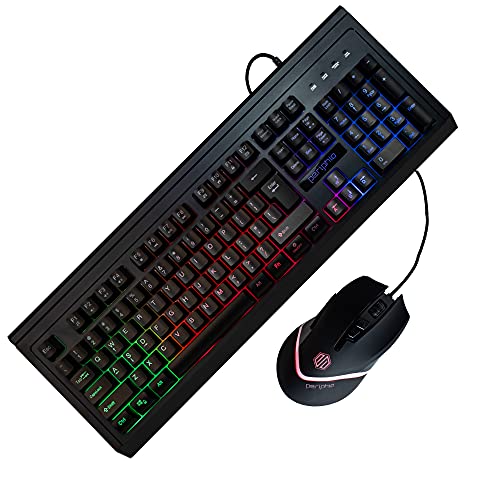
Choose the desktop form factor around desk space, cooling, repairability, and expansion: mini PCs and all-in-ones save space and can be quiet, but usually limit GPU upgrades, internal storage expansion, port access, and cooling headroom; mid-towers are bulkier but easier to clean, cool, repair, and upgrade. If aesthetics matter, check that RGB cases still have practical airflow, dust filtering, standard parts, and front-panel ports where you need them; for all-in-ones, remember the screen and computer are tied together, so a failure in one can affect the whole setup. Owner feedback supports the appeal of good design, with buyers appreciating clean all-in-one layouts, quiet operation, manageable case size, attractive lighting, smooth startup, and refurbished units that often look close to new.
1,000,000+ shoppers use Buyer's Guide every week to find the best products and services online.

Helping millions of users make smarter purchases online.


