


- Display Size: 15.6"
- Resolution: 1920 x 1080
- Memory: 32GB RAM
- Storage: 1TB SSD
- Processor: AMD Ryzen 7 Pro 6850U 8-core
- Graphics Processor: AMD Radeon 680M
- Touchscreen: No
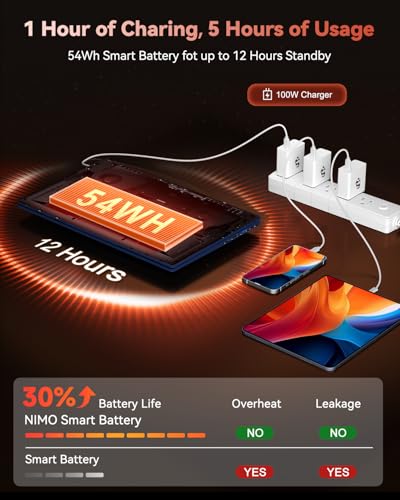
- Battery Life: 9 hours
- Operating System: Windows 11
- Weight: 3.75 lbs





NIMO 15.6" Light Gaming Laptop
Overall Performance and Everyday Experience

The NIMO 15.6" Light Gaming Laptop is aimed at people who want a single machine that can handle school or office work during the day and casual gaming at night without the bulk, noise, or price tag of a full-sized gaming rig. In day-to-day use, the experience tends to feel snappy for typical workloads like web browsing with multiple tabs, video calls, streaming, document editing, and light creative tasks. The “light gaming” positioning is important: this category generally prioritizes a balanced setup that can run popular competitive titles and older or well-optimized games smoothly, while newer AAA releases may require lower settings or resolution adjustments to stay comfortable.
Where this type of laptop often succeeds is in responsiveness and practicality. A 15.6-inch format is large enough to feel comfortable for productivity, while still being portable enough for commuting or moving between rooms. Many buyers will appreciate the familiar keyboard-and-trackpad layout and the room a 15.6-inch chassis provides for better cooling than ultra-compact laptops. When the system is under load, you should expect the fans to become audible; that’s normal for any laptop that’s asked to game or render. The key is whether the fan noise and surface temperatures remain reasonable for your environment, and whether performance stays consistent during longer sessions rather than dropping after the first few minutes.
For gaming specifically, the NIMO’s value is often in its ability to deliver a playable experience in esports and mainstream titles with sensible settings. If your gaming habits revolve around fast-paced shooters, MOBAs, or sports games, this class of laptop can make a lot of sense. If you’re hoping to play the newest graphically demanding games at high settings with ray tracing and consistently high frame rates, you may find yourself wishing for a stronger GPU and a more robust cooling system. In short, it’s a good fit for “play often, not always on max settings,” and for buyers who want a capable general-purpose laptop that can also game.
Key Buying Factors and What Matters Most
Before buying the NIMO 15.6" Light Gaming Laptop, it helps to be clear about which factors will have the biggest impact on your satisfaction. Performance is the obvious starting point, but “performance” isn’t one thing. The most important elements typically come down to the CPU and GPU pairing, the amount of RAM, and the storage type and capacity. If the laptop configuration includes a modern multi-core CPU, it will feel smoother in multitasking, large spreadsheets, and productivity software. The GPU determines how comfortable gaming feels and how high you can push settings. For light gaming, you’ll want a graphics solution that can hold stable frame rates in the games you actually play, not just in marketing benchmarks.
RAM is one of the most underestimated purchase factors. Many modern apps, browsers, and background tools can easily use significant memory, and games often perform better with enough RAM headroom. If you’re deciding between configurations, choosing more RAM can extend the useful life of the laptop more than minor jumps in CPU tier. Storage is equally practical: an SSD is essential for fast boots and quick loading, and capacity matters more than people expect once a few large games and media files are installed. If the model supports storage expansion, that can be a major advantage, letting you start with what you can afford and upgrade later.
The display is another major consideration, especially for a 15.6-inch laptop that you’ll look at for hours at a time. Buyers should think about resolution, refresh rate, brightness, and color quality. A higher refresh rate can make competitive games feel more responsive and smooth, but only if the GPU can drive the frame rates to match. Brightness and color matter for working in varied lighting and for content consumption. If you do photo or video work, color accuracy becomes a priority, while for gaming and general use, a solid, bright panel with decent contrast can be more important than perfect color calibration.
Thermals and noise are often the hidden “most important” factor for gaming laptops. Even if a laptop looks powerful on paper, poor cooling can lead to performance throttling during longer play sessions. A well-balanced light gaming laptop should keep clocks stable, avoid uncomfortable hot spots on the keyboard deck, and maintain fan noise at a level you can tolerate. Alongside thermals, battery life should be assessed realistically: gaming on battery is usually short-lived on any laptop, so the meaningful question is how long it lasts for non-gaming tasks such as note-taking, browsing, and streaming. If you’re often away from an outlet, battery life and USB-C charging support can matter more than a small performance advantage.
Port selection and build quality can also determine whether the laptop fits your routine. Consider how many USB ports you need for a mouse, controller, external drive, or headset dongle, and whether you’ll connect to an external monitor for a bigger gaming or productivity setup. A good Wi-Fi module and stable wireless performance are crucial for online games and video calls. Keyboard feel is subjective, but for many users it becomes a daily quality-of-life factor; if you type a lot, a comfortable keyboard can matter just as much as raw frame rates. Ultimately, the most important factors for most buyers are the GPU capability for the games they play, sufficient RAM and SSD storage for smooth everyday use, and cooling that keeps performance consistent.

Common Questions
Can the NIMO 15.6" Light Gaming Laptop handle modern games? Yes, but with expectations set to “light gaming.” It should be well-suited to esports titles and many popular games at reasonable settings. For the newest, most demanding AAA releases, you may need to lower graphics settings, use performance modes, or reduce resolution to maintain smooth frame rates.
Is it good for school or office work as well? Yes. A 15.6-inch laptop in this category typically performs very well for productivity tasks like documents, spreadsheets, web apps, presentations, streaming, and conferencing. The larger display can also be more comfortable for multitasking than smaller ultraportables.
What should I prioritize if I can only upgrade one thing? If the configuration allows it, RAM and SSD capacity are usually the most practical upgrades for overall feel and longevity. More RAM helps multitasking and can improve game smoothness, while a larger SSD prevents you from constantly uninstalling apps and games to make room.
Will it run hot or loud while gaming? Most gaming-capable laptops will get noticeably warmer and louder under load. The more important question is whether it stays within comfortable limits and maintains stable performance over time. Using a hard surface, keeping vents clear, and selecting balanced performance modes can help manage heat and noise.
Is a high refresh rate display worth it? It depends on the games you play. For competitive titles where frame rate is high, a higher refresh rate can feel smoother and more responsive. For slower-paced games or if the GPU can’t consistently push high frame rates, the benefit is smaller, and you may care more about brightness and color quality.
In conclusion, the NIMO 15.6" Light Gaming Laptop is best viewed as a versatile, everyday laptop with gaming ability rather than a no-compromise gaming powerhouse. If you focus on the most important purchase factors—GPU suitability for your favorite games, adequate RAM and SSD space, and cooling that sustains performance—you’ll be in a strong position to choose the right configuration and enjoy a balanced machine that works well across both productivity and play.