


- Functionality: Print, scan, copy
- Resolution: 600 x 600 dpi
- Color Print Speed: N/A
- Monochrome Print Speed: 36 ppm
- Two-Sided Printing: Yes
- Max Paper Size: 8.5" x 14"





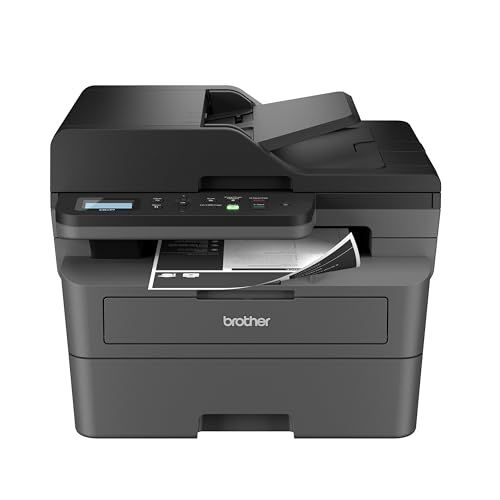
Brother DCP-L2640DW Multi-Function Laser Printer
Overall Review and Everyday Experience

The Brother DCP-L2640DW Multi-Function Laser Printer is designed for people who want the practicality of a monochrome laser device without stepping up to a bulky, expensive office machine. It combines printing, scanning, and copying in a compact footprint, and its general appeal is simple: dependable black-and-white output, low fuss operation, and features that suit home offices and small teams. If your day-to-day workload revolves around invoices, shipping labels, school worksheets, contracts, and text-heavy documents, this model aims to deliver speed and consistency with the crisp edges laser printers are known for.
In typical use, the most noticeable strength is how quickly it gets from “send” to “printed.” Laser printers like the DCP-L2640DW avoid the slow first-page behavior and ink-warming delays that many inkjets exhibit, especially if you print in bursts throughout the day. Text looks dark and well-defined, and small fonts remain readable, which matters when you’re printing legal forms or multi-page PDFs. While it’s not built for photo printing or color graphics, it handles charts, grayscale logos, and simple business graphics adequately as long as expectations match the device’s monochrome purpose.
For scanning and copying, the experience is generally straightforward. Flatbed scanning is helpful for books, IDs, receipts, and odd-sized originals, and it’s a feature many buyers appreciate because it adds flexibility beyond a document feeder. The copy function tends to be quick and legible for text documents. Where multifunction lasers often win is consistency: you can scan a stack of paperwork, print a batch of labels, and then copy a form without worrying about clogged nozzles or long maintenance cycles that sometimes accompany ink-based machines.
Connectivity is another part of the everyday experience. Wireless printing is the expectation now, and the DCP-L2640DW’s support for Wi‑Fi means you can place it where it fits best rather than tethering it to a computer. Mobile printing can be a real quality-of-life improvement if you frequently print email attachments, PDFs, and shipping QR codes straight from a phone. Duplex printing is also a major advantage because it reduces paper use and makes longer documents easier to handle. If you regularly print multi-page packets or draft documents, automatic two-sided printing becomes one of those features you quickly stop thinking about because it simply saves time and paper by default.
Key Factors to Consider Before Buying
The most important question to answer before buying the Brother DCP-L2640DW is whether a monochrome laser aligns with your real printing needs. If you mostly print text and want speed, sharpness, and smudge-free pages, a black-and-white laser is often the best value. If you need color for presentations, marketing materials, or photo-heavy school projects, you’ll likely be happier with a color laser or a higher-end inkjet, even if that means slower output or higher running complexity. Matching the printer to your typical documents is the single biggest factor, because it determines whether you’ll love the machine or constantly wish it did more.
Next, consider total cost of ownership rather than the purchase price alone. Toner-based printing is frequently cheaper per page than ink, particularly for text, and it’s also less prone to “wasted” consumables caused by cleaning cycles. The DCP-L2640DW’s long-term value depends on the price and availability of replacement toner and the expected yield. If you print a lot, the cost per page becomes more important than almost any other spec because it shows up month after month. Also consider whether you prefer standard-yield or high-yield toner options and whether you’re comfortable sticking with genuine supplies or exploring third-party alternatives. A printer that seems affordable upfront can become expensive if toner pricing is high in your region or if yields don’t match your usage patterns.
Paper handling should be a priority if you print a variety of documents. Think about the paper sizes you use, how often you print envelopes or labels, and whether you rely on duplex printing for reports. Automatic duplexing is especially important for home offices and students because it reduces manual flipping and keeps your workflow smooth. If you frequently print on thicker stock, you’ll also want to check the supported media weights and whether the feed path is friendly to labels and envelopes, since small differences in design can affect jam frequency with specialty media.
Scanning needs are also crucial, and this is where buyers sometimes get surprised. Ask yourself how you scan. If you mainly scan occasional pages, the flatbed is perfect and keeps the device compact. If you regularly scan multi-page documents, a machine with an automatic document feeder might be more efficient, even if it costs more. The DCP-L2640DW’s scanning capability is convenient for everyday use, but the “best” choice depends on whether scanning is a primary task or a secondary one.
Finally, think about where the printer will live and who will use it. Wireless reliability and ease of setup matter a lot in shared environments. A printer that is technically feature-rich but frustrating to connect can become a daily annoyance. If multiple people in a household or small office will print from laptops, phones, and tablets, stable Wi‑Fi and simple driver/app support are key. Noise level and sleep/wake behavior can also matter if the printer sits near a desk or in a living space. A laser printer that wakes quickly but stays quiet can feel much more “invisible” in the best way.
Common Questions
Does the Brother DCP-L2640DW print in color? No. This is a monochrome laser printer, meaning it prints in black and white only. It’s best for documents, text, and grayscale graphics rather than photos or color materials.
Is duplex printing automatic, or do I have to flip pages myself? Duplex printing is automatic, so the printer can print on both sides of the page without manual intervention. This is one of the most useful features for long documents and routine office printing.
Can I print from my phone or tablet? Yes, wireless connectivity enables printing from mobile devices, typically through supported mobile printing methods and Brother’s companion app options. This is useful for quick PDF printing, receipts, and shipping labels.
Is it a good choice for scanning multi-page paperwork? It can scan documents reliably, especially using the flatbed, but if you scan large multi-page stacks frequently, you may prefer a model with an automatic document feeder. For occasional scanning and copying, the experience is convenient and consistent.
What matters more: print speed or toner cost? Toner cost usually matters more for most buyers over time, because it determines the ongoing cost per page. Print speed is still important for busy days, but lower running costs tend to deliver the biggest long-term satisfaction.
For anyone seeking a practical, space-conscious multifunction laser printer focused on fast, sharp black-and-white output, the Brother DCP-L2640DW is an appealing choice. The best results come from aligning it with the right expectations: it excels as a reliable document workhorse, and the most important purchase considerations are whether monochrome printing fits your needs, what your long-term toner costs will be, and how well the scanning and paper-handling features match your daily workflow.