















We also considered 10 others:


Our Top Choice
Compare Features


The order above is not editorial opinion, and it is not paid placement. It comes from what shoppers across our network actually do - which cooling fans they compare, and which they ultimately buy. We re-rank as new data comes in, so the long-term favorites have to keep earning their spot against new entrants. The full method, including how we make money.
Cooling Fans Buyer's Guide
A cooling fan has to move enough air to make a room feel comfortable without becoming the loudest or most awkward object in the space. The key tradeoff is airflow versus noise at the settings you will actually use, plus placement details like oscillation range, base stability, cleanability, and sleep-friendly controls.
Airflow
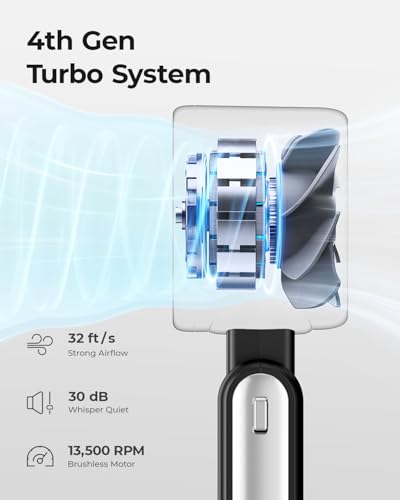
You’ll notice airflow most in how quickly a fan makes the room feel more comfortable and how far that cooling or heating effect actually reaches. Look for enough power and coverage for your space, plus useful features like multiple speeds, oscillation, or misting or heating modes if you need them, and watch out for fans that sound powerful but only move air well at close range.
Prioritize usable air delivery at the distance and height where you actually sit or sleep, not just a high maximum speed claim. For bedrooms and living rooms, look for distinct speed steps, a focused-enough stream to be felt 10+ feet away, and oscillation that sweeps the occupied zone without wasting airflow on walls; for desks or small rooms, a smaller circulator can work if it tilts precisely and does not need to run flat-out. Owner feedback supports this: shoppers often report strong room-reaching airflow, clear differences between low and high speeds, and enough cooling comfort overnight without relying on the highest setting.
Controls
The controls determine how easily you can fine-tune airflow for comfort, noise, and convenience throughout the day or night. Look for clearly labeled buttons or a responsive remote, multiple speed settings, useful modes like sleep or timer functions, and smooth oscillation; watch out for confusing menus, tiny displays, or limited adjustments that make the fan harder to live with.
Choose controls based on how the fan will be used when you are already in bed, at a desk, or across the room: a remote, reachable onboard buttons, timer, sleep mode, and oscillation controls are more than conveniences if you need to adjust airflow without fully waking up. Check that the display can dim or turn off for sleep, that the fan remembers settings after power changes if that matters, and that app control is not required for basic operation. Owners commonly value remotes, timers, auto shutoff, adjustable modes, and multi-direction oscillation because they make everyday and nighttime adjustments easy without getting up.
Build
You want a fan that feels solid, stays stable at its highest speed, and keeps working without new rattles, wobble, or motor odor after regular use. Look for sturdy housing, well-balanced blades, a secure base or mount, and parts that are easy to remove and clean, since flimsy materials and hard-to-maintain grills tend to show wear, collect dust, and shorten the fan’s useful life.
For floor and tower fans, check base weight, wobble, grille rigidity, and whether the fan remains stable while oscillating; for pedestal models, make sure the height-lock and tilt joints do not slip. For portable or neck-style fans, inspect hinge strength, charging-port durability, battery enclosure quality, and whether hair or loose clothing can get near moving parts. Owner sentiment generally backs the importance of solid construction: many buyers describe good fans as quick to assemble, sturdy rather than flimsy, compact when needed, and dependable in hot, crowded, or travel-heavy situations.
Noise
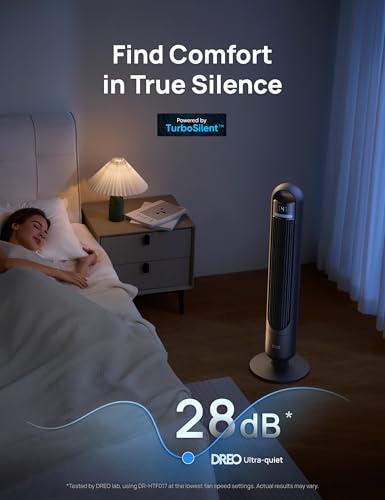
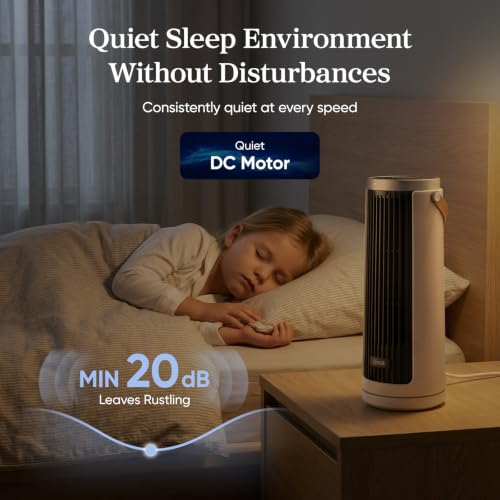
How a fan sounds can matter as much as how well it moves air, especially if you plan to use it in a bedroom, nursery, or office. Look for a fan that stays quiet at the speeds you actually use, has a smooth, consistent sound instead of rattling or clicking, and offers enough low-speed control for sleep; a fan that is only quiet on its weakest setting may still be disruptive at night.
Treat noise as a speed-specific issue: a fan that is quiet on low may become intrusive on high, so look for reports of low, mid, and high-speed sound separately and consider whether you need steady white noise or near-silence. For sleep, prioritize models that move enough air on lower settings, avoid rattles/clicks during oscillation, and have no beeping or bright display that cannot be disabled. Owner feedback strongly favors fans that stay very quiet while still moving useful air, especially in bedrooms, though higher settings are often noted as noticeably louder.
Value
You want a fan that feels worth what you pay, not just one that looks good on the shelf. Look for strong airflow, reliable performance, useful speed or control options, and a noise level you can live with, because a low upfront cost is not a bargain if the fan disappoints, wears out quickly, or costs more to run than expected.
Judge value by comfort delivered per use case: a fan is a better buy when it can make a hot room feel more comfortable without needing maximum speed all night, includes the controls you will actually use, and is stable and cleanable enough to last. Avoid paying for decorative extras, app features, or many modes if the basics—air reach, quiet low settings, stable base, and reliable oscillation—are weak. Owners tend to see the best value in fans that combine strong airflow for their size, quiet operation, sturdy construction, useful controls, and consistent performance over time.
Design
Design affects how well a fan fits your space and how easy it is to live with day to day, from its size and physical layout to whether any built-in light is actually useful or too harsh at night. Look for a fan with a stable base or secure wall mount, clear instructions, straightforward assembly, and lighting that matches your needs for brightness and placement without adding glare or awkward controls.
Match the design to placement and maintenance: tower fans save floor space but can be harder to deep-clean, pedestal fans offer height and aim control but need a stable footprint, and compact circulators need good tilt range to avoid blasting only one spot. Check cord length, handle placement, grille openings for child or pet safety, tool-free assembly, and whether the fan can be cleaned without fighting hidden clips or inaccessible dust paths. Owner sentiment supports these practical design wins, with buyers appreciating straightforward setup, compact footprints, sturdy bases, convenient remotes, and room-friendly looks that do not feel overly utilitarian.
1,000,000+ shoppers use Buyer's Guide every week to find the best products and services online.

Helping millions of users make smarter purchases online.


