


- Screen Size: 27"
- Screen Resolution: QHD (2560 x 1440)
- Screen Type: OLED
- Curved: No
- Aspect Ratio: 16:9
- Refresh Rate: 180Hz
- Brightness: 280 nits
- Response Time: 0.03ms GtG
- Panel Type: Not indicated





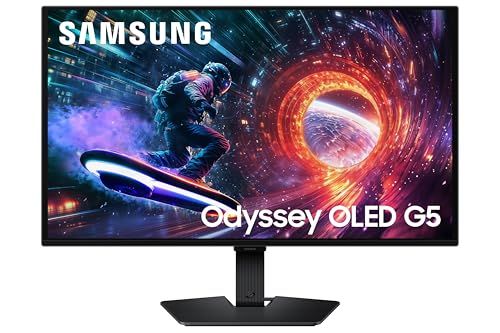
Samsung 27” Odyssey G5 Gaming Monitor
Overview and Real-World Performance

The Samsung 27” Odyssey G5 Gaming Monitor is positioned as an affordable entry into Samsung’s curved, high-refresh gaming lineup, aiming to deliver an immersive experience without pushing into premium pricing. In day-to-day use, the monitor’s most immediate selling point is the combination of a 27-inch panel, a pronounced curve, and a gaming-centric refresh rate that makes motion look smoother than standard 60Hz displays. If you mainly play fast-paced titles, you’ll notice that camera pans and quick flicks feel more fluid, which can make tracking targets easier and reduce perceived blur. That said, the overall experience depends heavily on your PC or console setup and what kinds of games you play, because higher refresh gaming shines most when your system can actually drive higher frame rates.
The 27-inch size is a comfortable sweet spot for many desks, giving you enough screen real estate for immersive gaming and practical multitasking. At typical viewing distances, it feels large without forcing excessive head movement. The curve, which is a defining characteristic of the Odyssey line, can make the image feel more “wrapped around” your field of view, especially in first-person shooters, racing games, and open-world titles. Some users love the added immersion; others may need a short adjustment period, particularly if they do a lot of straight-line design work or are coming from a flat monitor.
In terms of image quality, the G5 series is generally geared toward delivering strong contrast and punchy visuals that suit games and media. Dark scenes can look convincingly deep, and highlights can stand out nicely when the game’s lighting is well done. Color performance is typically pleasing out of the box for gaming, though creators who require strict color accuracy may want to calibrate or consider a monitor built explicitly for content work. For most gamers, the balance is appealing: it looks good, it feels responsive, and it emphasizes the qualities that matter when you’re playing rather than editing.
Key Factors to Consider Before Buying
The most important factor to consider is whether your system can take advantage of a high refresh rate at the monitor’s native resolution. A monitor like this is at its best when your GPU can push frame rates high enough to match the panel’s capabilities. If you have a midrange or higher gaming PC, you’re more likely to see the full benefit. If your PC struggles to maintain high frame rates at higher resolutions, you may still enjoy the monitor, but the upgrade won’t feel as dramatic as it could. For console players, it’s worth checking the console’s supported output options and the monitor’s specific input capabilities, because not all monitor features translate equally across platforms.
The second major factor is response behavior and motion handling. Many gaming monitors advertise fast response times, but real-world motion clarity can vary depending on overdrive settings and the type of panel. You’ll want to look for a monitor that offers smooth motion without excessive inverse ghosting or distracting trails. For the Odyssey G5, the practical approach is to plan on spending a few minutes trying different response settings in the on-screen display to find a balance that fits your game library. Competitive players tend to favor settings that minimize blur, while single-player and cinematic gamers might prefer settings that avoid artifacts, even if motion is slightly softer.
Another purchase consideration is the curve itself and how it fits your usage. Curved monitors can feel more immersive and comfortable for gaming sessions because the edges of the screen can appear closer to your eyes. However, if you frequently do tasks where straight geometry matters, such as architectural drawing, layout work, or certain kinds of photo editing, a curved panel can take some getting used to. It’s not necessarily a dealbreaker, but it’s important to be honest about how often you’ll be working versus gaming. If gaming is the primary purpose, the curve is typically a benefit rather than a drawback.
Connectivity and ergonomics also deserve attention, and they can be more important than people expect. Make sure the available ports match your devices and your desired refresh rate and resolution combination. If you plan to use a monitor arm, check VESA mounting compatibility and factor that cost into your total budget. Also consider stand adjustability. If the stand doesn’t offer the height, tilt, or swivel range you want, you may end up compensating with books under the base or investing in an arm anyway. Comfort matters, especially during longer gaming sessions, and proper monitor height can reduce neck and shoulder strain.
Finally, think about the room where you’ll use the monitor. If you play in a bright environment with lots of daylight, perceived contrast and reflections can impact your experience. If you mostly play in a dim or controlled-light room, the monitor’s contrast-forward presentation can look particularly good in darker games. This “match the monitor to the room” step is often overlooked, but it can be the difference between being impressed and feeling underwhelmed.
Common Questions
Is the Samsung 27” Odyssey G5 a good fit for competitive esports gaming?
It can be, especially if you value smooth motion and a responsive feel and your PC can maintain high frame rates. Dedicated esports players sometimes prefer even higher refresh options and panels tuned aggressively for motion clarity, but for most competitive gamers, the Odyssey G5 delivers a strong experience in its class.
Does the curved screen make games feel better, or is it just a gimmick?
For many players it genuinely increases immersion, particularly in racing, flight, and first-person games where peripheral wraparound adds to the sense of speed and depth. If you primarily play strategy games or do lots of productivity work with straight lines and grids, you may be less enthusiastic, but it’s not merely cosmetic for gaming-centric use.
Should I buy this monitor if I also do content creation?
If your creation work is casual, such as light photo edits, streaming overlays, and general media work, it can be a solid hybrid display. If you need highly accurate color for professional print or color-critical video work, you may want a monitor with stronger calibration tools and verified color accuracy, or plan to calibrate and accept that gaming-first monitors prioritize different strengths.
What settings should I adjust first after unboxing?
Start with the refresh rate in your operating system or GPU control panel to ensure you’re actually running at the maximum supported refresh rate. Then adjust brightness for your room lighting, and experiment with response/overdrive modes in a game you know well. A few minutes of tuning can noticeably improve comfort and motion clarity.
Conclusion
The Samsung 27” Odyssey G5 Gaming Monitor is an appealing choice for gamers who want a larger, curved, high-refresh experience without moving into premium price tiers. The most important buying considerations are whether your hardware can capitalize on higher refresh rates, whether you’ll enjoy a curved panel for your mix of gaming and work, and whether the ergonomics and connectivity match your setup. If those align, the G5 offers a satisfying blend of immersion, smooth gameplay, and strong everyday usability for its segment.