

















We also considered 10 others:


Our Top Choice
Compare Features


The order above is not editorial opinion, and it is not paid placement. It comes from what shoppers across our network actually do - which cheap gaming monitors they compare, and which they ultimately buy. We re-rank as new data comes in, so the long-term favorites have to keep earning their spot against new entrants. The full method, including how we make money.
Cheap Gaming Monitors Buyer's Guide
Cheap gaming monitors trade premium polish for the chance to get high refresh, sharper resolution, or a bigger screen at a low cost. The key is to verify that the monitor can actually deliver the gaming mode you want with your PC or console, while watching for the common budget compromises: weak stands, limited ports, ghosting, and overhyped HDR.
Build
Build quality matters because your monitor is something you’ll adjust, plug into, and rely on every day, so weak construction can lead to wobble, loose ports, creaking plastics, or early failures. Look for a stable stand, solid hinge and height-adjustment mechanisms if included, well-fitted panels, dependable buttons or controls, and ports that feel secure when cables are connected. A monitor that feels sturdy and consistent out of the box is more likely to stay reliable over years of use.
For cheap gaming monitors, treat “solid enough” as the goal: check for wobble, weak tilt-only stands, thin VESA mounting support, and flimsy port placement before being impressed by refresh-rate specs. A budget panel is a better buy if the stand holds height/angle securely, the frame does not flex when adjusting cables, and the included stand or VESA pattern fits your desk or arm. Owner feedback supports this priority: budget models are often praised as feeling better-built than expected, with some buyers calling out dependable stands, easy pairing, travel-friendly protective covers on portable screens, and a general sense of quality beyond the low-cost category.
Performance
Performance matters because it affects how smooth motion looks, how quickly the display responds to your inputs, and whether the monitor feels comfortable for gaming, creative work, or everyday multitasking. Look for a refresh rate and response behavior that match how you’ll use it: faster specs help with games and fast-moving content, while stable, responsive performance is still important for work. Watch out for monitors that advertise high numbers but have poor motion handling, input lag, or trade-offs in image quality at their fastest settings.
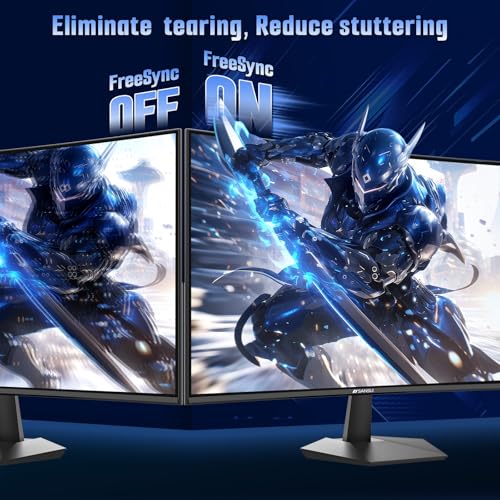
Match performance claims to your actual hardware: verify the monitor can run its advertised refresh rate at its native resolution over the port you will use, especially if you need 120Hz on console or 144Hz/165Hz/240Hz on PC. Look for adaptive sync support, a usable variable-refresh range, and real response behavior—not just a tiny advertised response-time number—because cheap VA panels can smear dark scenes and cheap high-Hz displays can still feel blurry if overdrive is poorly tuned. Owner sentiment backs the appeal when these basics line up: buyers consistently praise fast refresh rates, responsive feel, smooth gaming, straightforward setup at higher refresh rates, and noticeably better motion than a basic 60Hz screen.
Display
Your monitor’s display quality determines how sharp text looks, how accurate and vivid colors appear, and whether the screen stays clear in bright rooms or during fast motion. Look for a resolution and pixel density that suit your screen size, enough brightness for your workspace, good color coverage and accuracy if you edit photos or video, and low motion blur or ghosting if you game or watch fast-moving content. Also watch for uneven backlighting, poor viewing angles, and distracting artifacts that can make daily use more tiring.
Choose resolution and panel type based on the games you actually play: 1080p is easier to drive at high FPS on a budget GPU or console, while QHD looks sharper but demands more graphics power. Be cautious with “HDR” on inexpensive monitors, since many lack the brightness, local dimming, or color depth to make HDR meaningful; instead, prioritize clear text, decent contrast, brightness uniformity, and acceptable ghosting. Owners most often reinforce the display upside of this category, describing screens as clear, bright, sharp, colorful, smooth-looking, and in some cases a crisp upgrade from older 1080p displays.
Value
You want a monitor that gives you the right mix of image quality, size, refresh rate, ergonomics, and connectivity for what you actually do, without paying for features you won’t use. Look for strong core performance at a fair price, and watch out for cheap models that cut corners on panel quality, adjustability, or ports, as well as expensive ones whose extras don’t improve your everyday experience.
The best value in a cheap gaming monitor is not the lowest tag; it is the cheapest model that gives you the refresh rate, resolution, ports, stand, and panel behavior you will actually use. Avoid paying extra for marketing specs you cannot benefit from, such as 240Hz without a system that can reach very high frame rates, QHD without enough GPU power, or cosmetic “gaming” design with weak ergonomics. Owner feedback strongly supports the category’s value case: shoppers often describe these monitors as affordable upgrades, strong price-to-performance buys, capable extra screens, and surprisingly good gaming displays for the money.
Setup
You’ll feel a monitor’s setup quality before you ever judge the picture: a stable stand, straightforward assembly, flexible height/tilt adjustments, and clearly labeled ports can make daily use much easier. Look for simple on-screen controls, cable management, and compatibility with your desk, laptop, or mounting arm; watch out for bulky stands, awkward menus, or limited adjustment that can leave the screen uncomfortable to use.
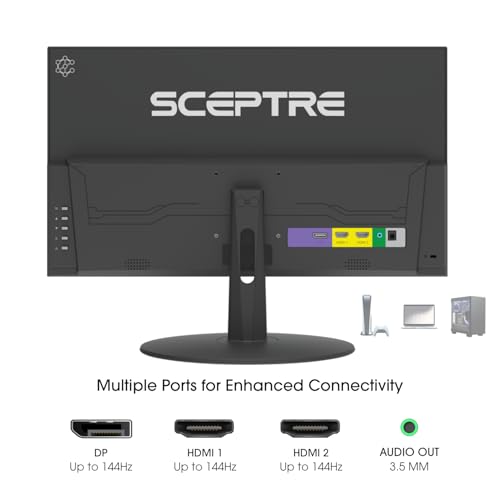
Before buying, confirm the exact cable and port path needed for your target mode: some monitors only reach maximum refresh over DisplayPort, some consoles need the right HDMI capability for 120Hz, and portable options may require USB-C with DisplayPort Alt Mode plus enough power delivery. Also check whether the monitor ships with the cable you need, whether high refresh must be enabled in the monitor menu and operating system, and whether mounting hardware or VESA screws are included. Owner sentiment is encouraging here, with many buyers reporting plug-and-play setup, included USB-C or HDMI options, easy assembly, quick laptop extension, and straightforward connection at higher refresh rates.
Design
You’ll see your monitor every day, so its appearance and slim design matter not just for style but for how comfortably it fits your desk and workspace. Look for clean cable management, stable stand design, and bezels that suit single- or multi-monitor setups; if you’re considering a curve, make sure it matches your viewing distance and screen size rather than choosing it for looks alone.
For design, prioritize ergonomics and desk fit over aggressive styling: a cheap monitor with height adjustment, tilt, stable footing, slim bezels, and VESA compatibility will usually serve gaming and work better than one that only looks flashy. Curved screens can feel more immersive, but check curve radius, viewing distance, and whether the curve makes sense for multi-monitor use; compact sizes can be useful for tight desks or dual setups, while larger screens need enough depth to avoid feeling too close. Owner feedback aligns with these practical design wins, praising compact desk-friendly sizes, immersive curved screens, clean zero-frame looks, adjustable stands, and slim designs that improve a setup.
1,000,000+ shoppers use Buyer's Guide every week to find the best products and services online.

Helping millions of users make smarter purchases online.


