











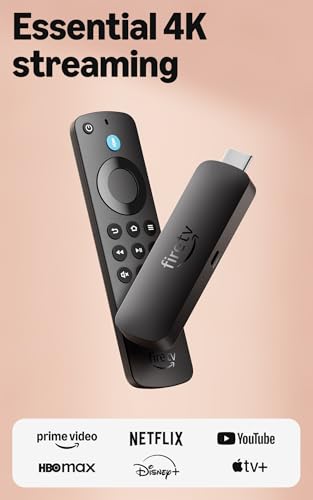

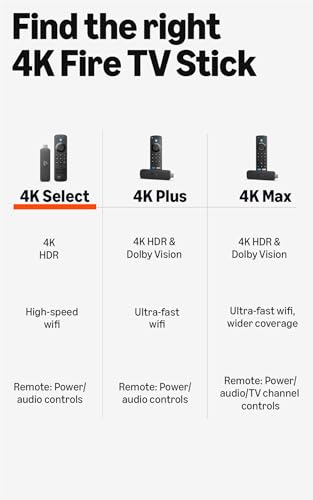
We also considered 10 others:


Our Top Choice
Compare Features


The order above is not editorial opinion, and it is not paid placement. It comes from what shoppers across our network actually do - which roku devices they compare, and which they ultimately buy. We re-rank as new data comes in, so the long-term favorites have to keep earning their spot against new entrants. The full method, including how we make money.
Roku Devices Buyer's Guide
For this category, the main tradeoff is choosing a small, simple streamer that revives an older TV without accidentally buying more capability than the TV, Wi-Fi network, or remote setup can use. The sharpest checks are video-format compatibility, power and HDMI fit, wireless reliability, and whether the remote can truly replace the TV remote for the people using it every day.
Performance
Performance matters because a TV stick should open apps quickly, stream smoothly, and respond to your remote without frustrating lag. Look for enough processing power and memory to handle the apps and video quality you use, and watch out for devices that stutter when switching apps, buffering, or navigating menus.
Prioritize the device’s match to your TV and network before judging raw speed: for 4K, confirm the TV’s HDMI port supports the needed copy-protection and HDR formats, and make sure your Wi-Fi is strong at the TV location or choose a model with wired-network support. For older smart TVs, the biggest performance win often comes from bypassing slow built-in apps, but weak Wi-Fi, underpowered USB ports, or an incompatible HDMI port can still cause buffering, freezing, or lower resolution. Owner feedback supports this: shoppers often describe these devices as fast and responsive, with quick app launches, smooth navigation, crisp picture quality, and a major speed upgrade over older built-in TV apps or aging streamers.
Setup
A smooth setup means you can start streaming without fighting activation codes, account sign-ins, Wi-Fi issues, or remote pairing problems. Look for a TV stick with clear on-screen instructions, reliable wireless setup, and simple accessory pairing, especially if you plan to use voice remotes, game controllers, or Bluetooth audio. Watch out for devices that require too many extra steps, apps, or account links before they’re usable.
Check the physical and account setup path before buying: confirm there is an open HDMI port, enough clearance behind a wall-mounted TV for a stick-style device, and either a wall outlet or a TV USB port that supplies reliable power. Be ready to create or sign into a streaming-platform account, enter activation codes, reinstall apps, and sign into each subscription separately; also avoid any third-party “activation fee” prompts, since legitimate setup should not require paying an outside service. Owners generally find setup straightforward, often describing it as plug-in, code-entry, and app-opening simple, including for less tech-savvy households and for upgrading older or non-smart TVs.
Value
Value matters because a TV stick should give you the streaming performance, app support, remote features, and reliability you need without making you pay for extras you will not use. Look for a balance of smooth navigation, broad service compatibility, useful voice or TV controls, and enough storage or speed for your habits. Watch out for very cheap sticks that feel slow, show too many ads, or lack key apps, because a low upfront cost can still be poor value for money.
The best value comes from buying the least expensive device that still fits your actual TV and network: a basic HD model is enough for a 1080p TV, while a 4K/HDR model only pays off if your TV and subscriptions support those formats. Also factor in hidden practical costs, such as needing an HDMI extender, stronger Wi-Fi, a wall power adapter, or paid streaming subscriptions; the device may replace a cable box, but it does not make paid services free. Owner sentiment backs the value case, with buyers saying these streamers add responsive apps, free viewing options, live-TV alternatives, and cable-replacement potential for much less than replacing a TV or keeping extra hardware.
Quality
A TV stick should feel solid enough to survive regular handling, travel, and repeated plugging or unplugging without loose seams, flimsy connectors, or overheating concerns. Look for a snug fit in the HDMI port, well-made cables or adapters, and included parts that feel like they will last; poor fit or cheap construction can lead to signal issues, physical damage, or needing a replacement sooner than expected.
Judge quality by long-term stability, heat management, and video/audio compatibility rather than just the spec sheet. For a primary living-room TV, look for stronger Wi-Fi or Ethernet, automatic resolution matching, reliable updates, and support for the audio and HDR formats your TV or sound system can actually decode; for travel or a spare room, compactness may matter more than premium format support. Owners commonly describe these devices as dependable daily streamers with crisp picture, clear sound, reliable app access, and strong results when replacing laggy TV interfaces or older boxes.
Ease
You’ll use a TV stick constantly, so a simple, user-friendly interface can make the difference between quickly finding something to watch and getting stuck in menus. Look for clear navigation, responsive controls, straightforward search, and easy app management. Watch out for cluttered home screens, confusing settings, or layouts that make common tasks take too many clicks.
For households that want minimal fuss, choose an interface and remote layout that keep common apps visible, avoid complicated input switching, and support simple search across services. If an older family member or guest will use it, check whether the device can power on the TV, control volume, and return easily to the home screen; otherwise, the user may still need multiple remotes or help switching inputs. Owner feedback aligns with this concern: many buyers say day-to-day use is approachable, navigation is simple for non-technical users, and switching between traditional TV inputs and streaming can feel seamless once configured.
Remote
You’ll use the remote control constantly, so it should feel intuitive in your hand and make common actions easy without hunting through menus. Look for a clear button layout, reliable remote control access from your usual seating position, and helpful touches like dedicated shortcut buttons or glow-in-the-dark keys, while watching out for cramped buttons or overly minimal remotes that make navigation frustrating.
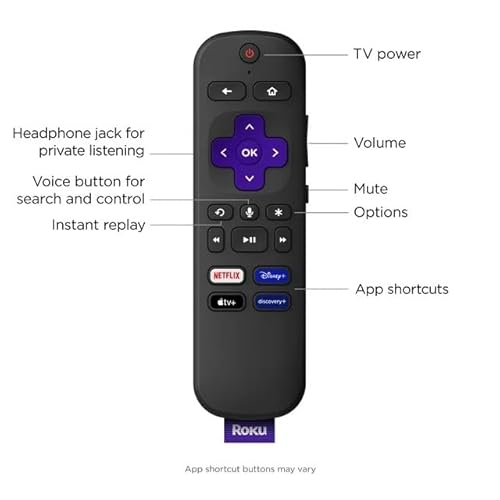
Do not treat the remote as an afterthought: confirm whether it uses line-of-sight infrared or point-anywhere wireless control, whether it can control TV power and volume, and whether it includes voice search, private listening, shortcut buttons, or a lost-remote feature if those matter. Watch for failure modes that matter in this niche, including battery drain, pairing problems after power loss, missing input buttons, unreliable TV-control setup, and limited compatibility with soundbars or receivers. Owners like the convenience of simple app access, voice search, playback control, volume and power control, and one-remote operation, but sentiment is mixed because some report quirky setup, battery drain, startup recognition issues, or faulty remotes.
1,000,000+ shoppers use Buyer's Guide every week to find the best products and services online.

Helping millions of users make smarter purchases online.


