








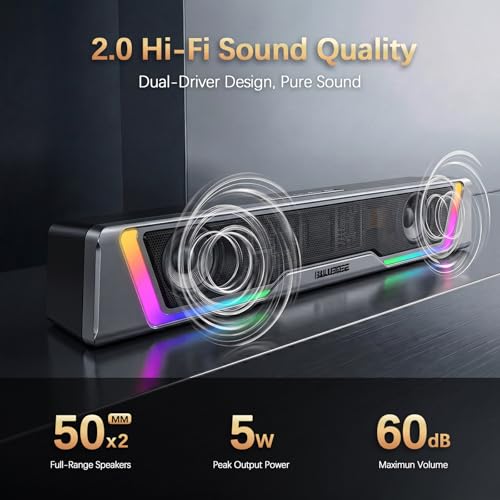


We also considered 10 others:


Our Top Choice
Compare Features


The order above is not editorial opinion, and it is not paid placement. It comes from what shoppers across our network actually do - which pc soundbars they compare, and which they ultimately buy. We re-rank as new data comes in, so the long-term favorites have to keep earning their spot against new entrants. The full method, including how we make money.
PC Soundbars Buyer's Guide
PC soundbars trade stereo separation for a clean, single-bar footprint, so the key is finding one that works well at near-field desk distance rather than just sounding loud across a room. Pay closest attention to monitor clearance, input type, USB power noise, Bluetooth latency, and whether the bar can deliver clear voices without hiss when it sits only an arm’s length away.
Sound
Sound quality matters because a soundbar should make TV, movies, games, and music clearer and more engaging without forcing you to ride the volume. Look for strong dialogue clarity, enough bass for impact without muddiness, clean loudness without distortion or hiss, and surround or Dolby Atmos effects that feel spacious rather than artificial. If you need deeper bass or a more immersive experience, consider whether the system includes or supports a subwoofer and useful sound adjustments for your room and listening preferences.
For sound, prioritize near-field clarity over raw loudness: a PC soundbar should keep dialogue, game cues, video calls, and music intelligible at low-to-moderate volume without idle hiss, boomy bass, or harsh treble right in front of you. Check whether the bar is wide enough to give some left/right separation under your monitor, but not so wide that the drivers sit blocked by monitor stands or desk clutter; if you game, avoid models that smear directional cues or rely only on virtual surround effects. Owner feedback supports this focus: shoppers often praise compact bars that sound clearer and fuller than built-in laptop, monitor, or thin TV speakers, with some larger setups earning praise for powerful bass and Atmos-like effects, while everyday desktop users mainly value clean, solid sound for videos, music, calls, and gaming.
Value
Value matters because a soundbar should justify what you spend through a strong balance of sound quality, features, build, and ease of use. Look for performance that matches your needs—clear dialogue, satisfying bass, useful connectivity, and room-filling sound—rather than paying extra for features you may not use. Watch out for models that seem affordable but require add-ons to feel complete, or premium options whose improvements may be too subtle for your setup.
For value, spend for the connection and control features your desk actually needs, not just extra volume: USB audio may simplify a PC setup, 3.5 mm may avoid driver quirks, Bluetooth is useful for phones but can add latency, and a remote or front volume knob matters if the bar sits under a monitor. A good PC soundbar value is one that fixes weak monitor speakers without forcing you into adapters, external power bricks, or a subwoofer you cannot place properly. Owner sentiment backs this: many buyers describe compact desktop bars as worthwhile upgrades that deliver better-than-expected performance for basic desk audio, especially when setup is simple and the form factor saves space.
Design
A soundbar’s design matters because it has to live in plain sight, fit your TV stand or wall setup, and avoid blocking the screen, remote sensor, or other devices. Look at its width, height, depth, finish, and any lighting or RGB effects to make sure the appearance suits your room and won’t become distracting during movies or games. If you need flexibility, consider whether the bar is compact, wall-mountable, or has detachable parts, but watch for tradeoffs in placement, cable clutter, and stability.
For design, measure the actual gap below your monitor before buying: the bar must clear the screen edge, monitor stand, webcam sightline, keyboard reach, and any monitor controls along the bottom bezel. Favor a low, stable cabinet with controls you can reach from the front or top, rubber feet that resist sliding, and lighting that can be dimmed or turned off for work, calls, or night use. Owners often like slim bars because they sit neatly under a monitor and free desk space, and RGB or LED lighting is praised most when it matches a gaming setup without being mandatory.
Setup
Setup matters because a soundbar should improve your TV audio without turning installation into a project. Look for clear instructions, simple TV connection options, reliable wireless pairing for the subwoofer or rear speakers, and mounting hardware or templates if you plan to wall-mount it. Also check whether it fits your TV stand and leaves room for remote sensors, ports, and cables.
For setup, confirm exactly how the bar gets power and audio before assuming it is plug-and-play: some use USB only for power plus 3.5 mm for sound, while others appear as a USB audio device in the operating system. Check cable length for a desktop tower under the desk, whether the bar remembers volume after sleep, and whether it pops, hums, or resets when the PC wakes. Owner reports are generally positive here, with many buyers describing quick plug-and-play USB or 3.5 mm setup, simple assembly, included cables, and straightforward TV-style HDMI setups when applicable.
Connectivity
You want a soundbar that connects cleanly to your TV and everyday devices without constant setup issues, so check for HDMI ARC or eARC if you want simple TV control and reliable audio routing. Bluetooth and wireless connectivity are useful for music and flexible placement, but look for stable pairing, broad device compatibility, and enough physical inputs for game consoles, streaming devices, or older TVs.
For connectivity, match the input to your real source chain: PCs and monitors often lack HDMI ARC/eARC, so a TV-oriented soundbar may not connect cleanly unless you use optical, analog, USB audio, or Bluetooth. For gaming or video editing, prefer wired USB, 3.5 mm, optical, or low-latency wireless over basic Bluetooth; for mixed PC/phone use, look for a clear source button and reliable reconnection so the bar does not grab the wrong device. Owners commonly praise flexible USB, Bluetooth, wired, and HDMI options, quick pairing, and easy switching, but they also note that ARC/eARC source switching can be less plug-and-play than expected.
Build
Build quality matters because a soundbar often sits in a visible, high-use spot and may need to withstand heat, vibration, dust, pets, kids, and occasional bumps without rattling, warping, or feeling flimsy. Look for a rigid cabinet, clean seams, stable feet or mounting hardware, durable grille material, and ports or buttons that feel secure; watch out for lightweight plastic housings, flexing panels, loose fabric, or controls that feel fragile.
For build, look beyond the shell and check the failure points that matter on a desk: fixed cables that can fray, loose volume wheels, lightweight cabinets that rattle at bass notes, cloth grilles that collect dust, and USB ports or plugs that loosen after frequent moving. A PC soundbar should feel stable when you bump the desk, stay quiet at idle, and survive being tucked under a monitor with cables bent behind it. Owner feedback is broadly encouraging, with compact bars often described as reliable, well built for everyday desktop use, and more refined-looking than expected, especially when they combine a small footprint with a clean finish.
1,000,000+ shoppers use Buyer's Guide every week to find the best products and services online.

Helping millions of users make smarter purchases online.


