


- Display: 7“ glare-free
- Resolution: 300 ppi
- Storage: 32GB
- Battery Life: Up to 12 weeks
- Waterproof: Yes





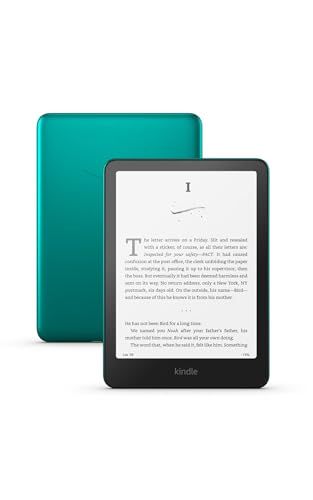
All-new Amazon Kindle Paperwhite Signature Edition
Overview and reading experience

The All-new Amazon Kindle Paperwhite Signature Edition is the kind of upgrade that feels less like a flashy gadget refresh and more like a set of thoughtful refinements aimed at people who actually read every day. At its core, it delivers what the Paperwhite line has long promised: a crisp, paper-like display, comfortable lighting, and a distraction-free environment that keeps you in the book rather than bouncing between apps. The Signature Edition builds on that foundation with convenience features that matter in real life, especially if you read often and don’t want to manage storage, battery anxiety, or tiny day-to-day frictions.
The display remains the star. Text is sharp, contrast is strong, and the front light is evenly distributed so you don’t get the blotchy “flashlight” effect older e-readers sometimes show. The warm light adjustment is particularly valuable for evening reading, letting you shift the tone away from stark blue-white and into something easier on the eyes. It doesn’t magically prevent fatigue for everyone, but it does make long sessions feel gentler, especially in dim rooms. Page turns are quick, and the interface is responsive enough that you’re not waiting on the device to catch up to your pace, which matters more than you might think once you’re deeply into a story.
One of the Signature Edition’s most practical upgrades is automatic brightness. It’s not essential, but it’s surprisingly satisfying: moving from a bright window to a darker corner of the couch no longer requires tapping through settings. If you read in varied lighting throughout the day, this becomes a “set it and forget it” feature you’ll appreciate daily. For those who read mostly in one consistent environment, it’s nice but less critical.
Features, performance, and what sets the Signature Edition apart
What separates the Signature Edition from the standard Paperwhite is a bundle of premium conveniences rather than a fundamentally different reading experience. The biggest headline features are more storage, wireless charging, and the automatic front light adjustment. For many buyers, the question is whether these conveniences are worth paying for compared with the regular Paperwhite, which already covers the essentials extremely well.
Extra storage matters most if you plan to keep a large library downloaded at once, especially if you use Audible audiobooks on your Kindle or you like to store graphic novels, manga, and heavily illustrated books. Standard text-based eBooks are small, so even modest storage can hold thousands of titles. But audiobooks and image-heavy content add up quickly. If your reading habits include those formats, the Signature Edition’s larger capacity can shift from “nice to have” to “glad I bought it.” If you primarily read regular novels and are comfortable re-downloading titles as needed, storage is less of a deciding factor.
Wireless charging is similarly about lifestyle fit. If you already have a Qi charging pad on a desk or nightstand, being able to drop the Kindle on it is convenient and keeps cables under control. If you don’t, it may feel like an extra feature you rarely use, because the Paperwhite family’s battery life is strong and most people don’t charge often anyway. Still, there’s a subtle benefit: wireless charging makes it easier to top off routinely, so you’re less likely to realize you’re low on battery right before a trip. In everyday use, it’s a comfort feature, not a necessity.
Performance is solid and predictable. The Kindle ecosystem is optimized around reading, so you get stable, low-maintenance operation rather than constant feature churn. The store, library management, and syncing across devices are polished, and the device tends to “just work” in a way that keeps it from becoming another digital project to maintain. If you like to highlight, look up words, and search within books, the experience is smooth and helpful. If you annotate heavily, it’s functional, although anyone looking for a full note-taking tablet experience will still be better served by a dedicated stylus-based device.
Durability and portability are also central to the value. A Paperwhite is easy to throw in a bag and carry everywhere, and the water-resistant design makes it more forgiving around pools, baths, and beach days. It’s not an invitation to submerge it intentionally, but it does mean a splash or an accident is less likely to end your reading streak. Combined with excellent battery life, the Kindle becomes a reliable travel companion: you can take multiple books without carrying multiple books.
Buying factors and the most important considerations
Before buying the All-new Amazon Kindle Paperwhite Signature Edition, it helps to be honest about how you read and what annoys you about your current setup. The most important factor for most people is the reading comfort of the screen and lighting, because that’s what you experience for hours at a time. If you currently read on a phone or tablet and your eyes feel strained, the Paperwhite’s e-ink display and adjustable warm front light can be a meaningful quality-of-life improvement. This is the core reason to buy a Kindle in the first place, and it outweighs convenience features like wireless charging for many readers.
The next most important factor is ecosystem fit. If you already buy books from Amazon or use Kindle apps, the transition is seamless. If your library relies heavily on non-Amazon sources, you should consider how you’ll get content onto the device and whether your preferred formats and workflows are supported. Many people are perfectly happy using Send to Kindle and standard eBook formats that work well within Amazon’s system, but if you have a large existing library in formats that require conversion or you value an open, drag-and-drop approach, it’s worth verifying your process before committing.
After comfort and ecosystem, consider whether the Signature Edition-specific features match your habits. Automatic brightness is most valuable if you read in changing light. Extra storage is most valuable if you download audiobooks, manga, or lots of large files. Wireless charging is most valuable if you already live in a Qi-charger household or you know you’ll appreciate cable-free charging on a nightstand. If none of those sound important, the standard Paperwhite may deliver nearly the same satisfaction for less money.
Finally, think about long-term ownership. Kindle devices tend to last, and the best value comes from buying the model that suits your habits without paying for features you won’t use. If you’re a heavy reader who wants maximum convenience, the Signature Edition feels like a premium “done right” version that reduces small annoyances over time. If you’re a casual reader, you may still love it, but you might not fully benefit from the premium extras.
Common Questions
Does the Signature Edition read differently than the regular Paperwhite? The core reading experience is very similar: the same e-ink feel, sharp text, and comfortable front lighting. The Signature Edition focuses on convenience upgrades like automatic brightness, more storage, and wireless charging rather than a radically different display experience.
Is wireless charging a must-have? Not for most people. The battery lasts a long time, so charging is infrequent. Wireless charging becomes most useful if you already have a Qi pad and like the simplicity of dropping the device onto a charger instead of plugging in a cable.
How much storage do I really need? If you mainly read standard novels and nonfiction, storage needs are modest and you can keep a huge library without worrying. If you store audiobooks, manga, comics, or lots of large documents, extra storage is more likely to matter.
Is the automatic brightness actually helpful? Yes, if your lighting changes often. If you read in a mix of daylight, lamplight, and nighttime conditions, auto-brightness reduces constant tweaking. If you mostly read in one consistent environment, it’s less impactful.
As a premium e-reader, the All-new Amazon Kindle Paperwhite Signature Edition succeeds by refining the everyday details that frequent readers notice most: consistently comfortable lighting, reliable performance, and practical upgrades that remove small hassles. The most important purchase considerations are screen comfort and ecosystem fit, followed by whether the Signature Edition’s conveniences align with your habits. If they do, it’s a satisfying “buy once, enjoy for years” Kindle; if they don’t, the standard Paperwhite may be the smarter value while delivering nearly the same core joy of reading.