




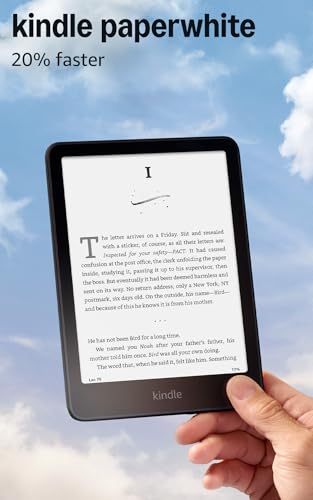


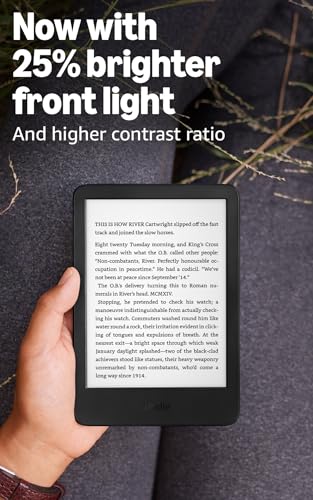


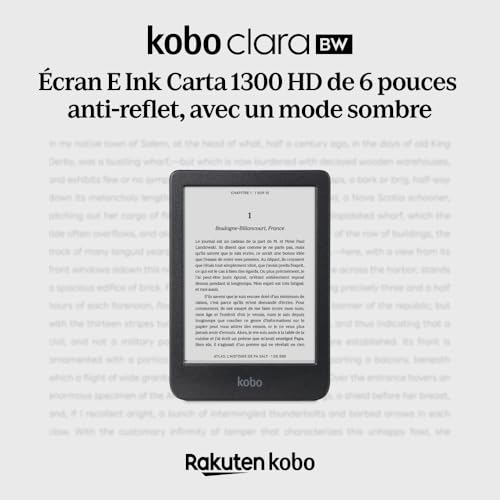


We also considered 10 others:


Our Top Choice
Compare Features


The order above is not editorial opinion, and it is not paid placement. It comes from what shoppers across our network actually do - which cheap e-readers they compare, and which they ultimately buy. We re-rank as new data comes in, so the long-term favorites have to keep earning their spot against new entrants. The full method, including how we make money.
Cheap E-Readers Buyer's Guide
Cheap e-readers are a tradeoff between low cost, reading comfort, and ecosystem freedom: the cheapest device is not always the best if it locks you out of library apps, EPUB files, or comfortable night reading. The sharpest checks are screen quality and book-source compatibility, because those determine whether the device becomes a daily reader or a frustrating gadget.
Usability
A good e-reader should let you get to your books, adjust settings, and move around the interface without friction. Look for simple setup, clear menus, responsive page turns, easy font and lighting controls, and reliable syncing if you use multiple devices. Watch out for cluttered stores, buried settings, sluggish software, or file-management quirks that make everyday reading feel more complicated than it should.
For a cheap e-reader, first decide whether you want a closed, book-focused reader or a small Android-style reading tablet: the former is usually simpler and less distracting, while the latter can install more library and reading apps but may feel more like managing a budget tablet. Check how library loans, sideloaded books, PDFs, kids profiles, and account setup actually work before buying, because cheap models can be easy for novels but clumsy for school PDFs, annotations, or non-store ebooks. Owner feedback supports this split: buyers often praise small lightweight readers for simple travel use, parents like easy setup and parental controls through existing family accounts, and some users specifically value Android support for installing library apps; note-taking and PDF markup are praised when the device is built for that use, but that is not a given on every cheap reader.
Display
The display determines how comfortable and natural your reading feels, especially over long sessions or in changing light. Look for crisp text, low glare, adjustable front lighting, and a screen size that suits how you read; if you read comics, magazines, or illustrated books, consider whether color quality and image detail are strong enough for that content. Watch out for screens that look washed out, refresh slowly, or offer limited lighting controls, since those can make reading feel more tiring.
Prioritize the screen over almost everything else: for budget e-readers, look for glare-free E Ink, sharp enough text, adjustable front light, and ideally warm light if you read at night. Avoid assuming every “e-reader” screen is equal—some cheap or tablet-like options are less crisp, more reflective, or more fatiguing than a true E Ink panel, and PDFs or comics may need a larger screen to avoid constant zooming. Owner sentiment lines up with this: readers repeatedly describe clear, paper-like, glare-free screens as easy on the eyes for long sessions, while larger screens are appreciated for visibility and writing; the main caution is that some buyers find text less crisp than on newer premium readers even when the screen remains comfortable.
Features
The right features determine how well an e-reader fits the way you actually read, from supported file formats and library compatibility to smooth page turning, note-taking tools, and options like a kickstand or hands-free use. If you’re buying for a child or a shared household, look for kid-friendly controls and content settings, and watch out for devices that seem versatile but limit annotations, sideloading, or common reading formats.
Match features to where your books actually come from: if you use public-library apps, EPUB files, PDFs, or a personal ebook collection, verify file-format support, app support, and sideloading before buying. For children, look for real parental controls and a kid-safe library experience; for bed reading or accessibility, check whether page-turn buttons, remote page-turner compatibility, font controls, and audiobook support matter to you. Owners reinforce these priorities: parents report that child accounts and controls can be easy to manage, readers like devices that make a large library feel accessible, hands-free page turning is praised when compatible, and buyers who want more control over their ebooks strongly value EPUB support and broader app compatibility.
Battery
Battery life matters because an e-reader should let you read for long stretches without planning around an outlet, especially if you travel or read daily. Look for realistic estimates based on your habits, since brightness level, wireless use, audiobook playback, and frequent syncing can shorten the time between charges. Also consider the charging port and recharge speed, so topping up the device fits easily into your routine.
Do not judge battery life by the headline estimate alone; cheap e-readers last longest when they use E Ink, low brightness, and wireless off, while Android-based readers, color screens, note-taking, audio, and frequent app use can drain faster. If you travel, check charging port type and real-world standby behavior, because a device that lasts weeks for novels may last only days with Wi-Fi, high brightness, or tablet-style apps. Owner reports are generally encouraging: many readers say a charge lasts days or weeks, frequent readers get strong results when managing brightness and wireless settings, and airplane mode helps heavy readers; the caution is that battery life is more variable on some devices, even when charging is fast or long reading sessions are still possible.
Build
You’ll handle an e-reader often, carry it in bags, and expect it to work reliably for years, so build quality affects both daily comfort and long-term value. Look for a solid-feeling body, stable buttons or ports, a screen that doesn’t flex easily, and dependable construction that can tolerate regular travel and reading sessions. Watch out for creaky shells, loose parts, inconsistent responsiveness, or anything that suggests the device may not hold up over time.
Cheap e-readers can feel solid, but inspect the failure-prone basics: screen uniformity, dead zones, loose buttons, charging reliability, case fit, and whether the device survives bag travel without flexing. If you plan to use a cover, grip, or clip-on page-turner, confirm the bezels and case thickness are compatible; if buying a newer or less-established model, keep return windows in mind because early hardware defects are a real risk. Owner sentiment is mixed but useful: many buyers describe budget readers as polished, responsive, and surprisingly solid for basic reading, and accessories often work across devices and thicker cases; at the same time, some owners characterize quality as early-adopter territory, with occasional defects requiring returns.
Handling
You’ll hold an e-reader for long stretches, so its size, weight, and ergonomics can matter as much as the screen. Look for a compact, lightweight design that fits your bag and feels secure in one hand, with a shape or grip that stays comfortable during extended reading. Watch out for devices that are too bulky, slippery, or awkwardly balanced, especially if you read while commuting, traveling, or lying down.
Choose size by your actual reading posture: a 6- to 7-inch reader is usually best for one-handed novels and travel, while larger screens help PDFs, textbooks, manga, and handwriting but become less pocketable and more tiring to hold. Check weight with the case attached, bezel space for gripping, physical page-turn buttons if you read one-handed, and whether a child can comfortably hold it without drops. Owners consistently back this up: small, lightweight models are praised for travel, pockets, purses, and quick reading sessions, children and teens benefit from lighter sizes, and 7-inch devices are often seen as a practical balance between a roomier screen and everyday portability.
1,000,000+ shoppers use Buyer's Guide every week to find the best products and services online.

Helping millions of users make smarter purchases online.


