


- Display Size: 14.2"
- Resolution: 3024 x 1964
- Memory: 16GB RAM
- Storage: 512GB SSD
- Processor: Apple M5 10-core
- Graphics Processor: Apple M5 10-core
- Battery Life: Up to 24 hours
- Operating System: Mac OS
- Weight: 3.4 lbs





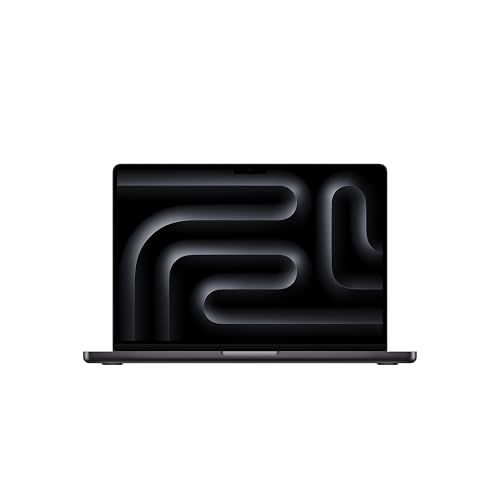
Apple 2025 MacBook Pro Laptop
Overview and real-world experience

The Apple 2025 MacBook Pro Laptop continues Apple’s familiar formula: a premium, performance-focused notebook that balances speed, battery life, and a refined daily experience in a way few competitors match. It’s the sort of machine that feels intentionally built for people who spend hours at a time creating, coding, editing, or managing complex workflows, while still being pleasant for everyday tasks like browsing, writing, and video calls. What stands out most is not a single headline feature, but how cohesive the whole package feels when you live with it.
In day-to-day use, the MacBook Pro’s responsiveness remains a defining strength. Apps launch quickly, multitasking is smooth, and heavy workflows tend to stay stable rather than becoming a game of constant restarts and memory juggling. For creative professionals, the experience typically shines when dealing with high-resolution photo libraries, layered design files, or long video timelines where background exports can run while you keep working. For developers, fast builds, virtualized environments, and multiple monitors tend to feel more “set and forget” than “fight and fix.”
The display experience is still central to why many people buy a MacBook Pro. Color accuracy, brightness, and clarity make long sessions easier on the eyes and more trustworthy for color-critical work. Whether you are grading video, preparing prints, or simply enjoying crisp text, it feels like a screen built for professionals rather than one that happens to be nice. The audio system, likewise, typically exceeds expectations for a laptop, offering strong volume and separation that makes editing, casual listening, and calls feel richer than on many thin-and-light machines.
Portability and build quality also remain part of the appeal. The MacBook Pro is not usually the lightest option, but it tends to feel solid and durable, with a hinge and chassis that hold up well over time. The trackpad and keyboard continue to matter more than you might think until you switch back to a machine where they are merely acceptable. If you type all day, the comfort and consistency can be a deciding factor.
Key factors to consider before buying
The first and most important factor is performance needs, because your workload determines which configuration makes sense and how long the laptop will remain satisfying. If your work is primarily web apps, documents, light photo editing, and occasional creative tasks, you may not need a top-tier configuration. If you regularly edit high-resolution video, work with large RAW photo batches, compile large codebases, run local AI tools, or manage multiple pro apps at once, you will benefit from more CPU/GPU capability and additional unified memory. The best rule is to buy for the heaviest thing you do weekly, not the heaviest thing you do once a year.
Unified memory and storage choices are especially important because they are typically not user-upgradable later. Memory determines how comfortably you can keep many apps and large projects open at once, and it can influence performance in creative suites and development tools. Storage affects how much local media you can keep, how many projects you can keep active, and how quickly scratch disks and caches can work without constant external drive management. Many buyers underestimate how quickly creative libraries, 4K/8K footage, and project assets fill a drive. If you want the laptop to feel “effortless” for several years, prioritizing a healthy amount of memory and storage is often more impactful than chasing the highest chip tier.
Battery life is another key consideration, particularly if you move between meetings, travel, or work away from outlets. The MacBook Pro’s endurance is usually one of its competitive strengths, but real-world results depend on workload and brightness. Heavy exports, sustained compilation, 3D work, and long video calls can reduce runtime significantly compared to light browsing. Consider your typical day: if you rely on all-day unplugged use, battery performance may be as important as raw speed.
Display size and portability trade-offs matter more than spec sheets suggest. A larger display improves timeline work, multitasking, and readability, while a smaller model is easier to carry and fits better on cramped desks, airplane trays, or shared workspaces. If you spend most of your day docked to an external monitor, the smaller option may be perfect. If you frequently work directly on the laptop screen and need space for panels, code, or timelines, the bigger display can be worth the added weight.
Ports and connectivity should be evaluated through the lens of your accessories. If you use SD cards, external displays, audio gear, or fast external drives, having the right built-in ports reduces dongle clutter and friction. It is easy to overlook this until you are on a shoot, at a client site, or presenting and you realize you need one more adapter. Wireless reliability also matters if you depend on fast Wi‑Fi for remote work, cloud media, or network storage.
Software compatibility can be the most important factor for some buyers. If your work depends on niche Windows-only applications, specialized enterprise tools, or certain games, you should verify whether macOS versions exist, whether your plugins are supported, and whether your collaboration pipeline is smooth. On the other hand, if you use macOS-optimized creative tools, iPhone integration, and Apple services, the overall ecosystem advantages can be substantial. Before buying, confirm your must-have apps, fonts, plugins, and hardware drivers work as expected.
Finally, price and longevity should be weighed together. The MacBook Pro is a premium purchase, but it can be cost-effective over time if it remains performant, reliable, and supported for years. If you plan to keep it a long time, investing in the right memory and storage upfront is often the smartest way to protect that investment. If you upgrade frequently, you can choose a more modest configuration and rely on resale value and an earlier refresh cycle.
Common Questions
Is the Apple 2025 MacBook Pro Laptop overkill for students? It depends on the course load. For general coursework, writing, research, and light creative projects, it can be more power than you need. For engineering, computer science, film, music production, and design programs that involve heavy tools and large files, it can be a strong fit that stays fast for years.
How much memory should I choose? Choose based on multitasking and the size of your projects. If you routinely keep many apps, browser tabs, and creative tools open, more memory will help the system stay smooth and reduce slowdowns. If you primarily do light work, a lower memory configuration can be fine, but buying extra headroom is often the best way to extend the laptop’s useful life.
Is upgrading storage worth it if I use external drives? External drives work well for archives and large media libraries, but more internal storage makes daily work simpler and often faster for active projects, caches, and offline access. If you travel or edit on the go, relying too much on external storage can become inconvenient.
Will it work well with external monitors and docking setups? In most professional setups, yes, especially if you choose the right cables and supported monitor specifications. If you plan a multi-monitor workstation, check the display support for the specific configuration you are considering and ensure your hub or dock matches the bandwidth requirements.
Is it a good choice for gaming? It can handle a range of games well, particularly those optimized for macOS, but it is not primarily a gaming laptop. If gaming is a top priority, you may prefer a dedicated gaming system, but for occasional play alongside serious work, it can be satisfying.
As a premium workhorse, the Apple 2025 MacBook Pro Laptop is most compelling when you match the configuration to your real workload and prioritize the factors that cannot be changed later, especially memory and storage. If your software stack fits macOS and you value a dependable, polished experience with strong performance and battery life, it remains one of the best all-around professional laptops to buy.