


- Speed: Up to 9.3Gbps
- Coverage Area: Up to 2500 sq ft
- Bands: Tri (2.4GHz, 5GHz, & 6GHz)
- Type: WiFi 7
- Ports: 1x 5 gigabit ethernet, 2x 2.5 gigabit ethernet, 2x gigabit ethernet, 1x USB 3.0





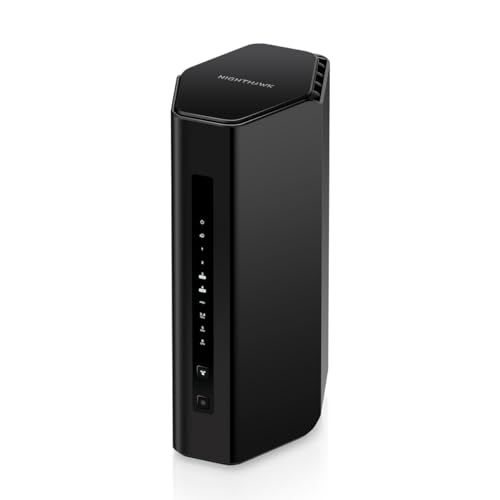
Netgear Nighthawk BE9300 WiFi 7 Router
Overview and real-world performance

The Netgear Nighthawk BE9300 positions itself as an accessible step into WiFi 7, aiming to deliver faster peak throughput, better responsiveness under load, and improved reliability for busy households. In day-to-day use, the biggest difference compared with many WiFi 6 and WiFi 6E routers is not just raw speed, but how gracefully the network holds up when multiple devices are competing for airtime. WiFi 7 features such as wider channels where available, improved multi-link capabilities depending on client support, and smarter scheduling help reduce the “everything slows down when someone starts a big download” effect that can plague older networks.
For typical homes, the BE9300 is likely to feel quickest in the places you notice most: quick file transfers to a NAS, snappier game updates, smoother 4K streaming while other devices are active, and reduced latency spikes in video calls. That said, performance is always a combination of the router, the internet connection, the client devices, and the physical environment. If your household is still dominated by WiFi 5 and WiFi 6 clients, the router can still improve overall efficiency and coverage consistency, but you won’t see the full “WiFi 7 headline speed” story until you add WiFi 7-capable laptops, phones, or PCs. Similarly, if your internet plan tops out well below gigabit speeds, your online performance may be limited more by the ISP than by the router, though local network tasks and multi-device stability can still benefit substantially.
Range and wall-penetration are solid for a mainstream standalone router, but buyers should be realistic about home layouts. Dense plaster, older brick, radiant barriers, and long hallways can turn any single-router setup into a compromise. In those environments, the BE9300 can still be a strong core router, but you may want to plan for adding compatible extenders or shifting to a mesh approach if you need consistent signal at the far edges of the property. Placement remains crucial: a central, elevated location away from metal objects and crowded electronics can yield a larger improvement than many settings changes.
One of the most practical strengths of a modern Nighthawk-class device is how it handles busy networks. Smart homes, cameras, and always-on devices generate constant low-level traffic. If you work from home, game online, or have multiple simultaneous streams, the router’s ability to manage contention matters more than a single top-speed test next to the unit. The BE9300 is built to keep the network responsive as demand scales, which is often the difference between a router that feels “fast” in a review and one that feels fast months later when you’ve added more devices.
Key factors to consider before buying
The most important factor to evaluate is whether you can actually benefit from WiFi 7 in your current setup. WiFi is a two-sided conversation, and the router can only use advanced features when the client device supports them. If you already own WiFi 7 clients or plan to upgrade a primary laptop or phone soon, the BE9300 makes more sense as a forward-looking purchase. If most of your devices are WiFi 6 or older, you can still gain from a stronger platform and improved overall network handling, but the upgrade is less dramatic unless your existing router is struggling.
The next major consideration is your home’s coverage needs. A single powerful router can be perfect for apartments, smaller homes, and open floor plans, but less ideal for multi-story houses with thick walls or detached offices. If you frequently experience dead zones, it’s worth thinking about whether your money is better spent on a mesh system or on pairing the BE9300 with an extender and careful wired backhaul planning. Ethernet backhaul, if available, remains the most reliable way to guarantee strong WiFi performance in distant rooms, regardless of router generation.
Your internet speed and modem or gateway compatibility matter as well. If you pay for multi-gig internet, you’ll want to ensure your modem and router WAN capability can actually accept those speeds and distribute them effectively across your devices. Conversely, if your plan is modest, the BE9300 won’t make your ISP faster, but it can make your in-home network feel more stable and reduce buffering or lag when many devices are active. Also consider whether you want to keep using an ISP-provided gateway in router mode, which can create double NAT and complicate port forwarding and gaming. Many users get the best experience by putting the ISP gateway into bridge mode or using a standalone modem where possible.
Security and ongoing costs are another purchasing factor that should not be overlooked. Netgear’s ecosystem often includes optional security and parental control services. Some users appreciate the convenience of consolidated protections and easier management, while others prefer to avoid subscriptions and rely on built-in router security plus device-level tools. Before you buy, check which features are included by default, which are trial-based, and what you might need long-term. The most important takeaway is to decide whether you want an “all-in-one” security approach, or whether you’re comfortable managing protections through endpoint software, DNS filtering, or separate tools.
Finally, consider your usage profile. Competitive gamers and remote workers tend to care most about latency stability, QoS behavior, and consistent performance under load. Families tend to value coverage, parental controls, and reliability. Creators and prosumers often prioritize LAN performance for local backups and fast transfers to network storage. The BE9300 is a strong fit when you want a router that can handle a growing number of devices and sustain performance without constant tinkering, but your personal priorities should determine whether you focus on WiFi 7 future-proofing, coverage reach, or management features.
Common Questions
Do I need WiFi 7 devices to benefit from the Netgear Nighthawk BE9300? The router will still work well with older WiFi 5 and WiFi 6 devices, and you may notice improvements in responsiveness and network stability. However, the most dramatic speed and feature gains require WiFi 7-capable clients.
Is the BE9300 a good choice for gaming and video calls? It can be, especially if your current router struggles when the network is busy. The primary advantage is steadier latency and fewer slowdowns during heavy household usage, though your ISP quality and home layout still play major roles.
Will one router cover my whole house? It depends on size, materials, and layout. Many average homes will be fine with a well-placed router, but multi-story houses, dense walls, and long distances may still require an extender, wired access point, or a mesh setup for consistent coverage.
Should I upgrade if I already have a good WiFi 6E router? If your WiFi 6E setup is stable, fast, and covers your space well, the upgrade may be incremental unless you’re adding WiFi 7 devices or you need better performance under heavy multi-device load. If you’re experiencing congestion, inconsistent latency, or reliability issues, the BE9300 could be a meaningful step up.
Do I need multi-gig internet to make this router worthwhile? No, but it helps if you want to see higher real-world throughput to the internet. Even on slower plans, you can still benefit from improved local network performance, better multi-device handling, and more headroom for simultaneous streaming, work, and smart home traffic.
Conclusion: The Netgear Nighthawk BE9300 is a compelling WiFi 7 router for users who want stronger multi-device stability today and a smoother runway into next-generation clients tomorrow. It shines most when your home network is busy, when you value responsive performance over headline speed tests, and when you’ve matched it with sensible placement and realistic coverage planning. If WiFi 7 devices are in your near future or your current router is showing its limits, the BE9300 is an upgrade that can feel immediately practical rather than purely theoretical.