








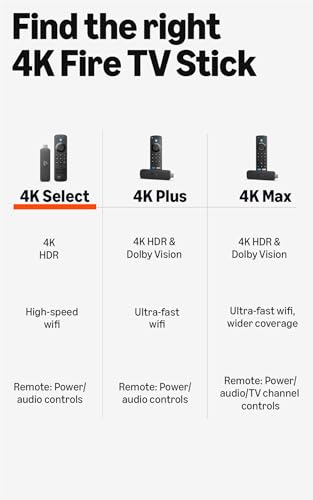


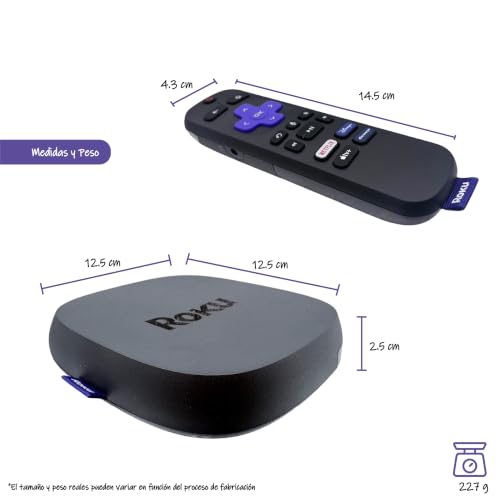


We also considered 8 others:


Our Top Choice
Compare Features


The order above is not editorial opinion, and it is not paid placement. It comes from what shoppers across our network actually do - which streaming sticks they compare, and which they ultimately buy. We re-rank as new data comes in, so the long-term favorites have to keep earning their spot against new entrants. The full method, including how we make money.
Streaming Sticks Buyer's Guide
Streaming sticks are often bought to rescue an aging smart TV, but the real tradeoff is whether the tiny device can match your TV, Wi‑Fi, apps, and remote-control needs without adding new friction. The sharpest checks are format compatibility—4K, HDR, Dolby Vision/HDR10+, and audio support—and whether the stick has enough power and wireless stability to avoid the buffering, freezing, or sluggish menus you are trying to escape.
Performance
Performance matters because a TV stick should open apps quickly, stream smoothly, and respond to your remote without frustrating lag. Look for enough processing power and memory to handle the apps and video quality you use, and watch out for devices that stutter when switching apps, buffering, or navigating menus.
Prioritize a stick with enough processing headroom for the resolution you actually watch: 4K HDR households should avoid entry-level HD-only hardware, while older 1080p TVs can save complexity with a simpler HD device. Also check for strong Wi‑Fi support, or an Ethernet option if the TV is far from the router, because streaming-stick slowdowns often come from weak wireless signal or underpowered USB ports rather than the app itself. Owner feedback supports this: shoppers frequently describe newer streamers as much faster than built-in TV apps or older devices, with quick app launches, smooth navigation, responsive voice search, less freezing, and polished 4K playback.
Quality
A TV stick should feel solid enough to survive regular handling, travel, and repeated plugging or unplugging without loose seams, flimsy connectors, or overheating concerns. Look for a snug fit in the HDMI port, well-made cables or adapters, and included parts that feel like they will last; poor fit or cheap construction can lead to signal issues, physical damage, or needing a replacement sooner than expected.
Match the stick’s video and audio formats to your TV and sound system before buying: a 4K stick is not enough if your display uses Dolby Vision, HDR10+, or a specific surround format that the device does not output. If you are replacing a cable box, decoder, or laggy smart-TV interface, also look for automatic resolution matching and dependable app support so picture quality does not come at the cost of compatibility. Owners commonly report crisp streaming, clearer Dolby Vision picture on compatible TVs, improved sound, automatic resolution adjustment, and a noticeable quality upgrade over older boxes and built-in TV menus.
Ease
You’ll use a TV stick constantly, so a simple, user-friendly interface can make the difference between quickly finding something to watch and getting stuck in menus. Look for clear navigation, responsive controls, straightforward search, and easy app management. Watch out for cluttered home screens, confusing settings, or layouts that make common tasks take too many clicks.
Choose an interface style that fits the household: some streaming sticks emphasize a simple app grid, while others push recommendations, voice assistants, or cross-service search. For less tech-heavy users, look for clear home-screen navigation, easy app installation, simple account sign-in, and parental/profile controls if multiple people share the TV. Owner sentiment backs this up, with many buyers saying setup and daily use feel approachable, navigation is responsive, content search is easier, and organized cross-service browsing helps reduce app-hopping confusion.
Remote
You’ll use the remote control constantly, so it should feel intuitive in your hand and make common actions easy without hunting through menus. Look for a clear button layout, reliable remote control access from your usual seating position, and helpful touches like dedicated shortcut buttons or glow-in-the-dark keys, while watching out for cramped buttons or overly minimal remotes that make navigation frustrating.
Do not treat the remote as an afterthought: confirm it can control your TV’s power and volume, and check whether you need mute, input switching, dedicated app buttons, voice search, headphone/private listening, or backlit keys. If the TV is in a bedroom or wall-mounted setup, also consider battery life, Bluetooth/IR behavior, and whether the remote can reliably wake the stick and TV without repeated pairing or power-cycling. Owners like voice search, playback control, and one-remote convenience when everything works, but feedback is more mixed here, with reports of quirky behavior, battery drain, startup-recognition issues, missing HDMI input controls, and occasional setup or service-specific limitations.
Setup
A smooth setup means you can start streaming without fighting activation codes, account sign-ins, Wi-Fi issues, or remote pairing problems. Look for a TV stick with clear on-screen instructions, reliable wireless setup, and simple accessory pairing, especially if you plan to use voice remotes, game controllers, or Bluetooth audio. Watch out for devices that require too many extra steps, apps, or account links before they’re usable.
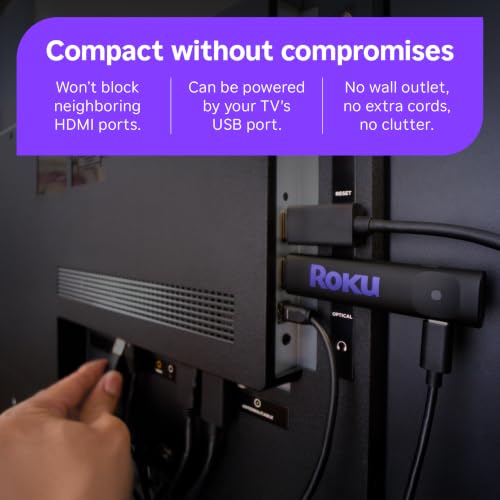
Before installation, check the physical fit behind your TV: some sticks crowd neighboring HDMI ports, need an extender, or require wall power instead of the TV’s USB port to avoid random restarts. Also confirm your TV has an available HDMI input, your Wi‑Fi credentials and streaming-service logins are ready, and your router supports the room where the TV sits; for travel or dorm use, captive Wi‑Fi portals can be a complication. Owners generally describe setup as quick and straightforward, often only a few minutes, with easy hookup, remote pairing, included cables or integration help, and a smooth path from unboxing to streaming on older or non-smart TVs.
1,000,000+ shoppers use Buyer's Guide every week to find the best products and services online.

Helping millions of users make smarter purchases online.


