


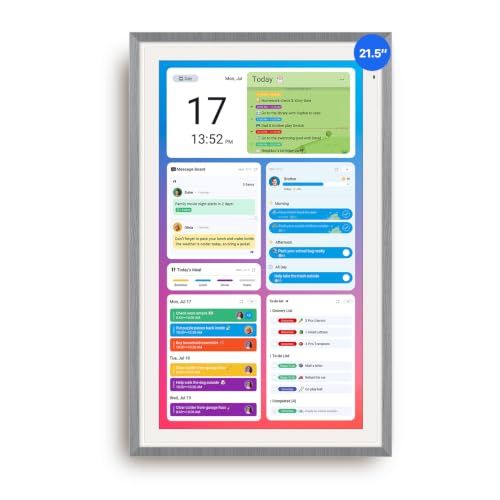
- Screen: 21.5" touchscreen
- Orientation: Landscape or portrait
- Auto Sync Calendars: Google, Yahoo, iCloud, Outlook, Cozi, and more
- Features: Digital picture frame, chore chart, meal planner
- Dimensions: 21.6" wide x 13.4" tall





ApoloSign 21.5" Digital Calendar
Overall Experience and Everyday Use

The ApoloSign 21.5" Digital Calendar is the kind of device that makes sense the moment it’s mounted on a wall or set on a counter: it turns schedules into something visible, shared, and hard to ignore. The 21.5-inch display is large enough to be read at a glance from across a kitchen, hallway, or office, which is exactly where a family or team calendar is most useful. Instead of asking who’s picking up the kids, when the dentist appointment is, or what time practice starts, the answers live on the screen in a way that feels immediate and communal.
In daily use, the biggest benefit is reduced friction. A digital calendar display removes the “I didn’t see the invite” problem that happens when calendars live only on individual phones. It also reduces the “What’s the plan today?” loop that can dominate mornings. When the layout is clean and the screen is bright enough to stay readable under common indoor lighting, it becomes a household dashboard rather than another gadget that needs babysitting.
Where the ApoloSign format really shines is when multiple people have overlapping commitments. A larger calendar panel is naturally more inclusive than a phone calendar because it supports quick scanning of the week and helps everyone form a shared picture of what’s coming next. It can also feel less cognitively taxing than juggling multiple apps, especially for families that include younger kids, older adults, or anyone who simply prefers a more visual, physical reminder.
What to Consider Before Buying (and What Matters Most)
Before buying a digital calendar in this size, it helps to think about placement, connectivity, and long-term usability. The first and arguably most important factor is where it will live and how it will be powered. A 21.5-inch screen is substantial, so you’ll want a spot that’s visible from key “traffic” areas, but also close enough to an outlet that cable routing won’t look messy. If you plan to mount it, consider whether the device supports the orientation you want and whether your wall space allows for comfortable viewing height without glare from nearby windows or overhead lights.
The second factor that tends to matter most is how it syncs with the calendars you already use. The entire value proposition depends on reliable integration. If your household or workplace uses Google Calendar, Outlook, or multiple services at once, you should confirm that the device supports your setup and that the syncing is stable. People often underestimate how quickly a calendar display becomes useless if it misses updates, duplicates events, or forces constant manual refresh. The best experience is when the screen behaves like a live window into your real schedules, not a separate system you have to maintain.
Screen quality is the next major consideration. At 21.5 inches, a display that’s too dim, too reflective, or washed out at angles will be frustrating. You want text that remains crisp from a few meters away, with strong contrast and a layout that doesn’t cram appointments into tiny blocks. Brightness controls matter because the ideal daytime setting can be too intense at night, especially in open-plan spaces. If the device includes auto-dimming or scheduling for brightness, that can be a meaningful quality-of-life feature for bedrooms, hallways, or any area visible after dark.
After those essentials, think about who will be interacting with the calendar and how. If the goal is mostly passive viewing, ease of setup and stability are more important than advanced controls. If you want people to interact directly on the screen, responsiveness and interface clarity start to matter more. It’s also worth considering accessibility: larger fonts, clear color coding, and a layout that remains readable without perfect eyesight can be the difference between “everyone uses it” and “only one person maintains it.”
Privacy and security deserve attention as well. A shared calendar display can reveal addresses, appointment details, or work meetings to anyone who walks past. Some users will want a mode that hides sensitive event titles or limits what is shown during certain hours. If the device supports user profiles, permissions, or adjustable visibility, that can be important for families with teens, roommates, or home offices that host visitors. In office environments, you may also want to ensure it aligns with your organization’s account security and network requirements.
Finally, consider reliability and longevity. A device like this is most valuable when it’s always on and always correct. That means stable Wi‑Fi performance, sensible software updates, and a system that recovers gracefully after power outages. If it reboots often, loses connection, or needs frequent sign-ins, it stops feeling like an appliance and starts feeling like a project. In practice, the most important factors are sync reliability, display readability, and a placement/power plan that makes the calendar effortless to see every day.
Common Questions
Does a 21.5" digital calendar feel too big for a home? It depends on your space, but for many households the size is a feature rather than a drawback. The larger display is what makes it readable from across a room and useful as a shared reference point. If you have a narrow hallway or limited wall space, measure first and consider whether you prefer a countertop placement or a wall mount.
Will it work if my family uses different calendar services? A digital calendar is most convenient when it can combine multiple sources into one view. Before buying, confirm that it supports the services you rely on and that each person can connect their account in a way that keeps events up to date. The ideal setup is one where everyone continues using their existing apps while the display aggregates everything automatically.
Is it hard to set up and keep running? Setup is usually straightforward if your Wi‑Fi is stable and you already have your calendars organized. The bigger “maintenance” question is whether the device stays signed in and synced over time. A calendar display should behave like an always-on appliance, so look for options that reduce the need for repeated logins, manual refreshes, or troubleshooting after routine network changes.
Can I keep personal details private while still showing the schedule? Many people want the convenience of shared visibility without exposing sensitive event titles or locations. If privacy matters in your home or office, check for features that let you hide details, display only busy blocks, or set viewing rules by time of day. A shared screen is great for coordination, but it should match your comfort level around what’s publicly visible.
Conclusion: The ApoloSign 21.5" Digital Calendar is best understood as a visibility upgrade for your schedule: it turns scattered, phone-bound plans into a shared, glanceable routine that can reduce missed appointments and daily confusion. If you prioritize dependable calendar syncing, strong readability from a distance, and a sensible placement plan for power and glare, the large format can feel less like a luxury and more like a practical household or office tool.