



- Functionality: Print, scan, copy
- Resolution: 1200 x 1200 dpi
- Color Print Speed: 30 ppm
- Monochrome Print Speed: 30 ppm
- Two-Sided Printing: Yes
- Max Paper Size: 8.5" x 11"





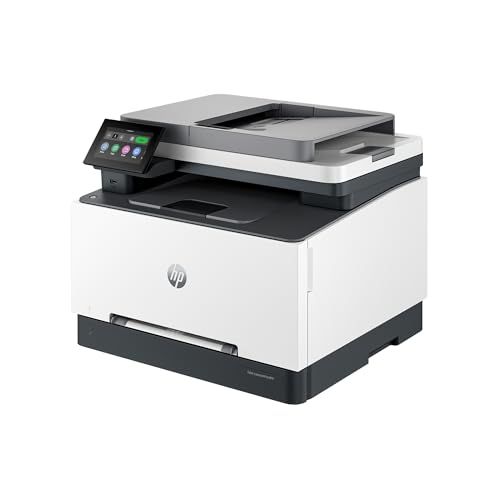
HP Color LaserJet Pro MFP 3301sdw Printer
Overview and real-world performance

The HP Color LaserJet Pro MFP 3301sdw is designed for people who want the speed and crisp output of a color laser device without stepping into the size, complexity, or running costs of larger enterprise machines. As a multifunction printer, it combines printing, scanning, copying, and fax capabilities, making it a practical choice for a home office or a small team that needs an all-in-one device that can handle varied tasks throughout the week. In everyday use, its biggest appeal is consistency: laser output tends to look clean and professional across documents, and this model is clearly tuned for business-style work like invoices, presentations, shipping labels, and forms.
Where the 3301sdw tends to shine is in pace and workflow convenience. It is well-suited to users who print frequently and do not want to wait for inkjet-style page-by-page variability or deal with printheads and maintenance cycles typical of ink systems. Text and fine lines usually appear sharp, with strong edge definition, and color graphics on plain paper look clear and persuasive for internal reports, handouts, and client-facing materials. While it can produce attractive color pages, it’s important to frame expectations: a color laser MFP like this typically excels at business graphics rather than gallery-quality photo output. If you mainly print photos, an inkjet photo printer is often the better match; if you mainly print documents with occasional charts, this HP is in its comfort zone.
As a multifunction unit, scanning and copying matter as much as printing. The “sdw” class of devices is typically aimed at productivity, so users who regularly scan stacks of documents will appreciate features that support faster capture and smoother document handling. In practical terms, the more you scan multi-page packets, contracts, or receipts, the more valuable a capable document feeder becomes. Copying benefits from the same strengths as printing, producing clean text and solid color fills for typical office use.
Connectivity is another major part of the experience. Modern offices are rarely tethered to a single computer, and this printer is built with that reality in mind. Wireless networking, mobile printing, and Ethernet support can reduce friction for teams, while a straightforward control panel experience can save time when you need to scan to email, copy a quick form, or run a fax without troubleshooting. When everything is set up correctly, the day-to-day impression is that the printer stays out of your way, which is ultimately the point of a good small-office MFP.
Key purchase factors and what matters most
Before buying the HP Color LaserJet Pro MFP 3301sdw, the most important question to ask is what type of printing you do and how often you do it. Print volume drives nearly every other consideration, including running cost, maintenance expectations, and how much you’ll benefit from laser speed. If you print sporadically, you might not fully capitalize on a business laser MFP; if you print frequently, the consistent output and efficiency can quickly feel essential. The most important factor for many buyers is total cost of ownership, not just the purchase price. Toner cartridges often cost more upfront than ink, but they tend to last longer, and laser printers typically avoid some of the ink-related waste that comes from cleaning cycles and dried nozzles.
Second in importance is workflow fit, especially scanning and document handling. If you routinely scan multi-page documents, you should pay close attention to the document feeder’s speed, reliability, and whether it supports duplex scanning for two-sided pages. Duplex scanning can be a major time-saver, and for administrative work it can easily become the feature you miss most if you buy a cheaper model without it. If your scanning needs are light, you may still appreciate the convenience, but you won’t depend on it as heavily.
Third, consider print quality in the context of your content. For sharp business text, laser is a strong choice. For color charts and presentations, color laser output is typically very good on plain paper. For photos, color lasers usually do not match the tonal smoothness and paper versatility of good inkjets. If your goal is marketing collateral, you might still use this printer for drafts and internal approvals while outsourcing final glossy pieces; if your goal is internal documentation with a professional look, this model can be a good fit.
Next comes connectivity and device sharing. If multiple people will use the printer, reliable Wi-Fi and Ethernet options matter, as does compatibility with your operating systems and mobile devices. If you anticipate guests printing from phones, simple mobile printing support can reduce headaches. In managed office environments, the ability to place the printer on Ethernet and keep it stable is often more valuable than any single convenience feature. For home offices, strong Wi-Fi performance can matter more than raw throughput.
Paper handling is another factor that is easy to underestimate. Think about the paper sizes you use most, whether you print envelopes or labels, and how often you want to refill trays. A printer that forces constant tray refills or struggles with specialty media can become a daily irritation. Also consider the physical footprint. Color laser MFPs tend to be larger and heavier than inkjets, and they want a stable surface with adequate ventilation and easy access for toner replacement.
Finally, consider the software experience and support. Printer hardware can be excellent, but a clumsy driver or confusing scanning workflow can undermine the experience. If scanning to PDF, scanning to email, and managing presets are central to your work, look for a setup that makes these tasks quick. Warranty and support can also be decisive for small businesses where downtime is costly. If you rely on printing for shipping, billing, or client deliverables, choosing a model with a solid service reputation is worth prioritizing.
Common Questions
Does the HP Color LaserJet Pro MFP 3301sdw handle duplex printing?
Yes. Duplex printing is a core productivity feature in this class, and it’s especially valuable for reducing paper use and keeping multi-page documents tidy without manual flipping.
Is this printer a good choice for photo printing?
It can print color images clearly, but it is primarily optimized for business documents and graphics. If high-quality photo printing is your main goal, an inkjet photo printer with photo paper support and finer tonal gradation is usually a better option.
Can multiple computers and phones use it easily?
Yes. This model is aimed at shared environments and typically supports network connections that allow multiple users to print and scan. For the smoothest experience in a small office, placing it on a stable Wi-Fi network or Ethernet can make device discovery and reliability more consistent.
Should I worry more about the printer price or toner costs?
Toner costs often matter more over time. If you print regularly, calculate your approximate monthly page volume and consider cost per page and cartridge yield, since those factors usually determine the true long-term expense.
Does it make sense for a home office?
Yes, especially if you print often and want professional-looking output with minimal fuss. If you print only occasionally or mostly photos, you may find a smaller inkjet or monochrome laser more cost-effective.
Conclusion: The HP Color LaserJet Pro MFP 3301sdw is a strong option for users who prioritize fast, consistent document printing, practical color output, and an all-in-one workflow that supports scanning and copying without constant babysitting. The most important buying considerations are your print volume and total cost of ownership, followed closely by whether its scanning and document-handling features match your daily routine. If your work is document-heavy and you want a printer that feels like a dependable office tool rather than a hobby device, this model is well worth shortlisting.