


- Functionality: Print, scan, copy, fax, photo
- Resolution: 4800 x 1200 dpi
- Color Print Speed: 10 ppm
- Monochrome Print Speed: 15 ppm
- Two-Sided Printing: Yes
- Max Paper Size: 8.5" x 14"





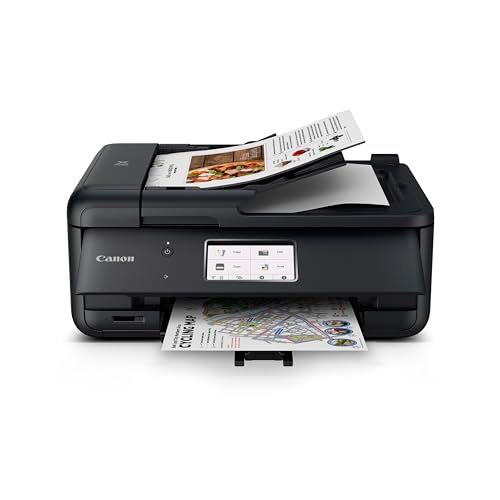
Canon TR8620a Home Office Printer
Overview and real-world performance

The Canon TR8620a Home Office Printer is designed for people who need an all-in-one that can comfortably handle the mix of tasks that show up in a home office: printing invoices and shipping labels, scanning signed documents, copying forms, and occasionally producing color-heavy pages like presentations or flyers. In day-to-day use, it feels aimed at convenience as much as output quality, balancing a compact footprint with features that reduce friction, such as wireless printing and an interface that makes routine tasks straightforward.
For text documents, the TR8620a generally delivers crisp, readable output that looks professional enough for business correspondence. Black text appears dark and well-defined, and standard documents print cleanly on plain paper. Color printing is where many home-office printers either shine or disappoint, and the TR8620a tends to land on the “pleasantly capable” side for charts, graphics, and photo-accented pages. While it’s not a dedicated photo printer in the enthusiast sense, it can produce attractive color documents and casual photos on the right paper, with smooth gradients and respectable detail for its class.
Scanning and copying are also central to the TR8620a’s appeal. If you frequently digitize receipts, contracts, school forms, or ID copies, you’ll appreciate predictable, consistent scans that don’t require much fiddling. Duplex printing support is a practical advantage for reducing paper use and making multi-page documents look more polished. Overall, it’s a sensible all-rounder for users who want one device to cover most home office needs without stepping up to a larger, more expensive business-class machine.
Factors to consider before buying and which matter most
The most important factor for most buyers is total cost of ownership, not just the purchase price. Inkjet printers can vary dramatically in what you spend over time, depending on cartridge yields and how you print. If you print frequently, the cost of replacement ink and how quickly you go through cartridges will matter more than a modest difference in upfront price. Consider your typical mix of pages: mostly black-and-white text, or lots of color graphics and photos. Color-heavy output tends to raise ink costs faster, and occasional printing can introduce another concern: inkjets may run cleaning cycles or require maintenance prints to keep nozzles healthy, which can also consume ink.
Print volume and speed are the next key consideration. If your weekly workload is a handful of pages, nearly any modern printer will feel “fast enough.” If you regularly print multi-page reports, client packets, or classroom materials, you’ll care more about print speed and how reliably the device handles longer runs. Beyond speed, paper handling can be a quiet deal-breaker. Pay attention to whether the printer supports the paper sizes you use most, how it feeds envelopes or thicker stock, and whether the tray capacity matches your rhythm. A device that constantly needs refilling interrupts work and becomes annoying quickly.
Duplex printing and duplex scanning are especially important to evaluate honestly. Duplex printing saves paper and time when producing double-sided documents, and it often makes paperwork look more professional. Duplex scanning is different: it means scanning both sides automatically. Many home office users print duplex far more often than they scan duplex, but if you handle two-sided contracts, IDs, or forms, automatic duplex scanning can become a major quality-of-life feature. Before purchasing, confirm which duplex features you truly need so you don’t overpay for something you won’t use or, worse, miss a feature you’ll wish you had later.
Connectivity and workflow compatibility are also high priority. Wireless printing is almost a requirement in many homes now, but reliability matters more than the checkbox on the box. Think about your environment: are you printing from a Windows PC, a Mac, phones and tablets, or all of the above? If multiple family members share the printer, a smooth mobile printing experience can be just as important as desktop drivers. If you work with cloud-based documents, the ease of sending files to print without extra steps can make a difference in how “home office friendly” the printer feels.
Output quality should be evaluated based on what you actually produce. If your work is mostly text, prioritize sharp black printing and consistent alignment over photo-centric features. If you print marketing materials, color accuracy and paper compatibility become more important. For occasional photo prints, it’s worth checking whether the printer performs well on glossy or semi-gloss photo paper and whether the color looks natural to your eye. For business documents, what matters most is legibility, consistency, and the ability to reproduce charts without banding or muddy colors.
Finally, consider size, noise, and ease of use. A home office printer often lives in a shared space, so compact design and quieter operation matter. A clear display and intuitive menus reduce small daily frustrations, and easy access to ink cartridges and paper paths can make maintenance less of a chore. The most important factors for most users, in order, tend to be long-term ink costs, reliable everyday printing and scanning, and paper handling that matches your workload. Everything else is secondary unless you have a specialized need.
Common Questions
Does the Canon TR8620a work well for a mix of documents and occasional color printing? Yes. It’s well-suited to home office use where you alternate between black text documents, color charts, and the occasional photo or color-heavy handout. It won’t replace a dedicated photo printer for demanding photo work, but it can produce attractive color output for everyday needs.
Is duplex printing available, and is it worth caring about? Duplex printing is a meaningful feature for most home office users because it saves paper and makes multi-page documents look more professional. If you print a lot of multi-page materials, duplex printing quickly becomes one of the most valuable conveniences.
How can I estimate whether ink costs will be reasonable for me? Start by looking at how many pages you print each month and how much of it is color. If you print mostly black text, costs may be manageable even with standard cartridges. If you print frequent color documents, your monthly spend can rise, so it’s worth comparing cartridge yields and considering whether your printing habits justify the ongoing cost.
Is it easy to print from phones and laptops? For most users, yes. The general experience is designed around modern wireless printing, which is helpful in a household where multiple devices need access. Your experience will still depend on your network stability and keeping the printer connected, but the intent of this model is clearly home-office convenience across devices.
As a home office all-in-one, the Canon TR8620a Home Office Printer focuses on practical versatility: solid text printing, capable color output, useful scanning and copying features, and conveniences like duplex printing and wireless workflows. The best buying decision comes from matching it to your real printing habits, with the strongest emphasis on long-term ink costs, the volume you print each month, and paper handling features that support the way you work.