





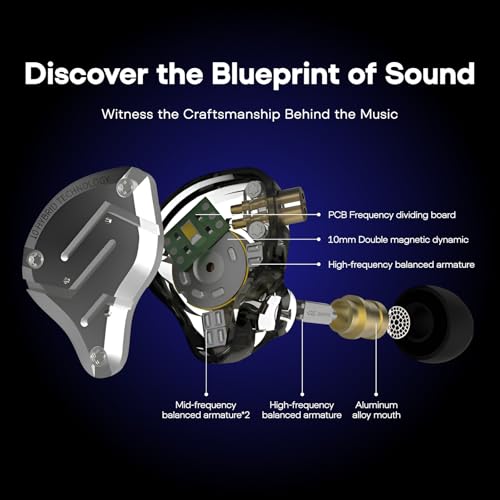

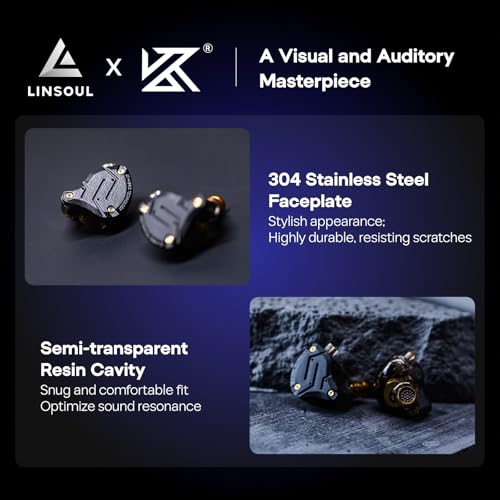



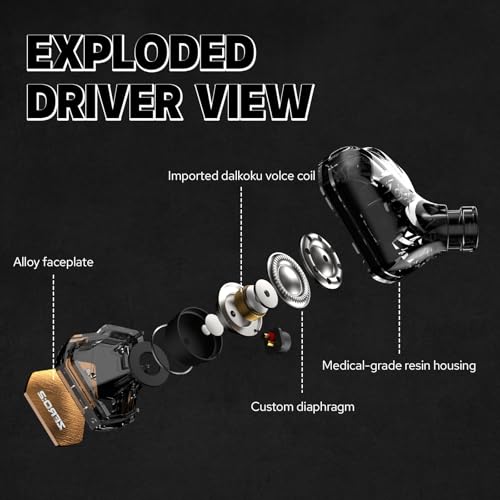


We also considered 10 others:


Our Top Choice
Compare Features


The order above is not editorial opinion, and it is not paid placement. It comes from what shoppers across our network actually do - which gaming earbuds they compare, and which they ultimately buy. We re-rank as new data comes in, so the long-term favorites have to keep earning their spot against new entrants. The full method, including how we make money.
Gaming Earbuds Buyer's Guide
Gaming earbuds have to balance competitive clarity, low latency, and long-session comfort in a much smaller form than a headset. The sharpest buying risks are choosing a connection that lags on your platform or a fit that breaks the seal, because either one can make positional audio and voice chat noticeably worse.
Build
You want earbuds that can handle daily use without loose seams, rattling housings, fraying cables, unreliable charging contacts, or tips that stop fitting securely. Pay attention to the sturdiness of the shells, hinges or case, cable strain relief on wired pairs, water or sweat resistance for workouts, and owner reports of early failures, connection issues, or one earbud dying before the other.
For gaming earbuds, prioritize strain relief, a sturdy cable, and reinforced plug areas because desk-edge snags, controller use, and repeated plugging into PC, console controllers, handhelds, or dongles are common failure points. If choosing wired IEM-style buds, a detachable cable is a plus; if choosing wireless, check case hinge durability, sweat resistance, and whether replacement tips are easy to find. Owner feedback supports that inexpensive gaming-capable earbuds can still feel better built than expected, with many buyers calling cords sturdy, daily-use durability solid, and overall build a pleasant surprise for the cost.
Fit
Fit matters because earbuds that don’t sit comfortably or seal well can sound thin, feel irritating, or work loose while you move. Look for multiple ear tip sizes or stabilizing features if you need them, and watch for pressure points, slipping, or a seal that breaks when you talk, chew, or exercise.
Fit matters more here than with casual earbuds because a poor seal ruins positional cues, weakens bass, and forces volume higher during long matches. Look for multiple silicone tip sizes, a shell shape that will not press painfully after hours, and a low-profile design if you wear glasses, a hat, VR gear, or sometimes layer ear protection over earbuds; avoid bulky shells if you know your outer ear gets sore. Owners often praise lightweight in-ear designs for reducing headset fatigue, staying secure without constant adjustment, and remaining comfortable through long gaming or listening sessions.
Sound
Sound quality matters because earbuds should make music, podcasts, and calls clear and balanced without forcing you to raise the volume. Look for enough bass to feel full without muddying vocals, clean detail at normal listening levels, and performance that stays consistent across different genres. Be wary of earbuds that sound overly boomy, harsh, or thin, since that can become tiring during longer listening sessions.
For gaming, do not shop only for heavy bass: look for clear mids/treble, good left-right imaging, and separation so footsteps, reloads, pings, and dialogue do not get masked by explosions. A slightly clean, detailed tuning is often more useful than a boomy one, while overly sharp treble can become tiring over long sessions. Owner sentiment backs this priority, with many buyers praising clear, detailed, full, and immersive sound, including the ability to hear game details like footsteps and effects, plus strong instrument separation that can translate well to positional awareness.
Value
Value matters because the best earbuds for you are not just the cheapest pair, but the ones that justify their cost through sound quality, comfort, battery life, durability, and useful features. Look for a balance between the features you will actually use and the compromises you can live with, and be cautious of paying extra for flashy specs or design touches that do not improve your everyday listening experience.
The best value in gaming earbuds is not just the cheapest pair; it is the pair that solves your platform and latency needs without forcing extra adapters, replacement cables, or an immediate upgrade. For PC and console play, confirm whether you need a 3.5 mm TRRS plug, USB-C, a low-latency 2.4 GHz dongle, or Bluetooth, and factor in mic/chat compatibility before buying. Owners frequently describe budget gaming-friendly earbuds and IEMs as outperforming typical cheap earbuds, with sound and build quality that feel stronger than expected and compare favorably with more expensive listening gear.
Noise
Noise control matters because it determines how clearly you can hear your music, calls, or podcasts in places like buses, offices, gyms, and busy streets. Look for earbuds with effective noise cancellation and a secure fit, since active noise cancellation works best when good physical isolation blocks sound first. Watch out for models that reduce steady low rumbles well but still let voices, wind, or sudden sounds cut through.
For competitive gaming, treat noise control as a seal-and-safety question: passive isolation can help you hear quiet cues, but too much isolation or active cancellation may make it harder to hear doorbells, roommates, children, or your own voice on chat. If you game in a loud room, prioritize a good tip seal and stable fit before assuming active noise cancellation will solve everything; if you play online often, also check whether the mic rejects keyboard, fan, and background noise. Owner feedback is mixed in exactly these areas: some buyers get useful isolation or even impressive noise blocking, while others say the seal depends heavily on ear shape and that cancellation is more of a light buffer than true isolation.
Connectivity
Strong connectivity keeps your earbuds paired reliably, with fewer dropouts when you move around, put your phone in a pocket, or use them in busy wireless environments. Look for easy Bluetooth pairing, stable range, and multipoint or smooth device switching if you regularly move between a phone, laptop, or tablet. Watch out for earbuds that reconnect slowly, favor one device too aggressively, or lose sync in crowded areas.
Latency is the make-or-break connectivity spec for gaming earbuds: standard Bluetooth can be fine for casual phone use but may lag in shooters, rhythm games, or voice chat, so prioritize wired connections or a dedicated low-latency 2.4 GHz dongle for serious play. Check platform compatibility specifically—PC, console, handheld, mobile, controller jack, USB-C port, and chat support do not all behave the same—and avoid earbuds that make mode switching confusing if you move between devices often. Owners report that simple Bluetooth pairing can be quick and stable for routine use, while 2.4 GHz dongles are especially valued for low-latency gaming across multiple platforms, though some note that mode switching and long-term consistency can vary.
1,000,000+ shoppers use Buyer's Guide every week to find the best products and services online.

Helping millions of users make smarter purchases online.


