


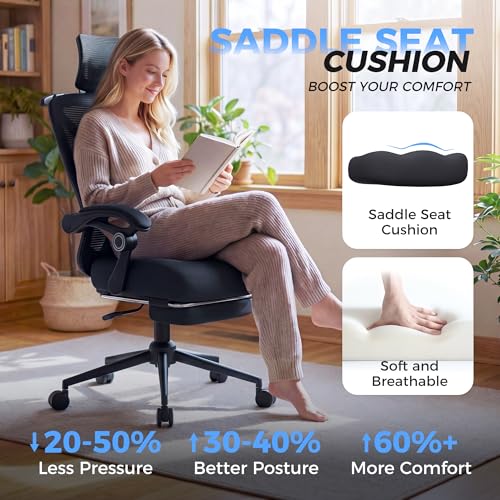
- Material: Mesh
- Support: Lumbar, headrest, foot rest
- Armrest: Linkage
- Weight Limit: 330 lbs
- Tilt/Recline: Back recline





CYKOV Ergonomic Office Chair
Overall Review and Daily Comfort

The CYKOV Ergonomic Office Chair is designed for people who spend long stretches at a desk and want a seat that feels supportive without being overly stiff. In day-to-day use, the chair’s biggest strength is that it aims to guide you into a healthier sitting posture rather than simply offering a soft cushion. The overall feel is best described as “structured comfort”: you get support where it matters, especially through the mid and lower back, while still having enough give to stay comfortable through a long work session. For typical office tasks such as typing, video calls, and reading, it encourages a neutral posture and reduces the tendency to slump forward.
What many users look for in an ergonomic chair is the balance between adjustability and simplicity. The CYKOV model generally fits that expectation by offering the core adjustments most people actually use, such as seat height, a reclining function, and armrest positioning. When the chair is tuned well for your body, it can help reduce common complaints like lower-back fatigue, tight shoulders, and pressure behind the thighs. If you frequently switch between focused work and relaxed reading, the recline can also add real value, since changing angles throughout the day is often more comfortable than holding one “perfect” posture for hours.
Comfort is not only about padding; it’s also about pressure distribution. The seat is intended to support your weight across a wider area, which can matter a lot if you sit for multiple hours at a time. A good ergonomic chair should keep your hips stable, allow your feet to rest flat, and keep your knees at a comfortable angle. With the CYKOV chair, those basics are achievable for many users, but the best results come when you take time to adjust it correctly and match it to your desk height and monitor position. Even a well-designed chair can’t fully compensate for a desk that is too high or a monitor that forces you to crane your neck.
Key Buying Factors and What Matters Most
Before purchasing the CYKOV Ergonomic Office Chair, the first factor to consider is fit. Ergonomics is personal: a chair that feels perfect to one person can feel wrong to another because of differences in height, leg length, and torso proportions. The most important aspects of fit are seat height range, seat depth comfort, and lumbar support alignment. Seat height determines whether you can keep your feet flat on the floor with your thighs roughly parallel to the ground. If the chair doesn’t go low enough, shorter users may feel pressure under the thighs or find themselves perched forward. If it doesn’t go high enough, taller users may struggle to align properly with their desk.
Lumbar support is the second major consideration and, for many buyers, the single most important feature. Good lumbar support should meet the natural inward curve of your lower back, helping you avoid slouching. If you already experience lower-back discomfort, prioritize how the chair supports the lumbar region over secondary features like an especially thick seat cushion. In practical terms, you want lumbar support that feels present but not aggressive, and ideally something you can fine-tune so it sits at the right height and firmness for your body. The CYKOV chair’s ergonomic intent is clear here, and if the lumbar support matches your back shape, it can be a meaningful upgrade from basic task chairs.
Adjustable armrests are another factor that is often underestimated. The “right” armrest height allows your shoulders to relax and your elbows to sit near a natural 90-degree bend while typing. If armrests are too high, they can push your shoulders upward and cause tension. If they’re too low or too far apart, you may end up leaning on your wrists or forearms in a way that increases strain. The most important point is that armrests should work with your desk, not fight it. If you use a keyboard tray or sit close to the desk edge, confirm the armrests can position comfortably or move out of the way when needed.
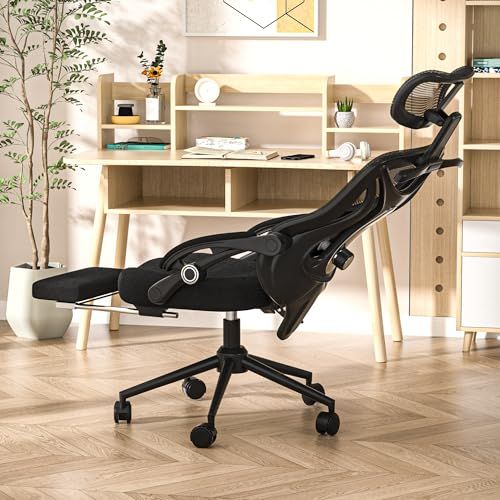
Recline and tilt tension matter most for people who don’t sit perfectly still. A chair that reclines but offers poor tension control can feel either too stiff to use or so loose that you’re constantly bracing with your core. Ideally, you should be able to lean back smoothly while still feeling supported, then return upright without effort. If you do a lot of calls or reading, the ability to recline comfortably can reduce spinal loading and help you vary posture, which is often better than locking into one angle all day.
Materials and breathability should be weighed based on your climate and typical sessions. If you run warm or work in a hot room, breathable back materials can be a bigger comfort factor than extra foam. If you tend to sit for very long periods, pay attention to how the seat feels after an hour or two, not just in the first five minutes. A seat that feels plush at first can compress and create pressure points later, while a slightly firmer seat can feel better over a full day.
Finally, consider build quality and stability. A chair should feel solid when you shift your weight, roll across the floor, or lean back. If you have a heavier workstation routine, such as frequent leaning, reaching, or swiveling, sturdiness becomes more important. Also think about your flooring. On hard floors, many casters roll easily, while on carpet you may want a chair mat for smoother movement and better posture, since struggling to roll can subtly change how you sit.
Common Questions
Does the CYKOV Ergonomic Office Chair work for long hours of work? It is built for extended sitting, and its main advantage is that it aims to keep your back supported and your posture more neutral. For long hours, the key is dialing in the seat height, lumbar position, and armrests so you can stay relaxed rather than tense.
Is it a good choice if I already have back pain? It can help if your pain is related to poor support or slouching, especially if the lumbar support aligns well with your lower back. However, back pain can have many causes, so it’s wise to treat the chair as one part of a broader setup that includes desk height, monitor position, and regular movement breaks.
How important are adjustable armrests compared with lumbar support? Lumbar support is usually the priority because it affects spinal alignment directly. Adjustable armrests are a close second because they influence shoulder and neck tension, especially for typing-heavy work.
Will the chair fit under my desk? That depends largely on your desk height and the armrest height range. If your desk has a low apron or you sit very close to the front edge, you’ll want to ensure the armrests can lower enough or that you can position the chair close without the armrests bumping the desk.
Is it difficult to get the chair adjusted correctly? Most people can get a good fit with a few minutes of experimentation. Start with seat height so your feet are flat, then adjust lumbar support to meet the curve of your lower back, and finish by setting armrests so your shoulders feel relaxed while typing.
As an ergonomic-focused option, the CYKOV Ergonomic Office Chair is best for users who value support, posture alignment, and adjustability more than a “sink-in” feel. The most important purchase considerations are fit, lumbar support, and armrest adjustability, because those directly affect comfort over hours rather than minutes. If it matches your body proportions and your desk setup, it can be a practical upgrade that makes everyday work noticeably easier on your back and shoulders.