








Our Top Choice
Why These Features Matter:
A computer mouse is one of those quietly intimate objects: it lives under your palm for hours, collects a suspicious amount of desk grit, and becomes intolerable the second it feels slightly “off.” A good one disappears. A bad one turns every spreadsheet, timeline, and late-night doomscroll into a tiny argument between your hand and your cursor.
The trick is that “best” isn’t a single mouse. It’s a set of choices that match how a home (and a body) actually behaves: cramped desks, glossy dining tables, couch work sessions, shared workstations, kids with juice hands, and the ever-present cable that somehow finds your coffee cup. Below: the features that actually change daily life—plus the small annoyances that are worth knowing before committing.
Shape: The Part Your Hand Will Remember
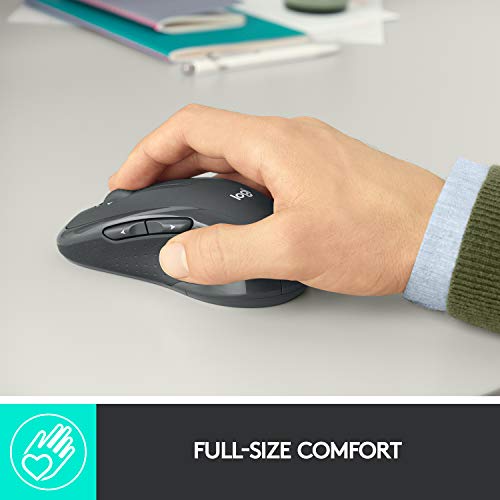
Shape isn’t aesthetics; it’s ergonomics pretending to be taste. The right silhouette keeps the wrist neutral and the fingers relaxed. The wrong one makes the hand clench without realizing it—until the end of the day when everything feels a little brittle.
- Palm vs. claw vs. fingertip grip: A higher “hump” fills the palm and suits people who rest their hand. Lower profiles favor lighter, fingertip-y control and smaller hands.
- Ambidextrous shapes: Clean, symmetrical, easy to share at a hot-desk situation. Less supportive if someone wants a more cradled feel.
- Right-handed ergonomic shapes: Usually the comfiest for long days—more hand-holding, less wrist drama—though they can feel weirdly bossy if someone likes to move a mouse with just fingertips.
Things to know: If a mouse forces the thumb to tuck in too tightly, it will start to feel like a bad shoe. If the pinky drags on the desk, that friction becomes its own little mood.
Weight & Glide: How It Feels on a Tuesday Afternoon
Weight is where preference gets strangely emotional. Some people want a mouse that floats like an air hockey puck. Others want a bit of heft—something that doesn’t skitter when the hand is tired or the desk is slightly sticky from iced-coffee condensation.
- Lighter mice: Easier on the wrist during long sessions; feel quick and “effortless.” They can also feel twitchy on high sensitivity settings.
- Heavier mice: More planted, calmer cursor control, less accidental flinging. They can start to feel like dragging a small appliance across the desk by day three.
- Feet (glide pads): Smooth feet matter more than most people expect. Cheap feet feel scratchy, amplify desk texture, and turn every movement into sandpaper ASMR.
Honest caveat: Even a great mouse can feel lousy on a bad surface. A desk mat can make an average mouse feel expensive—and a gorgeous raw-wood desk can make everything feel slightly wrong.
Clicks & Scroll: The Office Noise You Don’t Notice Until You Do
Click feel is basically mood lighting. Loud, snappy clicks feel satisfying until there’s a sleeping baby in the next room or a partner on a Zoom call quietly resenting your “typewriter” mouse. Scroll wheels are even more personal: too loose and it overshoots; too stiff and it feels like cranking a pepper mill.
- Quiet clicks: Great for shared spaces and late-night work. Some people find them a little mushy—less crisp feedback.
- Defined clicks: A clean “yes” feeling. Can be fatiguing if the buttons take too much force.
- Scroll modes: Notched scrolling is controlled for spreadsheets and careful browsing. Free-spin scrolling eats through long pages fast, but can feel like a runaway shopping cart.
Things to know: Scroll wheels are where dust, crumbs, and lint go to live. If a home has pets or a snacky desk situation, smoother scroll mechanisms tend to stay pleasant longer.
Wireless vs. Wired: The Cable Is Always Doing Something
Wired mice are simple and reliable—until the cable drags against a laptop stand, catches on a notebook, or does that thing where it slowly nudges your water glass. Wireless mice keep a workspace looking calmer and make couch-work possible without a cord leash.
- Wireless (Bluetooth): Clean, travel-friendly, fewer dongles to lose. Can be finicky with pairing on older machines or shared devices.
- Wireless (USB receiver): Usually the most stable connection. The receiver is tiny, which is great until it isn’t (read: it disappears into the same dimension as spare hair ties).
- Wired: No charging, no batteries, no “why is it lagging?” moments. Cable management becomes part of your personality.
Honest caveat: Wireless convenience comes with a background task: charging. If the household is already juggling phone chargers, earbuds, and a laptop that only charges at a specific angle, adding another battery can feel like one chore too many.
Battery & Charging: The Least Glamorous Part of Modern Life
Battery life rarely feels important until the mouse dies mid-sentence and you’re suddenly doing trackpad ballet. Good charging design is the difference between “easy” and “annoying.”
- Rechargeable (USB-C): The most painless if everything else is already USB-C. Bonus if it works while charging without feeling awkward.
- Replaceable batteries: Low-maintenance for people who don’t want another thing to charge. But batteries are a drawer commitment, and that drawer will someday be chaos.
- Charging docks: Elegant and tidy—if the mouse reliably lands on it. If alignment is picky, it becomes a nightly ritual that occasionally fails.
Things to know: A mouse that can be used while charging is a small mercy. A mouse with the charging port placed where it turns into a wired brick during charging is less charming in practice.
Buttons & Shortcuts: Convenience, Until It’s Too Much
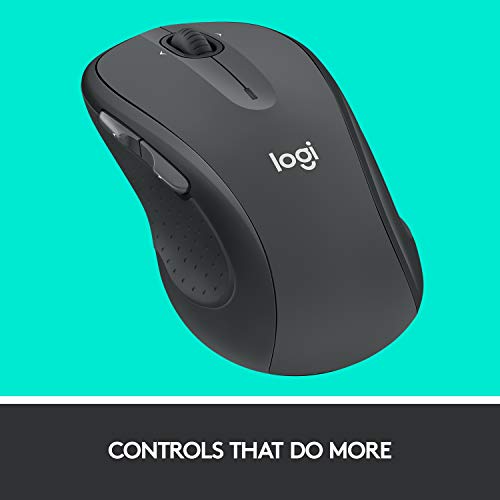
Extra buttons can be genuinely helpful—back/forward for browsing, a thumb button for push-to-talk, a quick shortcut for switching desktops. They can also be a minefield of accidental presses if the placement is off by a millimeter.
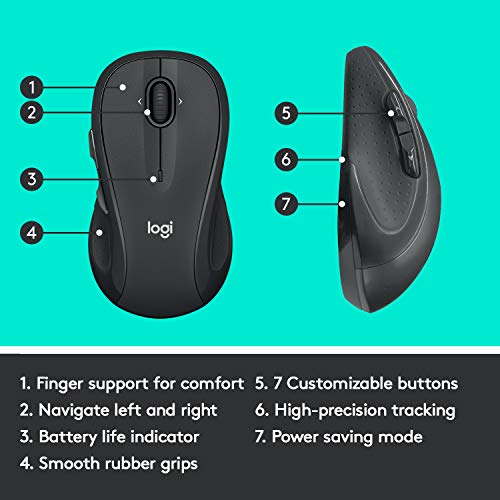
- Two side buttons: The sweet spot for most people. Useful without feeling like a cockpit.
- Many programmable buttons: Great for editing, design, or anyone who lives in keyboard shortcuts. Overkill for casual use, and sometimes awkward-looking in a minimalist setup.
- On-the-fly sensitivity switches: Handy for precise work. Confusing if someone bumps them and suddenly the cursor behaves like it had three espressos.
Honest caveat: Software can be the tax on button freedom. Some mice require apps that feel like installing a small operating system just to remap one button.
Surface Tracking: Your Desk Isn’t Always a Desk
People don’t always work at a proper desk. Sometimes it’s a dining table. Sometimes it’s a sofa arm. Sometimes it’s a glossy coffee table that looks chic and performs like an ice rink.
- Works on more surfaces: Helpful in small apartments and multi-use rooms where a desk mat isn’t always out.
- Prefers a mouse pad: Often fine—mouse pads are cheap, and they protect nice tables. But it’s another object to store, and storage is already a negotiation.
Things to know: If the mouse struggles on reflective or glass surfaces, that’s not personal. It’s physics. Keep a thin mat nearby if the home has a lot of glossy furniture.
Build, Finish & Cleaning: The Crumb Reality
Finish matters because hands aren’t neutral. Some people have dry hands, some have lotion, some have sunscreen, some have a child who just touched yogurt. Matte coatings feel soft and controlled; glossy bits show fingerprints like a crime scene.
- Matte finishes: Usually the most forgiving and pleasant to grip. Can polish over time where fingers rest.
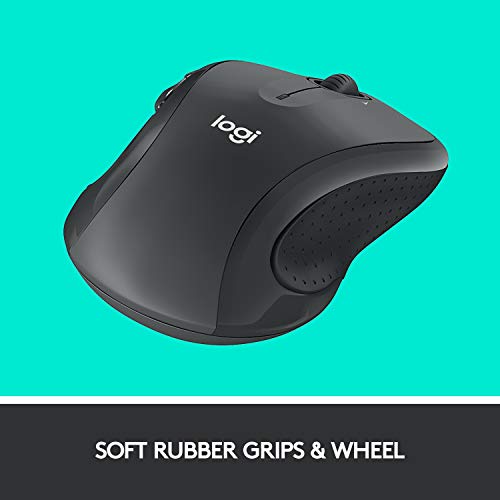
- Rubberized coatings: Grippy and comfortable. They can get tacky after years, especially in warm climates or heavy use.
- Textured sides: Helps with control, especially if hands get sweaty. Texture also collects dust in the tiny grooves like it’s their job.
Honest caveat: White and pale-colored mice look gorgeous for about five minutes in a real home. After that, they start documenting your life choices.
Portability: For People Who Work From “Anywhere” (and Mean It)
A travel mouse should slide into a bag without snagging on everything and should wake up quickly without a complicated pairing dance. The best portable options feel like a thoughtful object, not a freebie.
- Low-profile designs: Easy to pack, less wrist support for all-day use.
- Storage for dongles: A small detail that prevents a lot of future irritation.
- Hard switches vs. auto-sleep: Switches stop accidental bag-clicking. Auto-sleep saves battery but can add a half-second of “hello?” lag.
Buying Guidance: How to Choose Without Overthinking It
- For long desk days: Prioritize comfort and click feel. A supportive shape and a scroll wheel you enjoy matter more than fancy extras.
- For shared spaces and small apartments: Quiet clicks + wireless is a sanity combo. Bonus points for easy cleaning and a finish that doesn’t show every fingerprint.
- For couch work and moving around: Strong surface tracking and stable wireless connection. Keep a thin mat tucked nearby if the coffee table is fussy.
- For minimalists: Two side buttons, rechargeable battery, simple software (or none). Less to manage, fewer weird surprises.
- For power users: Extra programmable buttons and a scroll wheel with both controlled and fast modes—just be honest about whether you’ll actually set it up.
Small Red Flags That Usually Mean Regret
- Charging that forces an awkward grip (or turns the mouse into a sad wired slug while charging).
- Side buttons placed exactly where your thumb wants to rest.
- A scroll wheel that feels hollow, rattly, or overly loose—these tend to get worse, not better.
- A finish that looks pristine in photos but shows skin oils immediately (especially in bright daylight).
- Software that feels mandatory, intrusive, or weirdly difficult just to do something basic.
The Bottom Line
The best computer mouse is the one that makes the day feel smoother: less wrist tension, fewer little interruptions, a scroll wheel that behaves, clicks that don’t broadcast across the apartment, and a shape that doesn’t turn the hand into a claw by 4 p.m. Look for comfort and control first. Everything else is garnish—sometimes delightful, sometimes annoying, always more noticeable than it should be.
1,000,000+ shoppers use Buyer's Guide every week to find the best products and services online.

Helping millions of users make smarter purchases online.

