













We also considered 10 others:


Our Top Choice
The order above is not editorial opinion, and it is not paid placement. It comes from what shoppers across our network actually do - which cordless mouses for laptops they compare, and which they ultimately buy. We re-rank as new data comes in, so the long-term favorites have to keep earning their spot against new entrants. The full method, including how we make money.
Cordless Mouses for Laptops Buyer's Guide
A cordless mouse for a laptop has to be small enough to travel, reliable enough to replace the trackpad, and comfortable enough for real work. The sharpest tradeoffs are connection type and port compatibility, compact size versus hand comfort, and whether the mouse stays ready when it has been sitting in a bag.
Connection Setup
A cordless laptop mouse is only convenient if it connects quickly every time you sit down to work. Port type, receiver storage, pairing behavior, and wake-from-sleep reliability matter more for laptop use than they might on a fixed desktop setup.
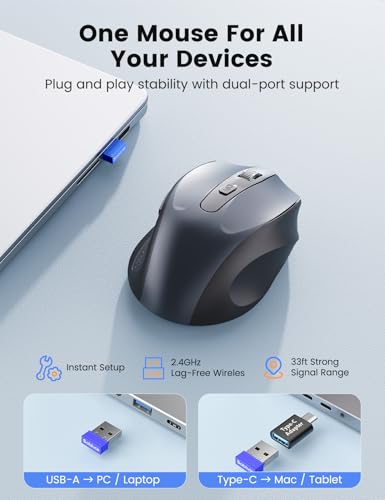
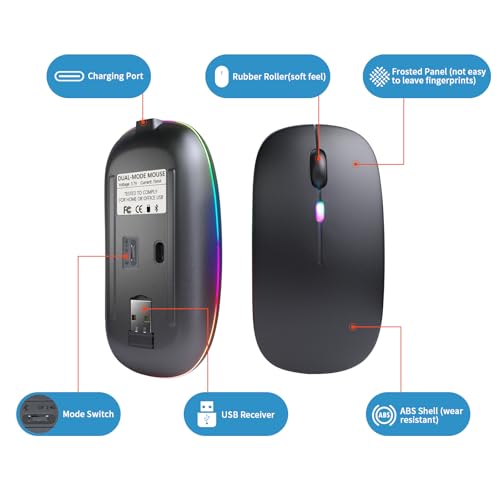
For a laptop, first decide whether you want Bluetooth, a 2.4 GHz USB receiver, or both. A tiny USB receiver is often simple and low-lag, but it can occupy a scarce USB-A port, require a USB-C adapter on newer laptops, and become easy to lose unless the mouse has onboard receiver storage; Bluetooth saves a port but depends on pairing stability and OS compatibility. Owner feedback supports prioritizing simple setup: buyers describe USB-receiver connection as easy, general use as straightforward, and setup as quick once the small receiver is found inside the mouse.
Tracking Control
The best cordless laptop mouse disappears into the task: pointing, selecting, dragging, and scrolling should feel immediate. Small flaws in tracking or wheel behavior become annoying fast because they affect every interaction, not just occasional features.
Look for smooth optical tracking, clean left/right clicks, a wheel that scrolls predictably, and cursor movement that stays accurate on common laptop work surfaces such as desks, café tables, notebooks, and mouse pads. If you switch between a laptop screen and an external monitor, adjustable sensitivity can help; avoid mice that only feel acceptable on one surface or that lag after waking. Owners consistently praise smooth, accurate cursor movement for normal laptop and desktop work, along with responsive controls that feel reliable for everyday office tasks.
Portable Fit
Laptop mice have to balance bag-friendly size against hand comfort. A mouse that is perfect for a commute can still be frustrating if it is too small for daily spreadsheets, browsing, or extended remote work.
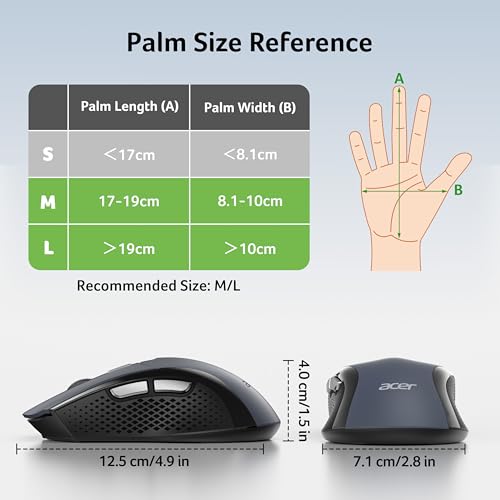
Choose the size for your actual use pattern: ultra-compact mice are easier to keep in a laptop bag, but a body that is too short or narrow can force a cramped grip during long sessions. Check the dimensions, grip shape, and whether the mouse suits your dominant hand or an ambidextrous grip; for travel, also consider whether it has a snag-resistant shape and a safe place for the receiver. Owner sentiment is mixed in exactly this way: compact sizing is appreciated for travel and smaller hands, but some buyers find these mice smaller than expected.
Power Readiness
Cordless convenience depends on the mouse being ready when the laptop is ready. Battery type, standby drain, charging access, and wake behavior can matter as much as tracking quality for people who work in different places.
For cordless laptop use, prioritize battery behavior that will not strand you away from a desk: long standby life, an automatic sleep mode that wakes cleanly, a physical on/off switch, and either common replaceable batteries or a convenient rechargeable design. A battery indicator is useful if the mouse rides in a bag for days between uses; avoid designs with unusual cells, awkward charging locations, or wake-up delays that interrupt quick laptop sessions. Owners in the provided feedback focus on dependable everyday function and simple use, which makes power management a hidden requirement even when it is not the first thing shoppers mention.
Build Quality
Small cordless mice get tossed into bags, used on improvised surfaces, and handled more roughly than many desktop peripherals. Durable construction keeps a simple mouse feeling reliable instead of disposable.
Inspect the parts that fail first on basic cordless mice: click consistency, scroll-wheel wobble, feet that glide evenly, battery-door fit, receiver-storage slot, and shell flex. A no-frills laptop mouse does not need premium materials, but it should not rattle in a bag, drop its battery cover, or feel imprecise after light daily use. Owners support this distinction, describing basic wireless mice as solid, dependable, good-quality, and not flimsy despite their simple design.
Value Match
A laptop mouse should solve a practical problem: better control than a trackpad without adding hassle. The best value is not the most feature-heavy option, but the one whose connection, comfort, and tracking match how and where the laptop is used.
Match the mouse to your laptop workload instead of buying by feature count alone. For office apps, browsing, schoolwork, and travel, a reliable basic cordless mouse with accurate tracking and easy setup can be the right value; extra programmable buttons, gaming sensors, or complex software only matter if your workflow truly uses them. Owner feedback strongly favors this no-frills value equation: buyers describe affordable wireless mice as good deals when they perform as promised, feel well made, and avoid feeling low quality.
1,000,000+ shoppers use Buyer's Guide every week to find the best products and services online.

Helping millions of users make smarter purchases online.


