











We also considered 10 others:


Our Top Choice
The order above is not editorial opinion, and it is not paid placement. It comes from what shoppers across our network actually do - which computer keyboards they compare, and which they ultimately buy. We re-rank as new data comes in, so the long-term favorites have to keep earning their spot against new entrants. The full method, including how we make money.
Computer Keyboards Buyer's Guide
Computer keyboards are a tradeoff between typing feel, desk fit, connection reliability, and how much noise or visual flair you can live with. The sharpest buying mistakes are choosing the wrong switch or layout for your daily use, and paying for lighting or gaming styling while overlooking comfort, compatibility, and build quality.
Feel & Sound
The switch or key mechanism determines how much force, feedback, travel, and noise you experience with every keystroke. A keyboard that feels great to one shopper can be distracting or tiring to another if the sound or tactility is wrong for the setting.
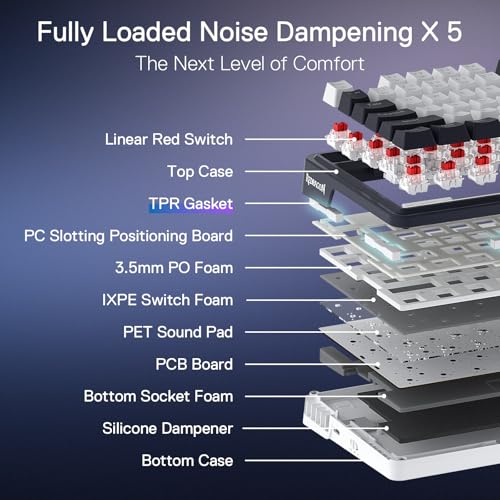
Start by choosing the switch feel that matches the room and the work: tactile switches give a bump for typing, clicky switches add audible feedback, linear switches favor smooth gaming inputs, and membrane or scissor-style boards are usually quieter and softer. For long writing or office use, look for stable larger keys, consistent actuation, and a sound profile you can tolerate for hours; for shared spaces, avoid sharp clicky switches unless others nearby are comfortable with the noise. Owner sentiment strongly supports this as a top separator: buyers repeatedly praise smooth, responsive typing, satisfying tactile bumps, creamy or thocky sound, and quiet keypresses when the feel matches their preference, while clickiness is only a plus when it is wanted.
Layout Comfort
Keyboard size changes both desk ergonomics and muscle memory. A poor layout can slow down shortcuts, crowd the mouse hand, or make long sessions uncomfortable even if the switches are good.
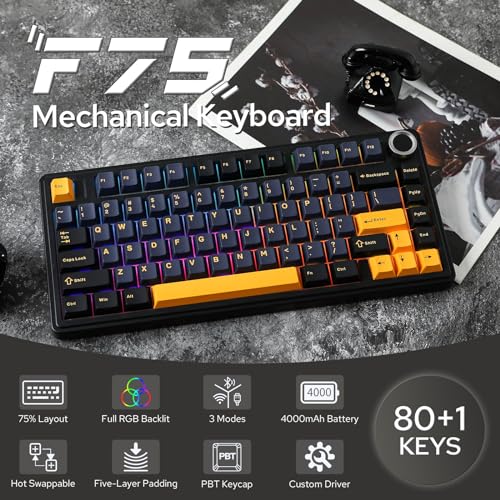
Pick the layout before the look: full-size is best if you need a number pad, tenkeyless saves mouse space, compact layouts trade dedicated keys for portability, and 75% layouts can keep function keys while shrinking the footprint. Check key spacing, arrow-key placement, wrist angle, and whether the legends are large enough to read; low-profile boards can feel clean and fast, while taller mechanical boards may need a wrist rest. Owners consistently reward boards that feel comfortable for extended use, work well for sensitive wrists, offer traditional key feel, or use large-print legends that improve readability.
Build Quality
A keyboard is a high-contact device, so small weaknesses in the case, stabilizers, caps, or switches become obvious over time. Better construction improves typing consistency and reduces rattling, flex, and premature wear.
Look for a rigid case or metal plate, low deck flex, stable stabilizers on large keys, and keycaps that do not feel thin or slippery. If you want the board to last or evolve, hot-swappable sockets, included replacement switches, standard keycap compatibility, and accessible maintenance matter more than flashy effects. Owner feedback repeatedly highlights sturdy construction, premium-feeling weight, rigid metal-backed designs, solid low-flex boards, and budget models that avoid the hollow cheap-plastic feel.
Connection Fit
Connection type affects latency, desk clutter, battery maintenance, and device compatibility. A keyboard can feel excellent but still be a poor fit if it drops connection, needs awkward software, or lacks the right layout support for your computer.
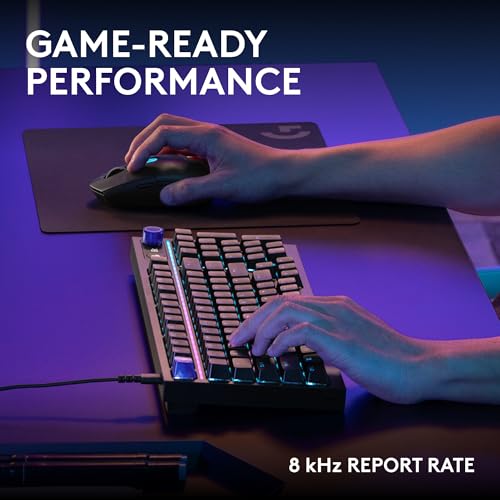
Choose wired if you want the simplest setup, no charging, and the least concern about latency; choose 2.4 GHz wireless for a cleaner desk with stronger everyday responsiveness; choose Bluetooth when switching among laptops, tablets, or multiple devices matters. Verify operating-system layout support, dongle requirements, charging or battery type, and whether lighting drains wireless runtime; for gaming, look for low-latency wireless or wired operation plus anti-ghosting or n-key rollover. Owner sentiment backs simple reliability: buyers value plug-and-play setup, easy connection without extra downloads, and dependable everyday performance.
Lighting & Legends
Lighting is not only aesthetic on a keyboard; it can determine how easily you find keys in low light. The best visual design supports readability while still matching the desk setup you want.
Prioritize readable legends first: shine-through keycaps, large-print lettering, and even backlighting are more useful than decorative lighting modes if you type in dim rooms. RGB can be worthwhile when it has onboard profiles, per-key customization, brightness control, and legends that stay visible; avoid boards where the lighting looks bright but the characters are hard to read from your normal seating angle. Owners praise bright backlighting for night use, RGB effects that make legends easy to see, saved color profiles, and distinctive color or retro styling when appearance is part of the setup.
Value Match
Keyboard pricing varies widely because features such as switch type, wireless modes, lighting, materials, and programmability can add cost. A good buy is the board whose compromises match your actual use rather than the one with the longest feature list.
Judge value by the features you will actually use: office buyers may get more from quiet keys, a full-size layout, and reliable plug-and-play operation, while gamers or enthusiasts may get more from mechanical switches, hot-swap support, onboard lighting profiles, and a sturdier plate. Do not pay extra only for aggressive styling if the switch type, layout, and connection are wrong; likewise, do not dismiss budget boards if they deliver the feel, reliability, and build you need. Owner sentiment strongly emphasizes value, with many buyers describing lower-cost boards as feeling solid, premium, smooth, or comparable to more expensive enthusiast-style options.
1,000,000+ shoppers use Buyer's Guide every week to find the best products and services online.

Helping millions of users make smarter purchases online.


