















We also considered 10 others:





Our Top Choice
Compare Features


The order above is not editorial opinion, and it is not paid placement. It comes from what shoppers across our network actually do - which cheap 55-inch tvs they compare, and which they ultimately buy. We re-rank as new data comes in, so the long-term favorites have to keep earning their spot against new entrants. The full method, including how we make money.
Cheap 55-Inch TVs Buyer's Guide
Cheap 55-inch TVs are usually a tradeoff between big-screen size and the parts you do not see on a spec sheet: panel uniformity, brightness, HDMI capability, and smart-TV responsiveness. The sharpest checks are whether the screen looks acceptable in your actual room lighting and whether the ports, stand width, mount pattern, and gaming features match how you will use a 55-inch set.
Quality
You want a smart TV that feels well built, runs consistently, and keeps delivering stable performance after the novelty wears off. Look for signs of solid construction, dependable software behavior, sturdy ports and stand hardware, and owner feedback about long-term reliability; watch out for reports of freezing, random restarts, loose panels, weak stands, or performance that degrades with regular use.
For a cheap 55-inch TV, inspect build and panel consistency as much as the feature list: look for a return-friendly purchase path in case of dirty-screen effect, corner darkening, dead pixels, weak backlight uniformity, or sluggish smart menus that only show up after setup. Also confirm the stand is stable on your furniture, the VESA mount pattern matches your wall mount, and the TV is not so flimsy that cable tension or frequent swiveling becomes a problem. Owner feedback generally supports the category as a strong deal, with many buyers feeling the screen quality, 4K capability, smooth everyday performance, and included functions are impressive for a lower-cost big TV.
Picture
Picture quality determines how clear, natural, and immersive everything looks, from dark movie scenes to bright sports broadcasts. You should look for a TV with accurate color, strong contrast, enough brightness for your room, and good motion handling, while watching out for sets that look vivid in a showroom but make skin tones, shadows, or fast action appear unnatural.
Do not buy a cheap 55-inch TV on “4K” alone; at this size, the bigger differences are brightness, reflection handling, local dimming or lack of it, motion handling, viewing angle, and upscaling of cable or older streaming content. For bright living rooms, avoid dim panels with glossy reflections; for sports, check motion settings and panel refresh; for movie nights, watch for gray-looking blacks and blotchy dark scenes; for gaming, verify low input lag and whether 120Hz, VRR, or ALLM are truly supported rather than implied. Owner sentiment is strongest around picture quality, with shoppers often describing budget sets as sharp, clear, bright, colorful, crisp, and satisfying for streaming, sports, movies, and gaming.
Setup
Setup matters because a smart TV can be large, fragile, and awkward to position, especially if you plan to wall-mount it or connect multiple devices. Look for clear instructions, stable stand assembly, accessible ports, straightforward Wi-Fi and account sign-in, and a guided on-screen setup that helps you tune channels and configure picture, sound, and apps without guesswork. Watch out for TVs that require extra tools, uncommon mounting hardware, or two-person lifting beyond what your space and setup plan can handle.
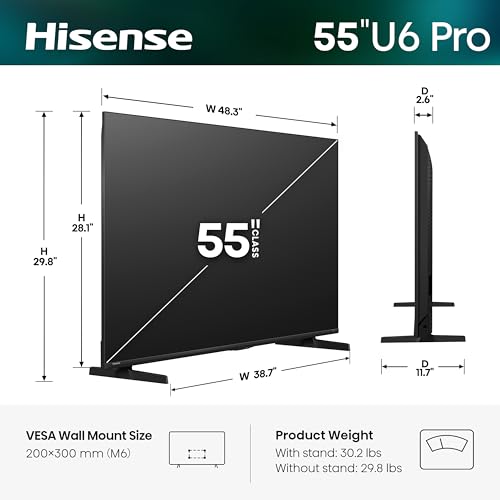
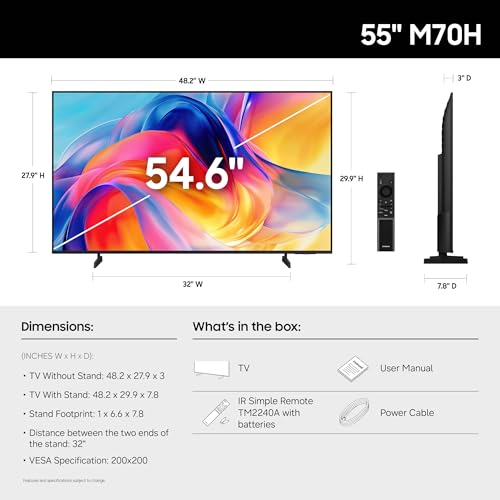
Before buying, measure the full 55-inch footprint: stand legs on budget TVs are often wide-set, so the TV may not fit a narrow console even if the screen size seems right. Also check whether you can complete setup without unwanted account friction, whether the remote has the controls you need, and whether wall mounting will block ports or require angled HDMI cables. Owners commonly describe setup as quick, guided, and beginner-friendly, with many able to attach the legs, connect to Wi-Fi, enter account details, and start streaming with little hassle.
Value
You want a smart TV that delivers strong picture quality, smooth performance, and useful streaming features without making you pay for extras you won’t use. Look for a balanced mix of display quality, app support, connectivity, and reliability at your budget level, and watch out for models that seem inexpensive but cut corners on brightness, processing speed, or long-term software support.
The best value in a cheap 55-inch TV is not the longest feature checklist; it is the set that gives you acceptable brightness, reliable smart performance, enough HDMI ports, and the right gaming or streaming features without paying for labels that do not improve your use case. Avoid overvaluing vague HDR claims on dim panels, fake-sounding motion numbers, or smart platforms you will replace immediately with an external streamer. Owner feedback backs up the value appeal: buyers often feel these TVs deliver a good-looking large screen, built-in streaming, 4K resolution, smooth basic performance, and useful functions for the money.
Connectivity
You want a smart TV that connects reliably to your Wi-Fi, pairs smoothly with your phone, speakers, controllers, or other devices, and supports the apps and inputs you actually use. Look for enough HDMI and USB ports, current wireless standards, and broad compatibility with streaming apps and external gear, while watching out for TVs that drop connections, limit certain apps, or make device switching frustrating.
For a 55-inch TV that will anchor a living room, count your devices before buying: game console, soundbar, cable box, antenna, disc player, and streaming stick can quickly exceed the available HDMI ports. Look specifically for HDMI eARC or ARC if using a soundbar, HDMI 2.1-level features if gaming matters, optical audio if you have older audio gear, Ethernet if Wi-Fi is weak, Bluetooth only if you need headphones, and side-facing ports if wall mounting. Owners often report easy Wi-Fi, cable, antenna, app, and accessory setup, but PC-monitor use deserves caution because some buyers find HDMI works while wake-from-sleep behavior can be unreliable.
Sound
Sound quality affects how clear dialogue, music, and effects feel, especially when you’re watching movies, sports, or shows without extra speakers. Look for a TV that can get loud enough for your room without sounding harsh, thin, or distorted, and pay attention to whether voices remain easy to understand. If the built-in speakers seem weak or lack bass, plan on pairing the TV with a soundbar or external audio system.
Assume a cheap 55-inch TV’s built-in speakers are fine for news and casual streaming but limited for movies, sports, and dialogue in larger rooms; thin cabinets rarely produce strong bass or wide sound. Check for eARC/ARC, optical output, Bluetooth audio delay controls, and dialogue enhancement settings if you plan to add a soundbar or headphones, and avoid setups where Bluetooth lip-sync issues would bother you. Owner sentiment is mixed but not bleak: many buyers say built-in audio is clear, loud, usable, or better than expected, while others still consider a soundbar or report occasional audio oddities and sync problems.
1,000,000+ shoppers use Buyer's Guide every week to find the best products and services online.

Helping millions of users make smarter purchases online.


