


- Display: 152"
- Brightness: 1500 nits
- Refresh Rate: 120Hz
- Speakers: Not indicated
- Camera: 12MP
- Power: USB-C cable to compatible device





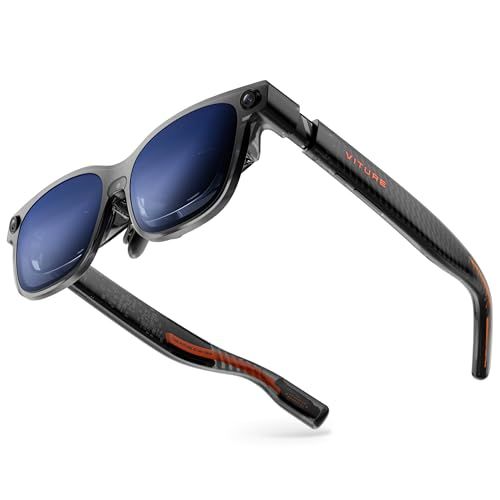
Viture Luma Ultra AR/XR Glasses
What the Luma Ultra Feels Like in Everyday Use

The Viture Luma Ultra AR/XR Glasses aim to deliver a “big screen anywhere” experience without asking you to carry a full headset. In practice, they succeed best when you treat them as a personal, wearable display rather than a full spatial-computing replacement. The core appeal is simple: you plug them into a compatible device, put them on like glasses, and you get a bright, sharp virtual screen that’s ideal for video, handheld gaming, cloud gaming, and productivity in short sessions.
Comfort is a major part of whether you’ll love or shelve glasses like these, and the Luma Ultra generally lands on the right side of the tradeoff between weight and stability. They’re light enough to wear for a movie and compact enough to travel with, but they still sit on your face like eyewear, which means fit is personal. If your nose bridge is sensitive or you wear prescription lenses, you’ll want to factor that into the purchase. The viewing experience depends heavily on how well the optics align with your eyes; a slightly off fit can turn “crisp” into “soft at the edges.” When the fit is right, the screen effect is convincingly large, and the perceived clarity is strong for text, UI elements, and subtitles.
As AR/XR glasses go, the Luma Ultra’s strengths are straightforward: quick setup, portability, and a cinematic display that feels more private than using a laptop on a plane or a handheld console in a waiting room. The limitations are also typical for the category: you’re mostly looking at a floating screen rather than interacting with a robust 3D world, and your best experience depends on what you plug them into and what software ecosystem you prefer. If you understand that going in, the Luma Ultra can feel like a surprisingly practical upgrade to your everyday devices.
Performance, Image Quality, and the Experience You Actually Get
Image quality is the make-or-break feature for display glasses, and the Luma Ultra is at its best with high-quality sources and stable output. Movies and console-style games look particularly good because they hide small optical imperfections better than tiny text does. Bright scenes are punchy, darker scenes tend to look better when ambient light is controlled, and the sense of immersion is strong because the screen stays centered in your field of view. If you plan to use them in bright environments, remember that these glasses are still competing with the real world; perceived contrast and black levels will depend on how much light is around you and how effectively the lenses block it.
Latency and smoothness are also worth paying attention to, especially for gaming. With a direct connection to a compatible device, the experience can feel snappy and responsive, but results vary with your source device, refresh behavior, and any wireless link you might introduce. If you’re a competitive gamer who is sensitive to input delay, you’ll want the simplest possible chain: device to glasses with minimal adapters. For cinematic use and casual gaming, most people will find the experience more than satisfying, and the portability advantage outweighs the slight compromises compared to a dedicated monitor or TV.
Audio is another area where expectations matter. Many AR glasses include integrated audio that’s convenient but not the same as isolating headphones. For private listening or deeper bass, pairing with earbuds or over-ears is often the best move. On the other hand, built-in audio can be great for quick sessions, shared spaces where you still need awareness, or travel where you don’t want extra gear. The Luma Ultra’s overall value improves if you already have a preferred audio solution and can treat the glasses as a display first.
For productivity, the Luma Ultra can be surprisingly useful for focused tasks like writing, email triage, or working in a terminal, particularly when you don’t have room for a larger screen. The key question is how well you tolerate extended near-eye viewing and how often you need razor-sharp small text. If your workday involves tiny spreadsheets, dense IDE layouts, or long hours, you may prefer a traditional monitor for primary work and reserve the Luma Ultra for travel and short bursts of productivity. If your work is more document-centric and you value privacy, the appeal is much stronger.
What to Consider Before Buying (and What Matters Most)
Before purchasing the Viture Luma Ultra, the most important factor is compatibility with the devices you already own. These glasses live and die by the ecosystem around them: your phone, handheld console, laptop, or media device must output in a way the glasses support, and you may need specific adapters depending on ports and power delivery. If you want a frictionless experience, confirm that your primary device can connect directly, maintain a stable signal, and deliver the resolution and refresh behavior you expect. A great pair of glasses can feel mediocre if you’re constantly troubleshooting cables or living with a finicky adapter.
The next most important factor is fit and vision correction. Unlike a TV, you can’t simply “sit a bit closer” if the image isn’t sharp; optical alignment and your own eyesight matter immediately. If you wear prescription glasses, investigate how lens inserts work, what the cost is, and how easy it is to swap them. If you have a strong prescription, astigmatism, or you’re sensitive to edge blur, prioritize return policies and the ability to test for comfort and clarity in your typical viewing positions. A strong display on paper doesn’t help if it never becomes crisp for your eyes.
Third, think honestly about your primary use case. If you mainly want a portable theater, the Luma Ultra is an appealing solution because it’s quick, compact, and immersive. If you mainly want AR features, spatial anchoring, gesture-driven interfaces, or a replacement for a full headset, you should verify exactly what XR features are supported and how mature the software is. Many buyers are happiest when they treat these glasses as a premium external display rather than expecting a full mixed-reality platform. Framing your expectations correctly is often the difference between “game-changing” and “returned in a week.”
Finally, consider comfort over time, heat management, and how you’ll handle audio and privacy in the places you plan to use them. In a quiet room, open audio may be fine; on a plane, you’ll likely want earbuds. In bright environments, you may want better light blocking. In public spaces, the privacy of a personal screen is excellent, but you’ll also want to be mindful of situational awareness. The most important purchases are the ones that fit your routine, not just your wishlist.
Common Questions
Can the Viture Luma Ultra replace a laptop monitor for daily work? For occasional productivity, travel, and focused writing or email, it can be a practical substitute. For all-day work involving lots of tiny text, multiple windows, or color-critical tasks, most people will still prefer a real monitor for comfort and consistency.
Do I need a special device to use the glasses? You typically need a compatible device that can output video over the appropriate connection and provide adequate power. Checking your phone, console, or laptop’s video-out support and the required adapters is the most important step before buying.
Are they good for gaming? Yes, especially for handheld and casual gaming where immersion and portability matter most. Competitive gaming depends on your sensitivity to latency and the simplicity of your connection setup.
What if I wear prescription glasses? You should plan for lens correction via inserts or another supported method. Comfort and optical clarity are highly personal, so prioritize fit, confirm how prescription solutions work, and buy from a seller with a good return policy if you’re uncertain.
Is the experience truly “AR” or more like a floating screen? For most buyers, the primary experience is a high-quality floating screen. Any advanced XR features depend on the supported software and devices, so it’s worth validating those capabilities against the specific apps and workflows you want.
As a portable display, the Viture Luma Ultra AR/XR Glasses are at their best when you want a big, private screen without the bulk of a headset. If you prioritize device compatibility and fit above everything else, align your expectations toward a premium wearable monitor, and plan your audio and lighting setup, they can be a genuinely satisfying upgrade for travel, media, and gaming.