










We also considered 10 others:


Our Top Choice
Compare Features


The order above is not editorial opinion, and it is not paid placement. It comes from what shoppers across our network actually do - which ring outdoor cams they compare, and which they ultimately buy. We re-rank as new data comes in, so the long-term favorites have to keep earning their spot against new entrants. The full method, including how we make money.
Ring Outdoor Cams Buyer's Guide
Outdoor security cameras in this ecosystem are strongest when they match the exact job: a porch needs face-and-package detail, a driveway needs reach and lighting, and a side yard needs reliable detection without constant false alerts. The sharpest buying concerns are power and Wi‑Fi at the mounting spot, because great video matters less if the camera is hard to recharge, loses live view, or misses motion due to placement.
Video
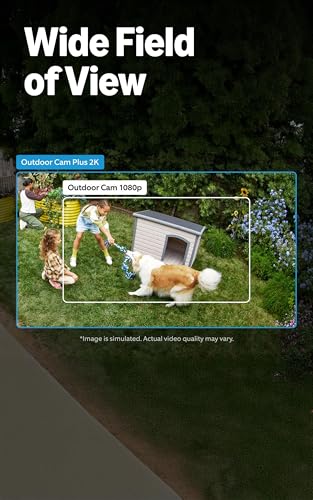
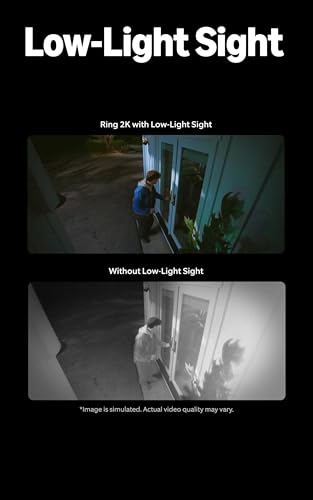
You want clear, sharp video so you can actually identify faces, license plates, packages, or activity rather than just see that something happened. Look for strong daytime image quality, effective night vision, a wide enough field of view to cover the area you care about, and brightness handling that doesn’t wash out faces in glare or hide details in shadows. Be careful with cameras that advertise high resolution but have poor low-light performance, narrow viewing angles, or digital zoom that gets blurry when you need details most.
For porch and entry coverage, prioritize a camera and mounting angle that can capture both faces and items left on the ground; for driveways or dark yards, look for strong night vision, useful range, and enough integrated lighting to identify movement beyond the immediate doorway. Avoid choosing only by headline resolution if the field of view is too narrow, the camera will be mounted too high to see packages, or bright floodlights will blow out faces close to the lens. Owner feedback strongly supports video as a strength: buyers repeatedly report clear, sharp daytime and nighttime footage, bright floodlights that illuminate large dark areas, and useful detail for faces, packages, movement, and live viewing.
Quality
You want a security camera that keeps working day and night, not one that fails when weather, power interruptions, or heavy use put it under stress. Look for solid construction, dependable connectivity, consistent recording and alerts, and weather resistance if it will be used outdoors; watch out for flimsy mounts, frequent disconnects, overheating, or reviews that mention premature failure.
For an outdoor cam, judge quality by how well the whole installation will survive its specific exposure: rain direction, direct sun, freezing or hot walls, wind vibration, insects near lights, and whether the mount can stay aimed after storms or ladder bumps. If replacing a security light, also check that the camera-light combination will function well as both illumination and surveillance, not just as a camera bolted to a wall. Supporting owner sentiment is generally positive, with buyers describing these cameras as dependable for everyday monitoring, effective as security lights plus cameras, sturdy in demanding outdoor conditions, and smooth when added to an existing same-ecosystem setup.
Setup
Setup matters because even a great security camera won’t help much if it’s difficult to mount, connect, or configure where you need it. Look for clear installation steps, flexible mounting options, reliable app pairing, and power requirements that fit your space, and watch out for cameras that need complicated wiring, weak Wi-Fi placement, or extra hardware to get working.
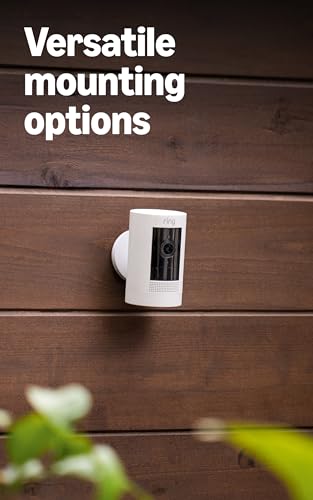
Before buying, confirm the power and mounting path: hardwired floodlight-style units usually need an appropriate exterior junction box and safe wiring, battery models need reachable placement for swaps, plug-in models need weather-safe cable routing, and bulb-socket styles need the right fixture orientation. Also check that the camera can be aimed after mounting, that the app supports the alert and recording settings you want, and that you can test Wi‑Fi at the final outdoor location before drilling. Owners commonly describe setup as a strength, saying installation, app onboarding, mounting, Wi‑Fi connection, and alert customization are quick and straightforward, especially when replacing an existing light or using battery power.
Detection
Detection determines how reliably your security camera notices activity, follows movement, and alerts you when something matters. Look for adjustable motion zones, sensitivity controls, person/pet/package recognition if you need it, and fast, accurate notifications; watch out for cameras that trigger too many false alerts from shadows, cars, or pets, or miss motion at the edges of the frame.
For outdoor use, buy for tunable detection, not just “motion alerts”: you need adjustable zones, sensitivity controls, and subject filtering that can ignore streets, trees, headlights, pets, rain, and neighbors while still catching people approaching from the side. In high-traffic areas, avoid cameras with limited zone control or no way to reduce nonessential alerts; in quiet side yards, avoid overly aggressive battery-saving settings that may delay or miss the start of motion. Owner sentiment is mixed but useful: many buyers find tracking and alerts accurate for people, vehicles, and animals, while others report oversensitivity, inconsistent alerts, or tracking/app behavior that requires tuning and can vary by placement, updates, and expectations.
Battery
Battery life and power reliability determine whether your camera keeps recording when you need it, especially in spots where wiring is difficult or outages happen. Look for realistic runtime, easy recharging, and clear low-battery alerts; if you’re considering solar-powered cameras, make sure your mounting location gets enough consistent sun exposure to maintain power output. Watch out for claims that assume ideal conditions, since cold weather, frequent motion alerts, live viewing, and poor Wi-Fi can all drain the battery faster.
Choose battery power only if the camera will be easy to reach or the area has low-to-moderate motion; high-traffic driveways, busy sidewalks, frequent live view, cold weather, night vision, and weak Wi‑Fi can all drain batteries faster. If relying on solar, verify direct sun at the panel location across seasons, not just at installation, and avoid shaded eaves or north-facing walls unless you are comfortable with occasional manual charging. Owner feedback makes battery the main watch-out: some users get long runtime, especially with solar or light use, but many report split results, inconvenient charging or swaps, inconsistent solar performance, and power use that depends heavily on settings, motion volume, placement, sunlight, and Wi‑Fi strength.
Connectivity
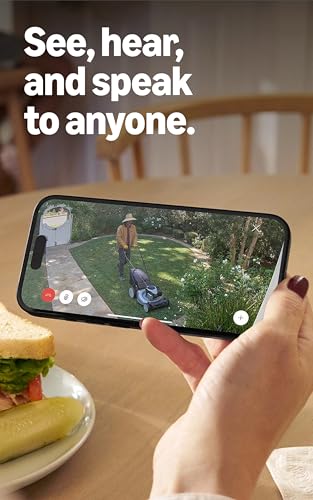
Reliable connectivity determines whether your security camera can send alerts, stream video, and record events when you need it, so check that it supports your home’s Wi-Fi setup and can maintain a strong signal where you plan to install it. Look for clear compatibility with your phone, smart home platform, and network band, and be cautious with cameras placed far from the router, behind thick walls, or outdoors where wireless range and stability can drop.
Test connectivity at the exact mounted height and wall exterior before committing, because outdoor cameras often sit behind brick, stucco, metal doors, insulation, or long distances from the router. Look for a setup that can maintain strong signal and upload performance for live view and recordings; if signal is marginal, plan for mesh, a closer access point, or a different mounting location rather than assuming the app will compensate. Owners often find initial phone/app connection simple, but connectivity is the major reliability caveat: feedback notes that cameras can lose connection, freeze, drop live feed, or behave inconsistently when Wi‑Fi or app performance is weak, even though setup and video quality are often praised.
1,000,000+ shoppers use Buyer's Guide every week to find the best products and services online.

Helping millions of users make smarter purchases online.


