


- Display Size: 16"
- Resolution: 1920 x 1200
- Memory: 16GB RAM
- Storage: 1TB SSD
- Processor: Intel Core 7 150U 10-core
- Graphics Processor: Intel Graphics
- Touchscreen: No
- Battery Life: Up to 15 hours
- Operating System: Windows 11 Home
- Weight: 4.37 lbs





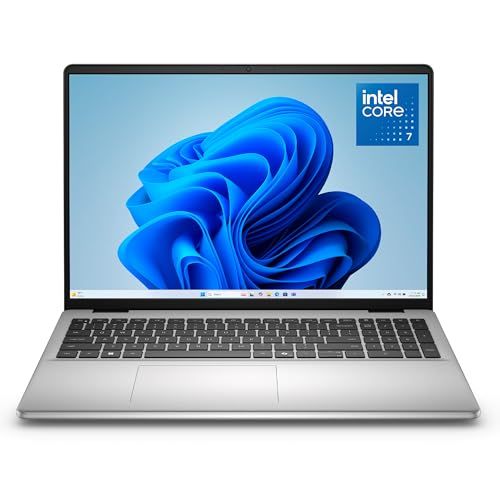
Dell 16 Laptop DC16251
Overview and Everyday Experience

The Dell 16 Laptop DC16251 is designed to sit in that practical middle ground: a larger-screen laptop meant for comfortable daily use, light content creation, schoolwork, and productivity without demanding the cost or complexity of a high-end workstation. The first thing most people notice is the 16-inch class form factor, which generally provides a more spacious canvas for multitasking than a 14-inch system while still remaining portable enough for commuting, campus life, or moving room to room at home. For many buyers, that bigger display is the single most immediate quality-of-life upgrade, because it makes side-by-side documents, spreadsheets, web research, and video calls feel less cramped.
In everyday use, this model’s appeal comes down to balance. A 16-inch laptop can be a sweet spot for people who want a larger view for writing, reading, editing, or project work but don’t want to jump to a heavier 17-inch device. If you frequently work in browsers with many tabs, manage email alongside a calendar and chat apps, or keep reference materials open while drafting, the extra screen real estate can reduce friction and help you stay organized. For streaming, casual photo work, and general home computing, it also offers a more immersive experience than smaller displays.
Thermals and noise are often overlooked in reviews, but they matter day to day. A well-tuned 16-inch chassis can sometimes manage heat and fan noise better than smaller laptops simply because there is more internal space for airflow. That said, the experience varies heavily by configuration and workload. If your usage includes frequent video meetings, large file downloads, or light creative work, you will notice the difference between a system that stays cool and quiet and one that ramps up fans quickly. As a practical note, most buyers should consider how and where they work: a quiet shared space or classroom makes fan noise more noticeable, while a home office environment may be more forgiving.
Keyboard comfort and trackpad control are also central to the DC16251’s overall usability. A 16-inch layout typically allows for a more comfortable palm rest area and larger trackpad surface, which can reduce fatigue over long writing sessions. If you spend hours typing, it’s worth prioritizing key travel, stability, and the feel of the deck. Likewise, if you rarely use a mouse, the responsiveness and size of the trackpad become a major factor in whether the laptop feels pleasant or frustrating over time.
Performance, Display, and Build Considerations
Before buying the Dell 16 Laptop DC16251, the most important step is matching performance to your real workload. Many shoppers overbuy on CPU and underbuy on memory and storage, which can lead to a machine that benchmarks well but feels constrained in daily use. For most people doing productivity tasks, the two most important specifications are RAM and SSD capacity. Adequate memory determines whether your system stays responsive with multiple apps open, and a solid-state drive determines how fast it boots, launches programs, and moves files. If you expect to keep the laptop for several years, leaning toward more RAM and a comfortably sized SSD is usually the most future-proof approach.
Display quality is a close second in importance because you interact with it all the time. With a 16-inch laptop, resolution, brightness, and color reproduction collectively shape the experience. If you work near windows or bright rooms, brightness matters more than many expect; a dim panel can feel restrictive, especially in daylight. If you do photo editing, design work, or anything color-sensitive, consistent color coverage and good calibration become key. For general productivity, a sharp panel that renders text cleanly and offers good viewing angles can meaningfully reduce eye strain, particularly during long reading and writing sessions.
Port selection is another factor that can shift a “good” laptop into a “great for you” laptop. Think about what you connect regularly: external monitors, wired headphones, SD cards, USB accessories, Ethernet, or a docking setup. Even if you can solve missing ports with adapters, those adapters add friction and cost. If you plan to use a larger external display, pay attention to how the laptop handles video output and whether it supports the monitor refresh rate and resolution you want. For students and remote workers, stable Wi‑Fi performance is also essential, as inconsistent connectivity turns routine video calls and cloud documents into daily headaches.
Battery life is often the deciding factor for portable use. A 16-inch screen can consume more power than smaller panels, so real-world endurance depends on the display, CPU, battery size, and your workload. If you mostly work in a browser at moderate brightness, you may see respectable runtime. If you do sustained multitasking, media creation, or keep brightness high, expect battery life to drop. The most important point is to be honest about your mobility: if you regularly work away from outlets, prioritize battery and efficient components. If you mostly use it plugged in, you can focus more on performance and display comfort.
Build quality and serviceability matter for ownership beyond the first month. A laptop that feels solid when carried, has minimal deck flex, and opens smoothly tends to hold up better to daily travel. It’s also worth considering warranty options and how easy it is to get support, because even reliable systems can have unexpected issues. If you plan to keep the laptop for a long time, it’s helpful to know whether memory or storage are upgradeable, since an SSD upgrade later can extend the usable life of the machine and keep it feeling fast.
Common Questions
Is the Dell 16 Laptop DC16251 a good choice for students? It can be, especially for students who value a larger screen for research, writing, and multitasking. The best configuration for student use is one with sufficient RAM for many browser tabs and a storage size that fits coursework files and offline access. Battery life and portability should be weighed against the benefits of the bigger display.
Will it handle light photo editing and creative projects? For light editing, basic design tasks, and casual content creation, it can be a solid fit depending on the configuration. The key is to prioritize adequate memory and a fast SSD, and to choose a display that is bright enough and has decent color quality if visual work matters to you. For heavy video editing or 3D work, you may want a model specifically configured with stronger graphics and cooling.
Is a 16-inch laptop too big to travel with? It depends on your routine. A 16-inch model is typically more portable than a 17-inch laptop but less convenient than a 13- or 14-inch option. If you commute daily and carry it for long periods, weight and charger size become more noticeable. If you mainly move it between home, office, and occasional travel, the larger screen is often worth it.
What should I prioritize: CPU, RAM, or storage? For most users, RAM and SSD storage are the priorities for a consistently smooth experience. A modern CPU is important, but insufficient memory is the more common cause of slowdowns during multitasking. Storage capacity matters because running close to full can reduce performance and creates constant file-management stress.
Conclusion: The Dell 16 Laptop DC16251 stands out as a sensible large-screen laptop for people who want comfortable daily productivity and a more spacious viewing experience without moving into bulky desktop-replacement territory. The most important purchase factors are the right balance of RAM and SSD capacity, a display that matches your lighting and usage needs, and practical considerations like battery life and ports. Choose a configuration aligned with how you actually work, and the DC16251 can be a dependable companion for school, home, and office tasks for years.