


- Display Size: 15.6"
- Resolution: 1920 x 1080
- Memory: 16GB RAM
- Storage: 512GB SSD
- Processor: Intel Core i5-13420H 8-core
- Graphics Processor: Intel UHD Graphics
- Touchscreen: No
- Battery Life: 15 hours
- Operating System: Windows 11 Pro
- Weight: 3.64 lbs





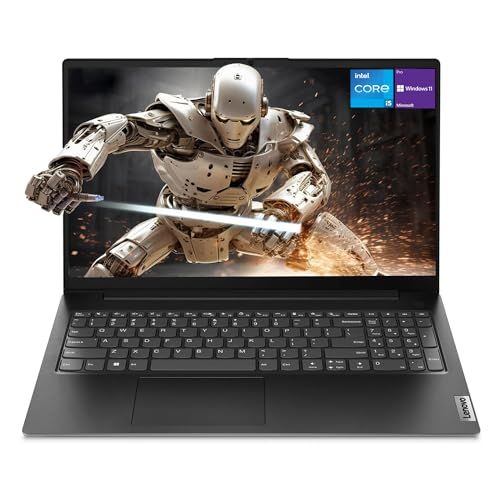
Lenovo V15 Gen 4 Laptop
Overview and everyday performance

The Lenovo V15 Gen 4 is designed for people who want a straightforward, budget-friendly Windows laptop that can handle day-to-day work without calling attention to itself. It’s positioned more as a practical tool than a status device, which means the focus tends to be on dependable basics: a comfortable keyboard, adequate connectivity, and performance that suits common productivity tasks such as web browsing with many tabs, email, office documents, video calls, and light content work. If your daily routine is mostly browser-based apps, spreadsheets, PDFs, and meetings, the V15 Gen 4 generally fits that workflow well.
Configuration matters a lot with this model, because “V15 Gen 4” can refer to a range of processors, memory capacities, and storage options. In many regions you’ll see variants based on AMD Ryzen or Intel Core processors, and that choice influences not only speed but also integrated graphics performance, thermals, and overall responsiveness under load. For typical office tasks, even entry-to-mid CPUs can feel snappy when paired with a fast SSD and enough RAM. Where you’ll notice differences is in heavier multitasking, large spreadsheets, sustained video conferencing while running other apps, or creative tasks such as photo editing. In those cases, stepping up to a stronger CPU and ensuring dual-channel memory (where supported) can make the laptop feel smoother and more resilient over time.
As a workhorse, it’s also worth thinking about what “performance” means for you. For some buyers, quick startup time and fast app launches matter most, which puts storage at the top of the priority list. For others, keeping many apps open at once without slowdowns is the key, which makes RAM more important than raw CPU horsepower. The V15 Gen 4 can be a good value when it’s configured with a solid amount of memory and an SSD, because those upgrades often yield the biggest real-world improvements in responsiveness.
Design, display, keyboard, and portability
The V15 Gen 4 typically follows Lenovo’s no-nonsense design language: understated styling, a focus on practicality, and a chassis that aims for durability in everyday handling. It’s not meant to feel ultra-premium like a flagship ultrabook, but the trade-off is often a more accessible price and a design that can tolerate commuting, desk-to-desk movement, and frequent opening and closing. Buyers who plan to travel daily should still pay attention to the exact weight and thickness of the specific configuration, because batteries and internal components can change those slightly.
The display is one of the most important factors to evaluate before purchase, especially in a 15-inch class laptop where you’ll likely spend hours reading and writing. In this segment, the key considerations are resolution, panel type, brightness, and color reproduction. A Full HD panel is typically the sweet spot for sharpness and workspace, while lower resolutions can feel cramped or less crisp. Panel technology also affects viewing angles and color accuracy; if you share your screen during meetings or work with visuals, wider viewing angles and better color stability become more valuable. Brightness is crucial if you work near windows or in bright rooms, because a dim display can lead to eye strain and constant adjustments. If you’re considering the V15 Gen 4 for content creation or color-sensitive work, you’ll want to verify the specific panel specs for your unit rather than assuming all models look the same.
Lenovo keyboards tend to be a strong point, and even on more affordable lines you often get a comfortable typing experience with sensible key spacing. That said, the best way to judge is by your own needs: long-form writing and data entry benefit from a firm, consistent key feel and a layout that minimizes mistakes. Trackpad quality is also part of that “everyday comfort” equation. If you rely on gestures, precise cursor control, or you work without a mouse, a responsive trackpad can make a bigger difference than you might expect.
Portability comes down to more than weight. Battery life is a major factor for students, remote workers, and anyone moving between rooms or offices. In budget-friendly laptops, battery longevity can vary considerably based on CPU choice, display brightness, and background tasks, especially video conferencing. If your day includes frequent calls, expect higher power draw than basic document work. The most important thing is aligning expectations: if you need a full day away from a charger, prioritize configurations known for efficiency and consider a model with a larger battery if available. If you’re usually near an outlet, you can treat battery as a convenience rather than a requirement.
Buying factors that matter most: configuration, connectivity, and longevity
Before purchasing the Lenovo V15 Gen 4, the most important decision is the exact configuration, because it determines how long the laptop will feel “fast enough.” For many buyers, the single biggest quality-of-life improvement is having enough RAM. If you regularly use multiple browser windows, collaboration tools, and spreadsheets, low memory can lead to stutters and excessive disk swapping. Choosing a configuration with more RAM, or one that can be upgraded later, is often the best way to extend the usable lifespan. Close behind that is storage type and capacity. An SSD is essential for modern responsiveness, and capacity should match your habits, especially if you keep large media libraries, offline files, or install many applications.
Connectivity is another area where practical needs can outweigh headline specs. Consider how you actually connect peripherals and displays. If you use an external monitor, confirm the available video output options and the resolutions/refresh rates they support. If you rely on wired networking for stability, the presence of an Ethernet port can be a major advantage in an office setting. For wireless, stable Wi-Fi matters more than theoretical peak speeds; strong, consistent connections reduce frustration during calls and file sync. Also think about the number and type of USB ports you need for drives, headsets, printers, security keys, or phone tethering.
Longevity is where the “budget” category can become expensive if chosen poorly. A lower upfront price can be offset by limited upgradeability, insufficient memory, or a display that you dislike using every day. The V15 Gen 4 makes the most sense when the spec matches your workload and when the essentials you interact with most often are strong: a comfortable keyboard, a usable screen, and enough RAM and SSD storage to avoid slowdowns. If you plan to keep the laptop for several years, prioritize RAM and storage first, then choose the best CPU you can reasonably afford. For many real-world workloads, that ordering delivers better long-term satisfaction than paying extra for a CPU upgrade while leaving memory tight.
It’s also wise to consider warranty and support, especially if this laptop is for school or business use. A laptop that’s mission-critical benefits from solid service options and straightforward parts availability. Even if you never need it, peace of mind is part of the value calculation.
Common Questions
Is the Lenovo V15 Gen 4 good for students and office work? Yes, it’s generally a strong fit for writing, research, online classes, office apps, and video calls, especially when configured with sufficient RAM and an SSD. It’s best viewed as a productivity laptop rather than a specialized machine.
Can the Lenovo V15 Gen 4 handle gaming or creative work? It can run lighter games and basic creative apps, but it’s not primarily designed for demanding 3D gaming or heavy video editing. If your workload includes frequent rendering, large project files, or modern AAA games, you’ll want to focus on higher-end CPUs, better integrated graphics, or a laptop with a dedicated GPU.
What should I prioritize when choosing a configuration? Prioritize enough RAM for your multitasking habits and an SSD with comfortable headroom for your files. After that, choose the CPU tier that matches your workload. The display is also a key quality-of-life factor, so confirm resolution and brightness if you’re sensitive to screen quality.
Is the Lenovo V15 Gen 4 easy to use with an external monitor and accessories? In most cases, yes, as long as the port selection matches your setup. Verify the specific ports on the exact model you’re buying and consider whether you’ll need a USB-C adapter or a docking solution for your workflow.
In conclusion, the Lenovo V15 Gen 4 is a sensible, value-oriented laptop that works best when you buy the right configuration for your daily tasks. The most important factors to consider are RAM, SSD storage, and display quality, because those shape how the laptop feels every time you open the lid. Choose thoughtfully, and it can be a reliable companion for school, office productivity, and everyday computing.