


- Display Size: 17.3"
- Resolution: 1600 x 900
- Memory: 64GB RAM
- Storage: 2TB SSD
- Processor: Intel Core i7-1255U 10-core
- Graphics Processor: Intel Iris Xe Graphics
- Touchscreen: No
- Battery Life: Up to 11 hours
- Operating System: Windows 11 Home
- Weight: 5.25 lbs




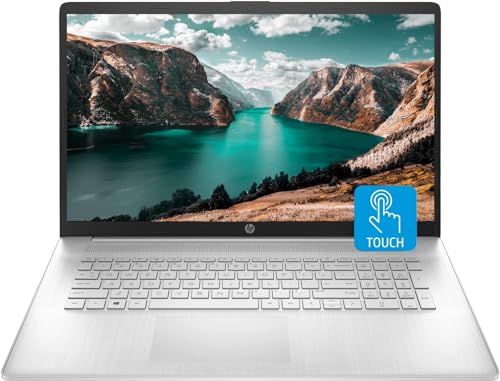
HP 17.3" Laptop
Overall Performance and Everyday Experience

The HP 17.3" Laptop is built around a simple promise: deliver a comfortable, big-screen computing experience without asking you to pay premium ultrabook prices. If you spend long hours reading, writing, working with spreadsheets, attending video calls, or managing lots of browser tabs, the 17.3-inch display immediately becomes the star. The larger canvas makes text easier to read, gives you more room to place two windows side by side, and reduces the sense of visual clutter that smaller laptops can create. For many buyers, that alone can make day-to-day work feel less tiring.
Performance on most HP 17.3" models is tuned for general productivity rather than specialized workloads. In practical terms, that means the laptop is at its best handling office apps, web-based work, streaming, email, and light photo tasks. If the configuration includes a modern Intel Core or AMD Ryzen processor paired with solid-state storage, boot times and app launches tend to feel quick, and the overall system is responsive in a way that older hard-drive laptops are not. Memory also matters: having enough RAM keeps the system from feeling bogged down when you have many tabs and programs open at once. For typical home and office use, a well-chosen configuration can feel smooth and dependable.
Where you should temper expectations is in advanced creative and gaming performance. Many versions of this laptop line rely on integrated graphics, which are efficient and fine for video playback and casual titles but are not intended for demanding 3D games, heavy video editing, or 3D rendering. If your workflow includes professional editing suites, large code builds, CAD work, or high-refresh competitive gaming, you will want to verify the exact processor, graphics solution, and cooling capacity of the specific model you are considering, because the overall HP 17.3" category includes multiple configurations with very different capabilities.
Key Purchase Factors and What Matters Most
Before buying an HP 17.3" Laptop, it helps to decide what you value most, because a large-format laptop involves natural trade-offs. The most important factor for many people is portability versus comfort. A 17.3-inch chassis is typically heavier and takes up more bag space than a 13- or 15-inch laptop. If you mainly use your laptop at a desk, kitchen table, or home office and only move it occasionally, the size is usually a benefit. If you commute daily or travel often, that extra bulk can become a consistent annoyance, so it is worth being honest about your routine.
The display itself deserves close attention, and not just the size. Look at the resolution and panel quality of the exact configuration you’re buying. A Full HD display is common and generally a good baseline for this screen size, giving you sharper text and more usable workspace than lower resolutions. Brightness and color quality also influence satisfaction: if you work near windows, do any color-sensitive tasks, or simply want a more vibrant picture, a brighter panel with better color coverage can be a bigger upgrade than you might expect. For many buyers, the screen is the primary reason to choose a 17.3-inch model, so it’s also the place where compromises are most noticeable.
Storage type is another high-impact decision. A model with an SSD will feel dramatically faster and more modern than one relying on a traditional hard drive. If you store lots of photos, videos, or large documents, capacity matters too, but an SSD is usually the single best quality-of-life feature for everyday speed. RAM is closely tied to this experience: more memory generally means fewer slowdowns when multitasking. If you keep dozens of tabs open, run collaboration tools, and jump between multiple apps, adequate RAM will matter more than small differences in processor tier.
Keyboard and trackpad comfort often determines whether a laptop feels like a tool you enjoy or one you tolerate. A 17.3-inch frame can allow for a more spacious keyboard layout, and some versions include a numeric keypad, which is valuable for accounting, data entry, and frequent spreadsheet work. If your hands spend hours on the keyboard, layout and key feel can outweigh benchmark numbers. Battery life is also worth considering through the lens of usage. Large screens can draw more power, so if you need long unplugged sessions, check real-world reviews for the specific model and assume that heavy multitasking and high brightness reduce runtime.
Finally, pay attention to ports and connectivity. A big laptop is often used as a semi-stationary workstation, so having the right USB ports, HDMI for an external monitor, and a reliable wireless card can be surprisingly important. If you plan to dock it to a home setup, think about your peripherals in advance, because having the right ports can save you from living in dongle territory.
Common Questions
Is the HP 17.3" Laptop good for students? Yes, especially for students who prefer a larger screen for reading PDFs, writing papers, and working on projects in multiple windows. It is less ideal for students who carry their laptop across campus all day, because the size and weight can become inconvenient.
Can it handle gaming? It depends on the configuration. Models with integrated graphics are best for casual or older games at modest settings. If gaming is a priority, look specifically for a configuration with a stronger GPU and confirm cooling and power limits, because not every 17.3-inch model is designed as a gaming laptop.
Should I choose more RAM or more storage? If you multitask heavily, choose more RAM first, because it directly affects how smoothly the system runs with many apps and tabs open. If your workload is lighter but you keep lots of large files, prioritize storage capacity, ideally on an SSD for speed.
Is a 17.3-inch laptop too big for travel? For frequent travel, many people find it bulky. For occasional trips, it can be manageable if you have a backpack designed for larger laptops. Your tolerance for weight and your need for screen space should guide the decision.
In the end, the HP 17.3" Laptop is a strong choice for buyers who want a roomy display and a comfortable everyday computing experience, especially for home, office, and general productivity. The smartest purchase comes from focusing on the fundamentals that most affect daily use: a good-quality screen, an SSD, adequate RAM, and a configuration that matches your workload. If you pick the right version for your needs, the big-screen format can feel like a genuine upgrade rather than a compromise.