
























We also considered 10 others:


Our Top Choice
Compare Features


The order above is not editorial opinion, and it is not paid placement. It comes from what shoppers across our network actually do - which 5.1 surround sound systems they compare, and which they ultimately buy. We re-rank as new data comes in, so the long-term favorites have to keep earning their spot against new entrants. The full method, including how we make money.
5.1 Surround Sound Systems Buyer's Guide
Buying a 5.1 surround sound system is a tradeoff between cinematic immersion and the practical realities of speaker placement, wiring, TV compatibility, and room acoustics. The sharpest mistakes are assuming every “surround” package creates true rear-channel sound, and overlooking whether the subwoofer, connectors, and controls fit your room and sources.
Surround Immersion
A 5.1 surround system is only worth the space and setup if it creates clear front-to-back movement, stable dialogue, and effects that do not collapse into ordinary stereo. Channel count, speaker placement, codec support, and whether the rear and height effects are discrete or simulated all change how cinematic the result feels.
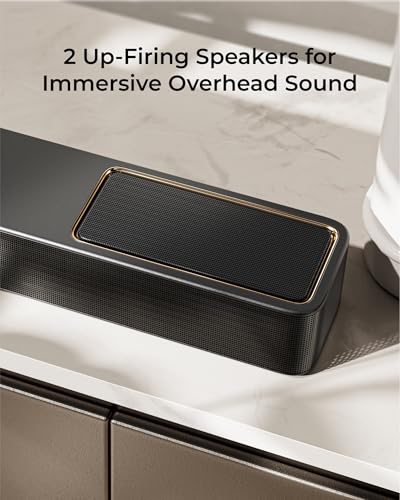
Look first at the actual channel layout: a true 5.1 system should include left, center, right, two surrounds, and a subwoofer, while 5.1.2 or 5.1.4 adds height channels for Dolby-style overhead effects. For the most convincing movie sound, prioritize a dedicated center channel for dialogue, real rear/surround speakers over purely virtual surround, and format support that matches your TV, streamer, disc player, or game console. If height effects matter, check whether the system uses up-firing drivers, separate height speakers, or virtualization; up-firing designs work best with a flat, reflective ceiling and can disappoint in vaulted or acoustically treated rooms. Owner sentiment strongly supports this dimension: buyers praised big, immersive home-theater sound, clear room-filling output, crisp highs, strong volume, and surround or Dolby effects that came through well.
Bass Headroom
Low-frequency effects carry much of the physical impact in movies, games, and live music, but weak or poorly controlled bass can make a system feel small or boomy. The best match depends on room size, subwoofer placement, crossover control, and whether bass level can be adjusted independently.
Match the subwoofer to the room, not just the speaker count: larger open rooms need more output and headroom, while small rooms benefit from tighter level control to avoid rattling or one-note boom. Look for an adjustable bass level, a sensible crossover with the satellite speakers, and placement flexibility, because a sub shoved into a cabinet or corner can overpower dialogue. Satellite speakers with enough mid-bass also matter; if they are too tiny, the sub has to cover too much of the range and bass can become easy to locate. Owners specifically praised strong, room-filling bass that made movies and music feel more lifelike, and some also noted that the satellite speakers produced more bass than expected.
Setup Fit
Surround systems fail in real homes when the wiring path, connector type, speaker size, or rear-channel layout does not fit the room. A system that sounds good on paper can become frustrating if it requires unexpected wire, awkward cable runs, or connectors that do not accept the wire gauge you planned to use.
Before buying, map every speaker location, cable path, outlet, and mounting point. Check whether speaker wire is included, what gauge the terminals accept, whether the rear speakers are wired to the main unit, wired to a wireless receiver module, or fully powered, and whether the center speaker fits below the TV without blocking the screen or remote sensor. Avoid assuming “wireless surrounds” means no cables at all; many still need power or a link box near the back of the room. Owner feedback backs up the importance of this check: setup was often described as simple, clean, and plug-and-play, and buyers liked rear-speaker arrangements that avoided wires across the floor. At the same time, some owners reported needing to buy wire separately, and larger-gauge wire could feel tight in push-lock connectors.
TV Integration
A surround system has to pass the right audio from your sources and turn on reliably with the display, or it becomes a daily hassle. HDMI ARC or eARC, optical input, Bluetooth, CEC power syncing, and codec compatibility affect both sound quality and ease of use.
For a main living-room system, prioritize HDMI ARC or eARC if your TV supports it, because it simplifies control and can carry higher-quality surround formats than basic stereo connections. Confirm that the system supports the formats your sources output, such as Dolby surround formats, and make sure your TV can pass those signals from streaming apps or external devices. Bluetooth is useful for music, but it should not be the main path for movie surround. Owners reported strong everyday functionality from systems with HDMI, Bluetooth, and TV power syncing, and they described them as easy to use once installed.
Sound Tuning
The same surround package can sound very different in a small bedroom, an open living room, or a room with hard floors and bare walls. Adjustable levels and EQ let you correct for placement compromises, tame bass, raise dialogue, and balance the rear channels without physically rebuilding the room.
Look for separate controls for bass, surround level, center/dialogue level, and EQ presets rather than a single vague “movie mode.” Rear speakers often need trimming because they may sit closer to the listener than the front speakers, and the subwoofer may need lowering or repositioning to avoid drowning out voices. If you cannot place every speaker ideally, tuning controls become especially important. Owner sentiment supports this: buyers valued EQ options, presets, and adjustable surround and bass settings for tailoring sound to the room.
System Value
Value in this category is not just about the lowest shelf price; it depends on whether the package includes the speakers, subwoofer, amplification, wiring, mounting needs, and surround features you expect. A cheap system can become less compelling if it needs missing accessories or cannot deliver the channel layout you bought it for.
Compare complete system requirements, not just the box label: verify whether amplification or a receiver is included, whether speaker wire and mounting hardware are included, and whether the package gives you real rear channels rather than only simulated surround. Also consider upgrade path; traditional speaker-and-receiver setups may be easier to expand or repair, while soundbar-based surround packages can be simpler but more closed. Owner sentiment repeatedly highlights value as a major separator: buyers saw full surround packages as strong value, especially when they delivered immersive sound and a higher-quality feel than expected. The main caveat from owners is to account for extras such as speaker wire when it is not included.
1,000,000+ shoppers use Buyer's Guide every week to find the best products and services online.

Helping millions of users make smarter purchases online.


