


- Display Size: 14"
- Resolution: 1366 x768
- Memory: 4GB RAM
- Storage: 64GB eMMC
- Processor: Intel Celeron N4500 2-core





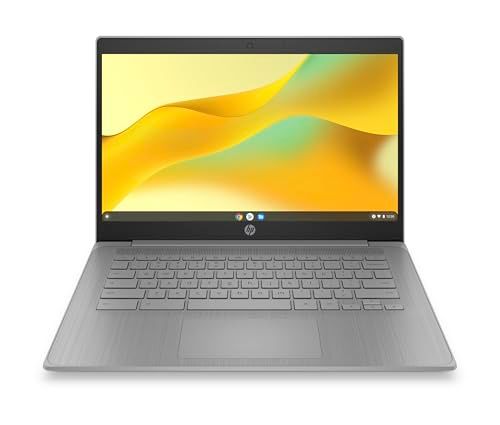
HP 14" Chromebook
Overall Review

The HP 14" Chromebook stands out in the market as a versatile and user-friendly device, catering excellently to users seeking simplicity combined with functionality. This laptop runs on Google’s Chrome OS, which is designed for efficiency and integration with the Google ecosystem including apps like Google Drive and the Chrome browser. With a 14-inch display, it strikes a balance between usability and portability, making it ideal for both students and professionals who need a reliable machine on the go.
The design of the HP 14" Chromebook is sleek with a minimalist aesthetic that appeals to modern tastes. It features a robust plastic chassis that contributes to its lightweight nature, weighing in at just over three pounds, which is ideal for mobility. The screen offers a resolution of 1366 x 768, which does not lead the pack in terms of clarity, but is sufficient for everyday tasks and some multimedia consumption. Performance-wise, the typical configuration includes an Intel processor paired with 4GB of RAM. This setup is adept for handling multiple browser tabs and light applications, though it may struggle with more intensive software.
Battery life is another strong point, with the HP 14" Chromebook usually lasting around 10 hours on a single charge under typical usage. This stamina allows users to work through a full day without needing a recharge, a crucial feature for anyone who needs to work remotely or travel frequently. Furthermore, the inclusion of multiple USB ports and an HDMI port enhances its functionality, enabling easy connection to other devices and external displays.
Factors to Consider Before Purchasing
When considering the HP 14" Chromebook, prospective buyers should evaluate several crucial factors. The operating system, Chrome OS, is fundamentally different from Windows or MacOS. It is designed to work primarily with internet-based applications and services, which means it requires a stable internet connection for optimal performance. This can be a limitation if you often find yourself in areas without reliable Wi-Fi.
The specific needs of the user are paramount; this device is perfect for those who primarily need a laptop for browsing, media consumption, simple productive tasks, and light applications. However, if one requires software that runs exclusively on Windows or MacOS, this Chromebook might not be suitable. Additionally, the storage capacity on most Chromebooks, including this one, which typically offers 32GB to 64GB of eMMC storage, is lower than many laptops, advocating for a largely cloud-based data management approach.
Display and build quality also play essential roles, especially for those who are visually inclined or travel frequently. While the HP 14" Chromebook is sturdy, the display resolution is not the highest, so if fine details and vibrant displays are a priority, one might look at other options or models.
An understanding of these facets will ensure that the HP 14" Chromebook meets the expectations and usage demands of its potential users.
Common Questions
Q: Can I install and run Microsoft Office on this Chromebook?
A: While you cannot install traditional desktop versions of Microsoft Office, the Chromebook supports Office applications through the web-based Microsoft Office Online or the Google Play Store apps like Office Mobile, which offer functionality sufficient for most tasks.
Q: Is it possible to upgrade the RAM or storage after purchase?
A: Upgrading RAM on the HP 14" Chromebook is not feasible as it is soldered to the motherboard. Storage can be somewhat expanded using cloud storage solutions like Google Drive or external storage devices, as internal upgrades are also limited.
Q: Does the Chromebook work offline?
A: Yes, Chrome OS supports offline functionality for several apps like Google Docs and Gmail, allowing users to work without an active internet connection and sync their changes when they go online next.
Conclusion
The HP 14" Chromebook offers valuable qualities such as portability, ease of use, and efficient performance, making it a worthy contender within its price range. However, potential buyers must align their expectations and needs with the capabilities of the Chromebook. It serves admirably within the confines of its design intentions — light computing tasks, internet-based activities, and multimedia consumption. Thus, those looking for a secondary device or a primary device for lighter computing duties will find it an excellent choice.