





We also considered 10 others:


Our Top Choice
Compare Features


The order above is not editorial opinion, and it is not paid placement. It comes from what shoppers across our network actually do - which smart padlocks they compare, and which they ultimately buy. We re-rank as new data comes in, so the long-term favorites have to keep earning their spot against new entrants. The full method, including how we make money.
Smart Padlocks Buyer's Guide
Smart padlocks trade the simplicity of a mechanical lock for faster shared access, logs or remote control, and fewer physical keys—but they also add batteries, sensors, apps, and wireless links that can fail at the worst time. For gates, sheds, lockers, and storage, the sharpest checks are whether the lock still opens when the electronics misbehave, whether the shackle/body are appropriate for the threat level, and whether outdoor exposure will undermine the electronics.
Access
You’ll use your lock every day, so access should feel quick, reliable, and intuitive for everyone who needs entry. Look for unlocking options that fit your routine, such as a keypad, fingerprint reader, app or remote control, backup key, and auto-locking, and watch for features that may become frustrating if they are slow, inconsistent, hard to program, or too dependent on batteries or connectivity.
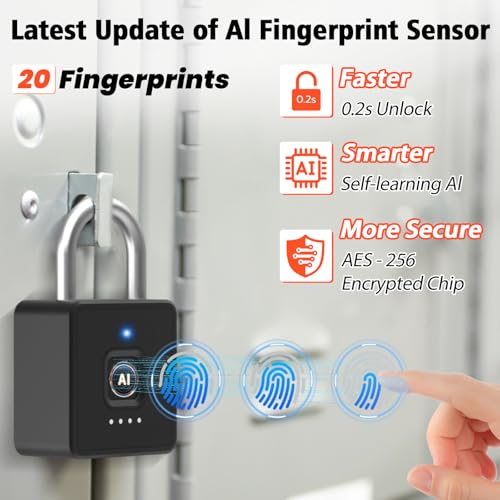
Prioritize a lock with at least two dependable non-phone entry methods—such as keypad plus fingerprint, RFID/fob, or a physical backup key—because phones can be dead, Bluetooth can fail, and wet or dirty fingers can defeat biometric access. For shared gates or family storage, check that the app supports multiple users without sharing one master code, that codes/fingerprints can be deleted quickly, and that the keypad is usable with gloves or in low light. Owner feedback supports this: buyers repeatedly value multiple unlocking methods, fast fingerprint access, responsive keypads, easy app pairing, and flexible access for households, while remote app control is especially appreciated when it does not require an extra hub.
Build
You want a lock that feels solid and can stand up to repeated use, weather, and forced handling without loosening, cracking, or corroding. Look for sturdy materials like hardened steel, brass, or reinforced alloys, tight construction with minimal wobble, and a smooth mechanism that does not bind or feel flimsy. Be wary of lightweight housings, exposed weak points, rough edges, or parts that rattle, since these can signal poor build quality and shorter service life.
Match the build to the actual security job: for outdoor gates, sheds, trailers, or storage units, look for a metal body, protected electronics, a hardened or shielded shackle, weather sealing, and a design that does not leave the shackle easy to cut or pry. Avoid treating a smart padlock with a thin exposed shackle or plastic-feeling body as high-theft protection; those are better suited to lockers, gym bags, cabinets, or low-risk indoor use. Owner sentiment generally favors models that feel solid, heavy, sturdy, and secure, with several buyers reporting confidence on gates, sheds, lockers, and storage, but there is also caution that some casual-use locks have shackle designs that do not inspire full theft-resistance confidence.
Reliability
You want a lock that responds quickly and works the same way every time, because hesitation, missed commands, or a sticking locking mechanism can turn a daily convenience into a security concern. Look for signs of dependable operation over time, including smooth manual use, consistent electronic response if applicable, and owner feedback about reliability after repeated locking and unlocking. Be cautious of locks that are prone to lag, jams, frequent resets, or inconsistent engagement.
For a smart padlock, reliability means more than “it unlocks once”: check how it behaves after rain, freezing weather, low battery, repeated daily use, app updates, and failed biometric scans. Prefer models with a manual override, clear reset process, reliable auto-lock behavior, and a way to recover if the app disconnects or the lock falsely reports a jam. Owner reports show the upside and the risk: some locks are described as dependable through regular locker use and harsh outdoor conditions, while others get mixed feedback for failed fingerprint scans, disconnects, false jams, resets, Bluetooth issues, app frustrations, or uneven remote-access performance.
Installation
A lock is only as secure and convenient as its installation allows, so you want one that fits your door’s thickness, bore hole, backset, and handing without forcing modifications. Look for clear instructions, included hardware, and a setup process that matches your comfort level, especially if the lock has electronic components or app pairing. Watch out for locks that require unusual drilling, poorly aligned strike plates, or extra parts that can turn a simple replacement into a more involved project.
Before buying, confirm the padlock’s shackle diameter and clearance fit the hasp, gate latch, chain, storage unit clasp, locker hole, or cable you plan to secure; smart padlocks can be bulkier than standard locks and may not fit tight latch hardware. Also check whether setup requires only the lock and phone, or whether account creation, permissions, firmware updates, Wi‑Fi credentials, or user enrollment must be done before the lock is installed in the field. Owners often report quick, intuitive setup, easy app pairing, clear instructions, simple installation, and lit keypads that help with passcode entry in low light, but the fit and enrollment steps still need to be verified for your specific use point.
Battery
Battery life matters because a smart or electronic lock that loses power can leave you relying on backup keys, emergency terminals, or other fallback methods at the worst time. Look for locks with clear low-battery alerts, easy battery access, and a realistic runtime for your door’s traffic level, especially if you use features like keypads, auto-locking, or wireless connectivity often. Also check what happens when the batteries die, so you know you’ll still have a dependable way to get in.
Battery planning is critical because a dead smart padlock can turn convenience into lockout: look for clear low-battery warnings, USB emergency charging or a physical backup key, and a charging port that remains accessible when the lock is installed. For outdoor or infrequently visited storage, avoid relying solely on a rechargeable cell unless you can check charge status remotely or have a backup entry plan, since cold weather and long idle periods can shorten usable runtime. Owner feedback is positive on long stretches between charges and convenient USB charging, but it is also mixed enough to make battery life a main watch item, with some buyers reporting periodic charging needs, inconsistent charge holding, or reliability problems after the battery dies.
Connectivity
Good connectivity determines whether you can reliably lock, unlock, and check status from your phone, and whether the lock fits into the smart-home setup you already use. Look for stable Wi-Fi or wireless performance, a clear app, and support for the integrations you care about, while watching for locks that require extra hubs, drain batteries faster when always connected, or lose key features when the connection drops.
Decide whether you truly need remote control or only nearby unlocking: Bluetooth is usually enough for a locker, shed, or gate you stand next to, while remote granting, status checks, or voice-assistant use typically require built-in Wi‑Fi or a hub-like connection. If the lock will be outdoors or far from the router, verify Wi‑Fi range at the exact mounting spot and make sure the lock can still be opened locally when the network, app, or cloud service is down. Owner sentiment backs the appeal of easy app pairing and built-in Wi‑Fi for remote management without extra hardware, but also shows the common failure modes to watch for: disconnects, buggy states, false jams, resets, and uneven Bluetooth or remote-access reliability.
1,000,000+ shoppers use Buyer's Guide every week to find the best products and services online.
Helping millions of users make smarter purchases online.