



- Coverage Area: Up to 2500 sq ft
- Max Internet Speed: 2.7 Gbps
- Max Cable Modem Speed: 2 Gbps
- Ports: 4 1-gigabit ethernet, 1 USB
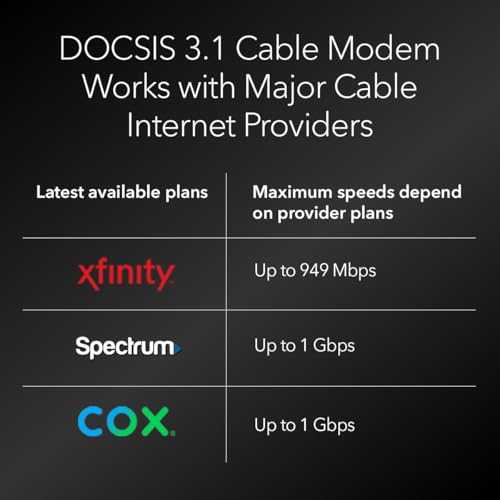
- Compatibility: Xfinity Comcast, Charter Spectrum, Cox, and other major providers





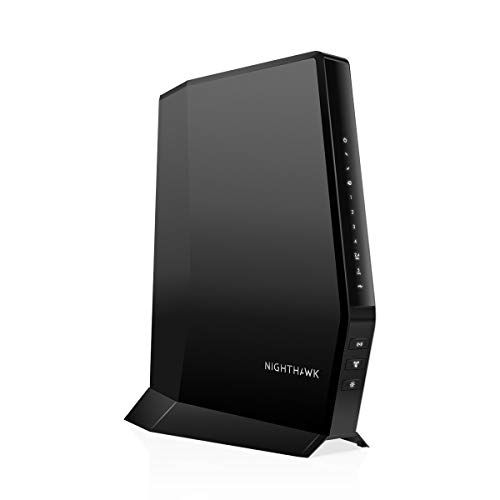
Netgear Nighthawk Modem Router Combo
Performance, coverage, and everyday experience

The Netgear Nighthawk Modem Router Combo is designed for people who want the simplicity of a single box without giving up the speed and reliability associated with the Nighthawk name. As an all-in-one unit, it combines a cable modem and a Wi‑Fi router, which can reduce clutter, save space, and often cut monthly rental fees from your internet provider. In daily use, the biggest appeal is convenience: one device to power, one interface to manage, and fewer compatibility headaches than mixing and matching separate modem and router hardware.
Performance depends heavily on the specific Nighthawk combo model you’re looking at, because Netgear sells multiple versions with different DOCSIS support levels and Wi‑Fi generations. Generally, these units aim to deliver strong throughput for streaming, gaming, video calls, and multiple devices online at the same time. When paired with a compatible cable internet plan, the modem side should provide stable downloads and uploads with low latency, while the router side focuses on maintaining consistent Wi‑Fi around the home.
Coverage is where many buyers will feel the difference compared to basic ISP gateways. Nighthawk combo units typically use higher-quality antennas, better radios, and smarter signal handling than entry-level equipment. In medium-size homes and apartments, you can often expect dependable coverage in the main living areas and solid performance through a couple of interior walls. In larger homes or buildings with difficult layouts, a single combo may still fall short in far rooms, and you may need a mesh system or an extender. The key point is that a combo can be a strong “one and done” solution if your space isn’t overly challenging, but it is not automatically a substitute for a dedicated mesh setup in very large or signal-hostile environments.
For gaming and real-time applications, the experience can be excellent when configured well and when the cable line quality is good. Many Nighthawk devices include features to prioritize traffic and reduce congestion, though the practical impact varies. What matters most is stability under load: if your household runs several 4K streams while someone is in a video meeting and another person is gaming, the device’s ability to manage multiple connections gracefully becomes more important than peak advertised speed.
What to consider before buying (and what matters most)
Before purchasing a Netgear Nighthawk Modem Router Combo, the first factor to consider is compatibility with your internet service provider. Cable ISPs often maintain lists of approved modems, and not every modem is accepted on every network. Even when it’s technically compatible, your ISP may limit which features are supported or may require specific provisioning steps. This is the single most important factor because an incompatible modem-router combo simply won’t activate correctly or won’t deliver the speeds you’re paying for.
The second crucial factor is DOCSIS version and speed tier matching. DOCSIS is the cable modem standard, and newer versions generally support better efficiency, performance, and headroom for faster plans. If you have a modest plan, buying a very high-end DOCSIS model may not improve your real-world speeds, but it can provide longer usefulness as your ISP raises tiers over time. On the other hand, if you subscribe to a high-speed plan, choosing a combo that can’t comfortably support that tier will bottleneck your connection. The “most important” perspective here is to buy for your current plan with some room to grow, rather than overpaying for capacity you won’t touch.
Third, consider the Wi‑Fi standard and band support. Depending on the model, you might see Wi‑Fi 5, Wi‑Fi 6, or newer capabilities. Wi‑Fi 6 can improve efficiency in busy households and often helps maintain better performance when many devices are connected at once, even if your internet speed is not extremely high. If your home is full of newer phones, laptops, and smart devices, Wi‑Fi 6 support can be a meaningful quality-of-life upgrade. If most of your devices are older, you may not see a dramatic jump beyond stronger coverage and better stability.
Fourth, evaluate your home layout and decide whether you need mesh expandability. A combo device is convenient, but it’s still a single Wi‑Fi point. If you already know you have dead zones, a separate modem plus a mesh router system can be more flexible than an all-in-one. Some shoppers choose the combo for the modem portion and later add networking gear in access point mode, but this can complicate your setup and may not be as seamless as starting with a plan for whole-home coverage.
Fifth, look at Ethernet ports and wired needs. If you have a gaming console, desktop PC, smart TV, network switch, or NAS, wired connections can be a huge stability boost. Make sure the combo has enough Ethernet ports and that they support the speeds you expect. For many households, robust wired connectivity ends up being as important as Wi‑Fi speed because it keeps critical devices stable and reduces wireless congestion.
Finally, consider software features, security, and long-term support. Netgear’s management apps and web interfaces are generally approachable, but some features may require subscriptions depending on the model and service. Firmware updates matter for both performance and security, and a well-supported device will stay safer and more reliable over time. This factor is important, but it comes after the basics of ISP compatibility and matching your speed and coverage needs.
Common Questions
Will a Netgear Nighthawk Modem Router Combo work with my internet provider?
It depends on your provider and the exact model. The safest approach is to check your ISP’s approved modem list and confirm the specific model number is supported for your speed tier. If it isn’t on the list, activation may fail or performance may be limited.
Is a modem-router combo better than buying a separate modem and router?
A combo is often better for simplicity, fewer cables, and easier setup, and it can reduce monthly rental costs. Separate devices can be better for flexibility, easier upgrades, and stronger whole-home Wi‑Fi when paired with a mesh system. The right choice depends on your space and how much control you want over future upgrades.
Can I use this with a mesh Wi‑Fi system later?
In many cases, yes, but it may require configuring the combo device to work with another router system, sometimes by disabling certain routing features or placing the mesh router in access point mode. If mesh is likely in your future, consider whether a separate modem plus mesh router might be simpler long-term.
Will it improve my Wi‑Fi and internet speed compared to my ISP gateway?
It often improves Wi‑Fi coverage, stability, and device handling, especially in busy households. Internet speed improvements depend on whether your existing gateway was a bottleneck and whether your plan and signal quality can support higher throughput. If your current equipment is outdated or underpowered, the upgrade can be noticeable.
Is it hard to set up?
Setup is usually straightforward: connect the coax cable, power it on, activate with your ISP, and configure Wi‑Fi in the app or web interface. The most common stumbling blocks involve ISP activation steps or ensuring you have the correct account information and compatible service.
Overall, the Netgear Nighthawk Modem Router Combo is a strong option for anyone who wants a cleaner, more convenient home network setup without relying on ISP rental hardware. The purchase decision should hinge first on ISP compatibility, then on choosing the right DOCSIS and Wi‑Fi capabilities for your plan, devices, and home layout. Get those elements right, and you’re likely to end up with a fast, stable connection that feels like a genuine upgrade in daily use.