


- Functionality: Print, scan, copy, fax
- Resolution: Up to 4800 x 1200 dpi
- Color Print Speed: 18 ppm
- Monochrome Print Speed: 22 ppm
- Two-Sided Printing: Yes
- Max Paper Size: 11" x 17"





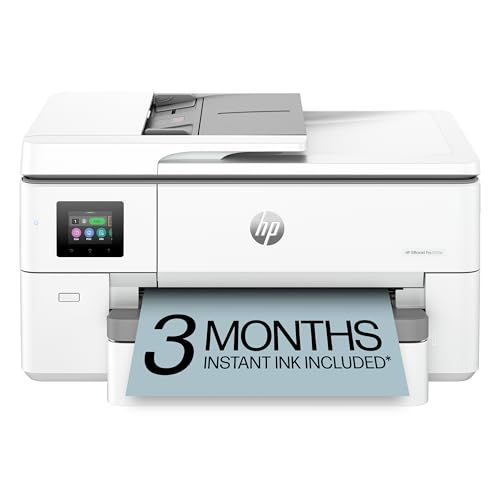
HP OfficeJet Pro 9720e Wide Format All-in-One Inkjet Printer
Overall performance and everyday experience

The HP OfficeJet Pro 9720e Wide Format All-in-One Inkjet Printer is designed for home offices and small teams that want an all-in-one device with the flexibility to print larger-than-letter documents without jumping all the way to a dedicated large-format plotter. In day-to-day use, it aims to balance speed, clarity, and convenience: you can print, scan, copy, and fax from a single footprint, while still handling attention-grabbing materials like posters, spreadsheets, flyers, and oversized presentations. The wide-format capability is the headline feature, and it’s particularly useful if you frequently need documents that feel cramped on standard paper.
For typical office output, text quality is where this kind of printer needs to shine, and the 9720e generally fits the “business inkjet” expectation: crisp characters, solid line definition, and professional-looking pages for contracts, invoices, and reports. Color documents tend to look clean and vivid enough for internal presentations, handouts, or marketing drafts, with the caveat that inkjets at this level usually prioritize office graphics over gallery-grade photo reproduction. If your primary goal is accurate photos on glossy paper, a photo-focused inkjet may be a better match; if you want sharp charts, readable labels, and convincing color blocks, this model is much more in its element.
Speed is another key aspect of the experience. This printer class is typically chosen by users who are printing often and don’t want to wait around for multi-page jobs. In practice, perceived speed depends on what you print. Plain text pages usually come out quickly, while heavy graphics or higher-quality settings slow things down. A useful way to think about performance is to match your expectations to your real workload: if you print lots of simple documents, it will feel fast; if you routinely print dense, full-color pages at high quality, it will feel more moderate.
As an all-in-one, scanning and copying matter too. A capable scanner is valuable for digitizing receipts, signed forms, and archived paperwork, and it’s also a productivity booster if you regularly need to duplicate multi-page documents. Ease of use shows up in the control panel logic, the reliability of paper handling, and how often you need to intervene. A printer can have great specs on paper, but the “quality of life” features—like predictable feeding, decent error messages, and stable wireless connections—often decide whether you enjoy owning it.
Key factors to consider before buying
Before choosing the HP OfficeJet Pro 9720e Wide Format All-in-One Inkjet Printer, the most important factor is whether you truly need wide-format printing. If you occasionally print a larger sheet once every few months, outsourcing those jobs might cost less than owning a device optimized for them. If you routinely create larger spreadsheets, signage, classroom materials, real-estate flyers, or design proofs that benefit from extra space, wide format becomes a daily advantage and can justify the purchase quickly.
The next most important consideration is total cost of ownership, not the upfront price. Ink costs, cartridge yields, and how often you print will shape your long-term expense far more than the initial checkout total. Office inkjets can be economical for mixed text and color, but costs can climb if you print a lot of full-page color or leave the printer idle for long periods and encounter maintenance cycles. If predictable monthly spending matters, you’ll want to evaluate what ink options are available to you, what kind of printing habits you have, and whether you can stay consistent with them. For many buyers, this is the deciding factor because it determines whether the printer feels like a bargain or a burden after a few months.
Paper handling and workflow fit should come right after cost. Consider the paper sizes you plan to use, how often you print multi-page jobs, and whether you need unattended operation. If you regularly produce batches of documents, features like reliable automatic document feeding for scans and copies, plus a paper capacity that matches your workload, are more important than maximum photo quality. Also think about whether you need duplex printing for saving paper and making documents look more professional. These practicalities matter every week, while peak resolution numbers are something most users rarely notice after the first few test prints.
Connectivity and device compatibility are also critical. Many users rely on wireless printing from laptops and phones, and the quality of the software experience can determine whether the printer feels frictionless or finicky. If your household or office uses a mix of operating systems, ensure your devices can all print and scan without workarounds. Network stability is especially important if the printer will be shared by multiple people, as intermittent connectivity becomes a constant annoyance in a small team environment.
Finally, consider the physical footprint and noise. Wide-format models tend to be larger than standard letter-only printers, and it’s worth measuring your desk or cabinet space and accounting for clearance when trays extend. Noise and vibration can matter if the printer sits near a meeting area or in a quiet home office. None of these elements are glamorous, but they strongly influence satisfaction once the novelty wears off.
Common Questions
Can the HP OfficeJet Pro 9720e Wide Format All-in-One Inkjet Printer replace a laser printer for a small office? It can, especially if your office prints a mix of text and color and values wide-format output. If your printing is almost entirely black-and-white, extremely high volume, and you want the lowest cost per page for text, a laser might still be more economical. For teams that need color charts, forms, and occasional marketing material, this kind of business inkjet can be a strong all-in-one replacement.
Is wide-format printing actually useful for non-designers? Yes, if you deal with spreadsheets, schedules, lesson plans, real-estate materials, or presentations that become hard to read when squeezed onto letter-size pages. The benefit is often legibility and impact rather than artistic output. If you never find yourself wishing for more room on a page, you may not get enough value from the wide-format feature.
What should I prioritize: print quality or ink cost? For most buyers, ink cost is the more important long-term factor, because it affects every page you print. Print quality matters, but business inkjets typically deliver very good text and strong color graphics for office use. If you need premium photo output, prioritize quality and media handling; if you need reliable everyday printing, prioritize running costs and paper workflow.
Will it work well with phones and laptops over Wi-Fi? It is intended to, and wireless printing is a core expectation for this category. The practical answer depends on your network stability and device mix. If you have a busy Wi-Fi environment, it’s worth placing the printer within good range of your router and ensuring your devices are on the same network to minimize setup friction.
Conclusion: The HP OfficeJet Pro 9720e Wide Format All-in-One Inkjet Printer stands out for users who want the versatility of an all-in-one combined with the added flexibility of wide-format output. The most important purchase considerations are whether you’ll truly use wide format and what your long-term ink costs will look like, followed by paper handling, connectivity, and workspace fit. If those align with your needs, it can be a highly practical centerpiece for a productive home office or small business workflow.