



- Functionality: Print, copy, scan
- Resolution: 4800 x 1200 dpi
- Color Print Speed: 5 ppm
- Monochrome Print Speed: 12 ppm
- Two-Sided Printing: No
- Max Paper Size: 8.5" x 14"





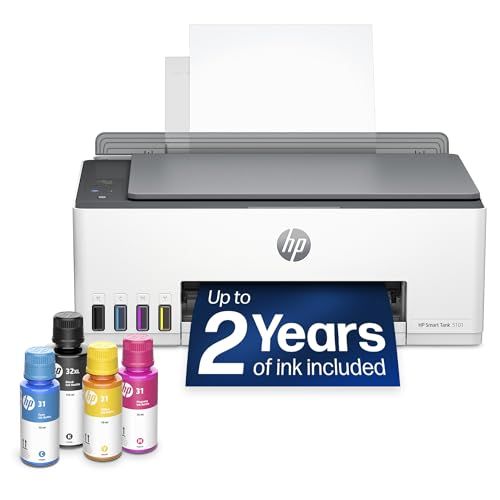
HP Smart Tank 5101 All-in-One Printer
Overall Review and Everyday Experience

The HP Smart Tank 5101 All-in-One Printer is designed for people who print frequently and want to avoid the recurring cost and hassle of traditional ink cartridges. As an all-in-one, it covers the basics most homes and small offices need: printing, scanning, and copying. Where it differentiates itself is in the “tank” concept, which stores ink in refillable reservoirs rather than disposable cartridges. In day-to-day use, that translates to fewer interruptions, more predictable running costs, and less time spent babysitting ink levels.
Print quality is generally strong for typical home and home-office tasks. Text documents come out sharp and readable, with consistent edges and solid darkness when using default settings. For color printing, the Smart Tank 5101 tends to do well on school projects, charts, and casual photo prints, though it’s not positioned as a dedicated photo printer. Photos printed on proper photo paper can look vibrant and pleasing, but users who demand gallery-grade accuracy, especially in skin tones or subtle gradients, may notice limitations compared with higher-end photo-focused models.
Speed is competitive for an inkjet in its class, especially for black-and-white documents and mixed text-and-graphics pages. That said, real-world speed depends heavily on quality settings, whether you’re printing over Wi‑Fi, and how complex your documents are. If you regularly print long, black-and-white packets or frequent color handouts, the 5101’s tank system helps you feel less anxious about every page you send to the printer. The scanning and copying functions are practical for everyday paperwork, forms, and school assignments, and they offer a convenient way to digitize documents without needing extra hardware.
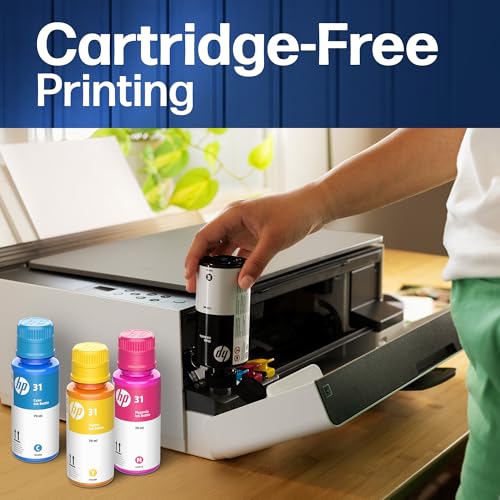
Setup is typically straightforward, though ink tank printers can require a bit more patience than cartridge-based printers because filling tanks and priming the system is part of the initial process. Once that’s done, the experience becomes more “set it and forget it,” particularly if you keep the ink topped off and print often enough to keep everything flowing smoothly. HP’s app-based features can make mobile printing and basic management simpler, but your satisfaction will depend on how comfortable you are using phone-based workflows and whether your home network is stable.
What to Consider Before Buying and What Matters Most
The first factor most buyers should consider is printing volume and cost per page. The Smart Tank 5101 makes the most sense when you print regularly: weekly schoolwork, frequent business documents, shipping labels, or ongoing personal projects. Tank printers are appealing because the ink lasts a long time and refills can be cheaper per page than cartridges. If you only print occasionally, you may not benefit as much from the tank system, and you might even run into ink maintenance issues common to many inkjets when they sit unused for long periods. For many buyers, total cost of ownership is the most important point: the printer price plus the cost of ink over time. In that category, a tank-based model like the 5101 often shines.
The second major factor is print quality requirements. If most of your work is text, forms, or simple color graphics, the 5101 should meet expectations. If your primary purpose is high-quality photo printing for albums or framing, you’ll want to weigh whether a photo-centric printer would serve you better. Tank printers can do photos, but the best photo output typically comes from printers built specifically for that job, often with more inks and advanced photo handling. Still, for casual photos and family snapshots, the results can be satisfying, especially when matched with the right paper and settings.
Paper handling is another practical consideration. Think about the kinds of paper you use most: plain letter paper, cardstock for crafts, glossy photo paper, envelopes, or labels. A printer can have excellent ink economics but feel frustrating if it struggles with your preferred media. Before purchasing, consider how often you print double-sided. If you expect automatic duplex printing, verify whether that feature matches your workflow, because manual duplex can be fine for occasional use but irritating when you’re printing many multipage documents.
Connectivity and device compatibility are also key. Most modern households need reliable Wi‑Fi printing from laptops, phones, and tablets. The Smart Tank 5101 is aimed at wireless convenience, but your experience will depend on your router quality, signal strength where the printer sits, and whether you prefer printing through an app, AirPrint-like system integrations, or a traditional driver on a computer. The most important takeaway here is that a printer is only as pleasant as it is dependable. If your environment is prone to Wi‑Fi dropouts, a stable alternative connection option can matter more than small differences in print speed.
Finally, consider maintenance habits and reliability expectations. Inkjet printers, including tank models, benefit from regular use. If you print a little every week, you’re more likely to have a smooth experience. If you leave it idle for months, you may end up running cleaning cycles that consume ink and time. The tank design can make refilling easier and less wasteful, but it doesn’t fully eliminate the need for occasional upkeep. For many users, the most important buying factors are long-term running cost, consistent reliability, and whether the printer fits your typical print routine, not just your once-in-a-while projects.
Common Questions
Does the HP Smart Tank 5101 save money compared with cartridge printers? For frequent printing, it often can. The tank system is designed to deliver a lower cost per page, especially for users who print a lot of black text or regular color documents. If you print only a few pages per month, the savings may be less dramatic, and you’ll want to consider whether the higher upfront cost of a tank printer is worth it for your volume.
Is it a good choice for photos? It can be a good choice for casual photo printing, school projects, and colorful documents. If you want the best possible photo fidelity, richer tonal transitions, or consistent professional results, a dedicated photo printer may be more appropriate. The 5101 is better viewed as a versatile family or home-office printer that happens to handle photos reasonably well.
How difficult is the initial setup? Setup is usually manageable, but it can take longer than a cartridge printer because filling the tanks and initializing the ink system is part of the process. Once completed, daily use tends to be simpler because you won’t be swapping cartridges frequently.
Will it work well with phones and tablets? In most cases, yes, as long as your network is stable and your device supports the printer’s mobile printing options. Many users print successfully from both computers and mobile devices, but the smoothness of the experience can vary depending on your home Wi‑Fi environment and app preferences.
As an all-in-one built around refillable ink tanks, the HP Smart Tank 5101 is a practical choice for households and small offices that print often and want predictable, lower ongoing ink costs. It delivers strong everyday text quality, capable color for general use, and convenient scanning and copying, while asking you to think realistically about your print volume, media needs, and how consistently you’ll use it.