


- Functionality: Print, scan, copy
- Resolution: 4800 x 1200 dpi
- Color Print Speed: 9 ppm
- Monochrome Print Speed: 18 ppm
- Two-Sided Printing: Yes
- Max Paper Size: 8.5" x 14"





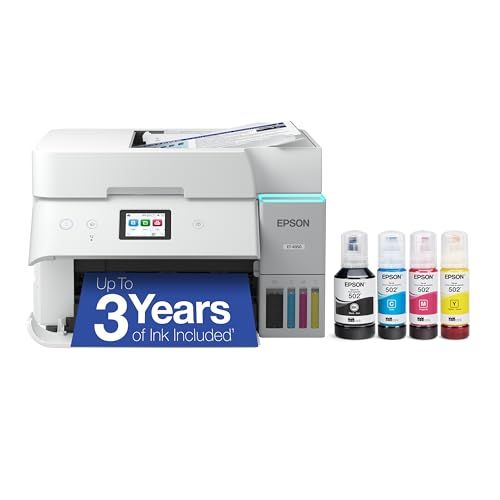
Epson EcoTank ET-4950 Printer
Overview and Real-World Performance

The Epson EcoTank ET-4950 is designed for people who want the convenience of a home office all-in-one printer without the recurring expense and hassle of constantly replacing cartridges. As part of Epson’s EcoTank line, it uses refillable ink tanks rather than traditional cartridges, aiming to shift printing costs from frequent small purchases to occasional, higher-yield refills. In day-to-day use, that difference is meaningful: if you print regularly for schoolwork, small business paperwork, shipping labels, or household admin, the ET-4950’s core value is its ability to keep going with less interruption.
For general document printing, the ET-4950 is at its best. Text output is typically crisp and readable, with good consistency across multi-page jobs. It also handles color documents competently, making it suitable for presentations, charts, and flyers where accurate, clean color matters more than gallery-grade photo reproduction. Like many inkjets in this category, photo printing can be satisfactory on the right paper and settings, but it isn’t primarily a photo-focused model. If you mainly print borderless photos, want exceptionally deep blacks, or rely on specialty photo media and color management, a dedicated photo printer might fit better.
As an all-in-one, the ET-4950 adds scanning, copying, and fax. The scanner is practical for everyday tasks such as digitizing receipts, forms, and school worksheets. Copies generally match the quality you’d expect in this class, with clear text and decent color for casual use. Fax is increasingly niche, but it can still be valuable for certain medical, legal, or administrative workflows. A key comfort feature for many users is the automatic document feeder, which helps when you need to scan or copy multiple pages without manually placing each one on the glass. That said, users who regularly scan long, double-sided packets may want to confirm whether their workflow needs single-pass duplex scanning or more advanced document handling than a typical home office unit provides.
Connectivity is another practical strength. Most buyers will use Wi‑Fi printing from laptops and phones, and the ET-4950 is built for that reality. Once set up, it’s convenient for multi-device households where a printer should be shared rather than tethered to one computer. As with many wireless printers, the setup experience can vary depending on your router, password complexity, and whether your network is stable, but after configuration it usually becomes a set-and-forget appliance. For people who prefer reliability over wireless convenience, having a wired option or direct connection path can be a deciding factor, especially in busy small offices where dropouts are costly.
What to Consider Before Buying (and What Matters Most)
The most important factor for most shoppers is total cost of ownership, not the sticker price. The ET-4950 typically costs more upfront than entry-level cartridge printers, but the refillable ink system is meant to pay that back over time. If you print frequently, the economics can be compelling: you buy ink less often, you waste fewer partially used cartridges, and you spend less time troubleshooting “empty” cartridges that still feel like they should have more life. If you print only a few pages a month, the savings may take longer to realize, and the higher initial price may not feel justified compared with a low-cost cartridge model.
The second most important factor is your monthly volume and your tolerance for maintenance. Any inkjet can be sensitive to long periods of inactivity, because ink can dry in nozzles over time. EcoTank printers can still require occasional cleaning cycles, and those cycles use ink. If you plan to print regularly, even modestly, this is less of a concern; if you print very rarely, you should weigh whether a laser printer (for mostly black-and-white documents) would be a better fit.
Paper handling is another key consideration. Think about what you print, not just how much. If you need auto duplex printing, you’ll want to ensure the ET-4950’s duplex behavior aligns with your expectations, particularly for mixed workloads like forms and longer documents. If you print labels, envelopes, or thicker paper, you’ll want to verify the supported media types and the ease of feeding non-standard stock. If you run a small shop and print shipping labels daily, reliable feeding and consistent output can matter more than photo quality or even raw speed.
Speed is often cited, but it’s best understood realistically. Home office inkjets can feel fast on short jobs, but the first page out time, warm-up behavior, and how the printer handles multi-page color can matter as much as a quoted pages-per-minute number. If your work involves many single-page print commands throughout the day, responsiveness and connection stability may matter more than maximum throughput. If you routinely print large packets, you’ll care more about sustained speed and paper capacity.
Scan and copy features are worth evaluating based on your habits. The presence of an automatic document feeder is a practical advantage if you scan multi-page forms, but the way it handles duplex scanning may be important if you often scan two-sided documents. Also consider software: the quality of Epson’s scanning utilities, mobile apps, and integration with cloud destinations can affect whether scanning feels effortless or annoying. People who plan to archive documents, submit PDFs for work, or manage receipts for taxes should prioritize an easy, consistent scan workflow.
Finally, consider your environment and tolerance for “printer friction.” If you want a printer that the whole household uses, easy wireless printing and straightforward refills are critical. EcoTank refilling is generally less messy than it sounds, but you should still think about where you’ll keep bottles and whether you prefer a system that minimizes drips and confusion between colors. The ET-4950 is most appealing when it becomes boringly dependable: it’s there when you need it, and you aren’t negotiating with cartridges every few weeks.
Common Questions
Does the Epson EcoTank ET-4950 actually save money versus cartridges?
For many users, yes, especially if you print regularly. The main savings comes from using high-yield bottled ink rather than small cartridges. The break-even point depends on your print volume and what you would otherwise spend on cartridges, but frequent printing tends to favor EcoTank’s economics.
Is the ET-4950 good for photos?
It can produce nice casual photos on appropriate photo paper, but it is primarily a home office all-in-one optimized for documents and general color. If your priority is consistent, high-end photo output with advanced color control, a dedicated photo printer may be a better choice.
How hard is it to refill the ink tanks?
Refilling is typically straightforward and far less frequent than replacing cartridges. The process is designed to be user-friendly, but it still requires careful handling to avoid spills and to ensure each color goes into the correct tank.
Will it work well with phones and multiple computers?
In most homes and small offices, yes. The ET-4950 is built for Wi‑Fi printing and mobile use, and once it’s set up properly on your network, it’s usually easy to share among devices. If your Wi‑Fi is unstable, a more direct connection option may be preferable for reliability.
Is it a good choice if I only print occasionally?
It depends. If “occasionally” means a few pages every month or two, you may not recoup the upfront cost quickly, and any inkjet can be more prone to nozzle drying if left unused for long stretches. If you print mostly text and very infrequently, a monochrome laser printer might be the more practical low-maintenance alternative.
In summary, the Epson EcoTank ET-4950 stands out most for people who want predictable, lower ongoing ink costs and a capable set of home office features in one machine. If you print often enough to benefit from bottled ink, value an all-in-one with convenient scanning and copying, and want a printer that reduces cartridge-related headaches, it’s an appealing and sensible upgrade from typical consumer inkjets.